> ## Documentation Index
> Fetch the complete documentation index at: https://www.truefoundry.com/llms.txt
> Use this file to discover all available pages before exploring further.
# Azure Content Safety Guardrail Integration
> Configure Azure Content Safety with the TrueFoundry AI Gateway.
This guide explains how to integrate [Azure Content Safety Guardrail](https://azure.microsoft.com/en-us/products/ai-services/ai-content-safety) with TrueFoundry to enhance the safety and compliance of your LLM applications.
## What is Azure Content Safety?
Azure Content Safety is Microsoft's cloud-based content moderation service that helps detect and filter harmful content across text, images, and other media.
### Key Features of Azure Content Safety
1. **Multi-Modal Content Analysis**: Azure Content Safety analyzes both text and image content for harmful material including hate speech, violence, sexual content, and self-harm. The service uses advanced [Azure AI models](https://azure.microsoft.com/en-us/products/ai-services/ai-content-safety/) to provide comprehensive content moderation across multiple content types and languages with high accuracy and low latency.
2. **Customizable Severity Thresholds**: Fine-tune content moderation sensitivity with configurable severity levels for different content categories. Organizations can set custom thresholds based on their specific requirements, allowing for flexible policy enforcement that balances safety with user experience across different use cases and demographics.
## How to setup Azure Content Safety on Azure
Navigate to [Azure Portal](https://portal.azure.com/) and sign in with your Azure credentials.
Select **Create a resource** in the top left corner of the Azure Portal.
Choose **Azure AI Content Safety** from the list of resources, then select **Create**.
* **Subscription**: Choose your Azure subscription.
* **Resource group**: Select an existing resource group or create a new one.
* **Instance details**:
* **Region**: Select the region (e.g., East US) where you want your resource to be hosted.
* **Name**: Enter a unique name for your Content Safety resource.
* **Pricing tier**: Choose the appropriate pricing tier for your needs.
Select **Create** to provision your Azure Content Safety resource. The creation process may take several minutes.
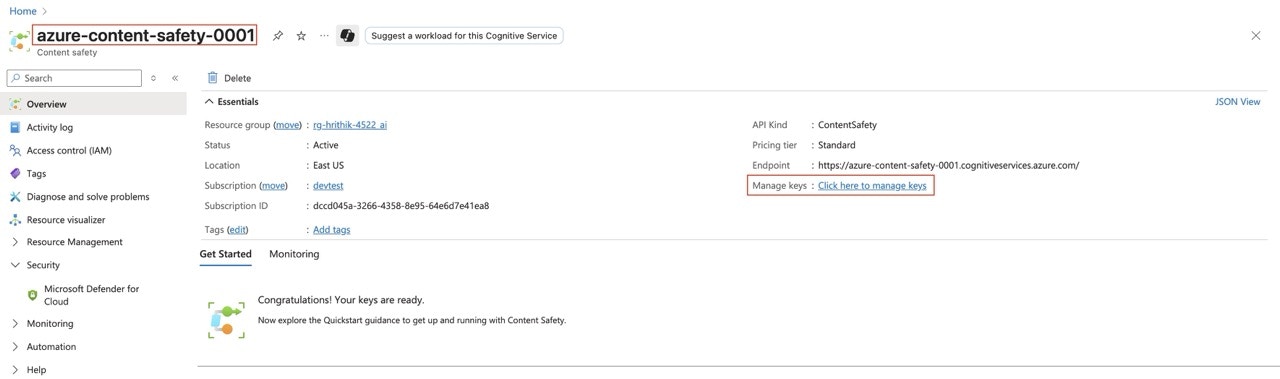
Once your resource is created, navigate to the **Overview** section in the Azure Portal. Here, you will see the **Manage Keys** and **Resource Name** displayed, it will be used later when configuring the integration in TrueFoundry.
 ### Adding Azure Content Safety Guardrail Integration
To add Azure Content Safety Guardrail to your TrueFoundry setup, follow these steps:
**Fill in the Guardrails Group Form**
* **Name**: Enter a name for your guardrails group.
* **Collaborators**: Add collaborators who will have access to this group.
* **Azure Content Safety Guardrail Config**:
* **Name**: Enter a name for the Azure Content Safety Guardrail configuration.
* **Resource Name**: The unique name of your Azure resource (e.g., the Azure Cognitive Services or Azure AI resource) that provides the content safety capability. You can find this in the Azure portal under the resource's overview page. This is required to authenticate and route requests to the correct Azure service instance.
* **API Version**: The version of the Azure Content Safety API to use. (Default: `2024-09-01`)
* **Blocklist Name** (Optional): The name of the blocklist to use.
* **Severity**: The severity threshold to use for blocking content. (Default: `2`)
* **Categories**: The categories of content to check against.
* **Azure Authentication Data**:
* **API Key**: The API key for the Azure Content Safety Guardrail service.
This key is required to authenticate requests to Azure's Content Safety Guardrail API. You can obtain it from the Azure portal by navigating to your Cognitive Services or Azure AI resource, then selecting "Keys and Endpoint" in the resource menu. Ensure you keep this key secure, as it grants access to your Azure resource.
As an alternative to API keys, you can authenticate via Microsoft Entra ID using [certificate-based authentication](/docs/ai-gateway/azure-entra-certificate-auth), [client secret based authentication](/docs/ai-gateway/azure-entra-client-secret-auth), or [workload identity federation](/docs/ai-gateway/azure-entra-wif-auth).
### Adding Azure Content Safety Guardrail Integration
To add Azure Content Safety Guardrail to your TrueFoundry setup, follow these steps:
**Fill in the Guardrails Group Form**
* **Name**: Enter a name for your guardrails group.
* **Collaborators**: Add collaborators who will have access to this group.
* **Azure Content Safety Guardrail Config**:
* **Name**: Enter a name for the Azure Content Safety Guardrail configuration.
* **Resource Name**: The unique name of your Azure resource (e.g., the Azure Cognitive Services or Azure AI resource) that provides the content safety capability. You can find this in the Azure portal under the resource's overview page. This is required to authenticate and route requests to the correct Azure service instance.
* **API Version**: The version of the Azure Content Safety API to use. (Default: `2024-09-01`)
* **Blocklist Name** (Optional): The name of the blocklist to use.
* **Severity**: The severity threshold to use for blocking content. (Default: `2`)
* **Categories**: The categories of content to check against.
* **Azure Authentication Data**:
* **API Key**: The API key for the Azure Content Safety Guardrail service.
This key is required to authenticate requests to Azure's Content Safety Guardrail API. You can obtain it from the Azure portal by navigating to your Cognitive Services or Azure AI resource, then selecting "Keys and Endpoint" in the resource menu. Ensure you keep this key secure, as it grants access to your Azure resource.
As an alternative to API keys, you can authenticate via Microsoft Entra ID using [certificate-based authentication](/docs/ai-gateway/azure-entra-certificate-auth), [client secret based authentication](/docs/ai-gateway/azure-entra-client-secret-auth), or [workload identity federation](/docs/ai-gateway/azure-entra-wif-auth).
 ### How Azure Content Safety Guardrail Works
When you integrate Azure Content Safety Guardrail with TrueFoundry, the gateway sends the request or response text to Azure's Analyze Text API and uses the returned category severities (and any blocklist hits) to decide whether to block.
By default, input guardrails evaluate **all messages** in the conversation. To check only recent turns, set `X-TFY-GUARDRAILS-SCOPE` to `last` or a positive integer (e.g. `10`) — see [Guardrails Overview](/docs/ai-gateway/guardrails-overview#faq).
#### Response Structure
The Azure Content Safety Guardrail API returns a response with the following structure:
Example response from Azure Content Safety when categories are scored:
```json theme={"dark"}
{
"blocklistsMatch": [],
"categoriesAnalysis": [
{
"category": "Hate",
"severity": 2
},
{
"category": "SelfHarm",
"severity": 1
},
{
"category": "Sexual",
"severity": 3
},
{
"category": "Violence",
"severity": 0
}
]
}
```
#### Validation Logic
TrueFoundry relies on the Azure Content Safety Guardrail response to determine content safety:
* TrueFoundry uses a configurable severity threshold to determine if content should be blocked.
* If any category in the Azure Content Safety Guardrail response has a severity equal to or greater than the configured threshold, the content will be blocked.
* If a configured blocklist matches, the content will be blocked.
* If all detected severities are below the threshold and there is no blocklist hit, the content will be passed through as is.
* TrueFoundry AI Gateway will respond with an error or block the content if the severity threshold is met or exceeded.
### Large Inputs and Chunking
Azure AI Content Safety limits each Analyze Text request to **10,000 characters**. Without chunking, longer content fails with a provider character-limit error. The gateway avoids that by packing the text into requests of at most **9,500 characters** — the headroom covers the difference between how the gateway and Azure count characters — scanning each one, and blocking if any chunk exceeds the configured severity threshold or matches a blocklist.
Text longer than the budget is split at the first boundary that still fills at least half the budget, preferring paragraph breaks, then newlines, then sentence ends, then word boundaries, and falling back to a hard cut. Chunks never overlap, so every character is scanned exactly once.
Chunks are scanned concurrently, up to **10 at a time** by default (`GUARDRAIL_CHUNK_CONCURRENCY`), so one oversized request cannot exhaust a shared Azure rate limit. Once a violation is found — or a chunk fails while your enforcement strategy treats provider errors as decisive — no further chunks are launched.
#### How chunk results are combined
When the text fits in a single request, Azure's response is reported unchanged. When it was split:
* **The worst severity per category survives.** Each category is reported at the highest severity any chunk returned, rather than as a single overall maximum.
* **Blocklist matches are combined across chunks.** The list is a concatenation, not a deduplicated set, so a term hit in three chunks is counted three times in the reported match count.
* **A violation outranks a provider error.** If one chunk reports a violation and another fails outright, the request is blocked on the violation regardless of enforcement strategy — ignoring provider errors does not mean ignoring content already identified as harmful.
Because scanning stops early, the set of categories reported in the trace can differ between otherwise identical requests. The block-or-pass verdict is deterministic; the detail attached to it depends on which chunks completed first. Nothing in the trace records the chunk count, so a chunked scan is otherwise indistinguishable from an unchunked one.
#### Transient provider errors
Azure `429` and `503` responses are retried up to twice, for three attempts in total, with exponential backoff that starts around 200 ms and is capped at 1 s, plus jitter. A `Retry-After` header takes precedence over that backoff, unless it asks for more than 5 seconds — in which case the gateway fails fast rather than holding the request. Timeouts and network errors are not retried, and any other `4xx` is treated as permanent.
The request timeout applies per attempt rather than to the whole scan, so a single chunk can occupy up to three timeouts plus backoff before it is reported as failed.
Splitting the text is negligible in latency (sub-millisecond even for \~50k-token prompts). End-to-end cost for very long inputs is dominated by Azure round trips.
### How Azure Content Safety Guardrail Works
When you integrate Azure Content Safety Guardrail with TrueFoundry, the gateway sends the request or response text to Azure's Analyze Text API and uses the returned category severities (and any blocklist hits) to decide whether to block.
By default, input guardrails evaluate **all messages** in the conversation. To check only recent turns, set `X-TFY-GUARDRAILS-SCOPE` to `last` or a positive integer (e.g. `10`) — see [Guardrails Overview](/docs/ai-gateway/guardrails-overview#faq).
#### Response Structure
The Azure Content Safety Guardrail API returns a response with the following structure:
Example response from Azure Content Safety when categories are scored:
```json theme={"dark"}
{
"blocklistsMatch": [],
"categoriesAnalysis": [
{
"category": "Hate",
"severity": 2
},
{
"category": "SelfHarm",
"severity": 1
},
{
"category": "Sexual",
"severity": 3
},
{
"category": "Violence",
"severity": 0
}
]
}
```
#### Validation Logic
TrueFoundry relies on the Azure Content Safety Guardrail response to determine content safety:
* TrueFoundry uses a configurable severity threshold to determine if content should be blocked.
* If any category in the Azure Content Safety Guardrail response has a severity equal to or greater than the configured threshold, the content will be blocked.
* If a configured blocklist matches, the content will be blocked.
* If all detected severities are below the threshold and there is no blocklist hit, the content will be passed through as is.
* TrueFoundry AI Gateway will respond with an error or block the content if the severity threshold is met or exceeded.
### Large Inputs and Chunking
Azure AI Content Safety limits each Analyze Text request to **10,000 characters**. Without chunking, longer content fails with a provider character-limit error. The gateway avoids that by packing the text into requests of at most **9,500 characters** — the headroom covers the difference between how the gateway and Azure count characters — scanning each one, and blocking if any chunk exceeds the configured severity threshold or matches a blocklist.
Text longer than the budget is split at the first boundary that still fills at least half the budget, preferring paragraph breaks, then newlines, then sentence ends, then word boundaries, and falling back to a hard cut. Chunks never overlap, so every character is scanned exactly once.
Chunks are scanned concurrently, up to **10 at a time** by default (`GUARDRAIL_CHUNK_CONCURRENCY`), so one oversized request cannot exhaust a shared Azure rate limit. Once a violation is found — or a chunk fails while your enforcement strategy treats provider errors as decisive — no further chunks are launched.
#### How chunk results are combined
When the text fits in a single request, Azure's response is reported unchanged. When it was split:
* **The worst severity per category survives.** Each category is reported at the highest severity any chunk returned, rather than as a single overall maximum.
* **Blocklist matches are combined across chunks.** The list is a concatenation, not a deduplicated set, so a term hit in three chunks is counted three times in the reported match count.
* **A violation outranks a provider error.** If one chunk reports a violation and another fails outright, the request is blocked on the violation regardless of enforcement strategy — ignoring provider errors does not mean ignoring content already identified as harmful.
Because scanning stops early, the set of categories reported in the trace can differ between otherwise identical requests. The block-or-pass verdict is deterministic; the detail attached to it depends on which chunks completed first. Nothing in the trace records the chunk count, so a chunked scan is otherwise indistinguishable from an unchunked one.
#### Transient provider errors
Azure `429` and `503` responses are retried up to twice, for three attempts in total, with exponential backoff that starts around 200 ms and is capped at 1 s, plus jitter. A `Retry-After` header takes precedence over that backoff, unless it asks for more than 5 seconds — in which case the gateway fails fast rather than holding the request. Timeouts and network errors are not retried, and any other `4xx` is treated as permanent.
The request timeout applies per attempt rather than to the whole scan, so a single chunk can occupy up to three timeouts plus backoff before it is reported as failed.
Splitting the text is negligible in latency (sub-millisecond even for \~50k-token prompts). End-to-end cost for very long inputs is dominated by Azure round trips.