> ## Documentation Index
> Fetch the complete documentation index at: https://www.truefoundry.com/llms.txt
> Use this file to discover all available pages before exploring further.
# Configure Guardrail Policies
> Create guardrail policies that decide which guardrails run on which requests — by model, MCP server, user, team, or request metadata.
Applying guardrails on the AI Gateway is a two-step process:
In **AI Gateway** → **Guardrails**, create a guardrails group and add the guardrail integrations you want to use — [TrueFoundry guardrails](/docs/ai-gateway/truefoundry-guardrails), [external providers](/docs/ai-gateway/guardrails-overview#external-providers), or your own [custom guardrails](/docs/ai-gateway/custom-guardrails). See the [Getting Started](/docs/ai-gateway/guardrails-getting-started) guide for a walkthrough.
In **AI Gateway** → **Policies** → **Guardrails**, create policy rules that decide **when to apply which guardrails** — based on the model or MCP server being called, the user or team making the request, and request metadata — and on which hooks they run (LLM input/output, MCP tool pre/post invoke).
Registering a guardrail does not apply it to any traffic by itself. Guardrail policies are what attach registered guardrails to requests. The only exception is passing guardrails per-request via the [`X-TFY-GUARDRAILS` header](/docs/ai-gateway/guardrails-getting-started), which bypasses policies entirely.
## Create a Guardrail Policy
Navigate to **AI Gateway** → **Policies** → **Guardrails** and click **Add Rule**. Each rule has a unique **Rule ID** and the following sections:
### When Request Goes To (Targets)
Define which traffic the rule applies to. Click **Add Targets** to add conditions on:
* **Models** — Select one or more models with an `IN` or `NOT IN` condition. If no model condition is set, the rule matches requests to any model.
* **MCP Servers** — Select one or more MCP servers, and optionally narrow down to specific tools within each server (for example, only the `ask_question` tool of a server).
Multiple target conditions are combined with **OR** — the rule matches if the request goes to any of the listed models *or* MCP servers.
### From Subjects
Specify who the rule applies to. Click **Add Filters** to add `IN` / `NOT IN` conditions on **users**, **teams**, or **virtual accounts**. For example, apply a rule to `team:data-science` but exclude `user:admin@company.com`. If no subject filter is set, the rule applies to all callers.
### With Metadata
Match requests based on metadata key-value pairs sent in the `X-TFY-METADATA` header. For example, a rule with metadata `environment: production` only applies to requests carrying `X-TFY-METADATA: {"environment": "production"}`.
### Apply on Hooks
Attach your registered guardrails to one or more hooks. Click **Add Hook**, pick the hook, and select the guardrail integrations to run on it:
| Hook | When It Runs |
| ------------------------ | -------------------------------------------------------------- |
| **LLM Input** | Before the prompt is sent to the model |
| **LLM Output** | After the model responds, before the response is returned |
| **MCP Tool Pre-Invoke** | Before an MCP tool is executed |
| **MCP Tool Post-Invoke** | After an MCP tool returns, before the result reaches the model |
You can attach multiple guardrails to the same hook — all of them run for matching requests.
### Set a Custom Error Message
By default, when a guardrail blocks a request, the client receives the provider-specific failure detail. You can override this with a **Custom Error Message** per rule — useful for showing end users a friendly, actionable message instead of raw guardrail output.
The message supports two placeholders:
| Placeholder | Renders |
| ----------------------- | --------------------------------------------------------------------------------------------- |
| `{{guardrail_message}}` | The default guardrail failure detail (provider-specific violation summary) |
| `{{failed_guardrails}}` | A comma-separated list of the guardrails in this rule that failed (as `group/name` selectors) |
For example:
```text theme={"dark"}
Your request was blocked by {{failed_guardrails}}: {{guardrail_message}}
```
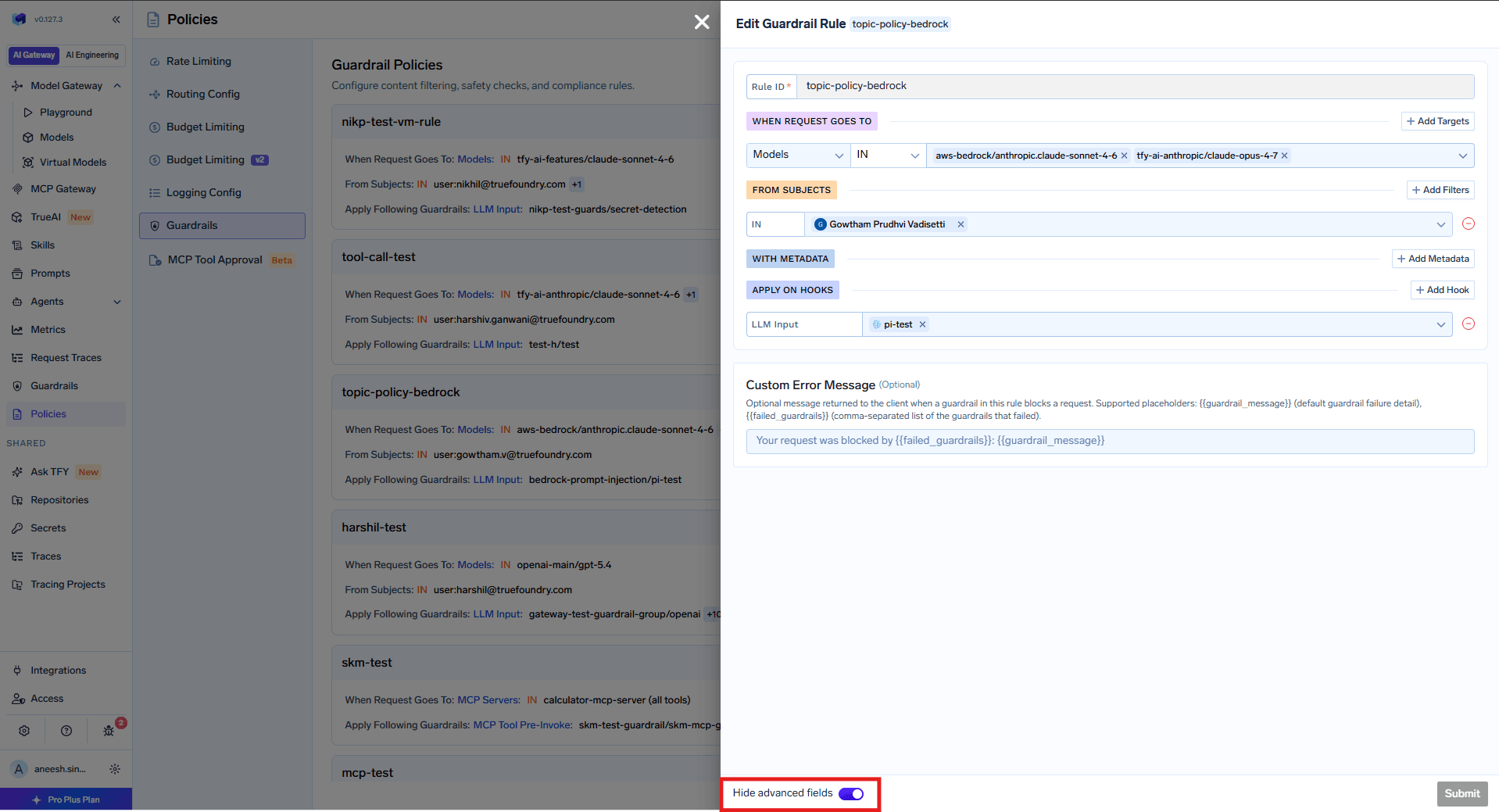 The Custom Error Message field is an advanced field. If you don't see it, use the **Hide advanced fields** toggle at the bottom of the rule editor to reveal it.
Placeholders that aren't used are left as-is, and messages that use only `{{guardrail_message}}` continue to work unchanged.
## How Policies Are Evaluated
* **All rules are evaluated for every request.** The guardrails from all matching rules are combined (union) and applied together.
* If multiple rules match, their guardrails are **merged per hook** — for example, if Rule A applies PII detection on LLM Input and Rule B applies prompt injection detection on LLM Input, both guardrails run.
* A rule with no target or subject conditions matches **all requests**. Use this for baseline guardrails that should apply universally alongside any other matching rules.
* Omitted conditions are not used for filtering — if a rule has no model condition, it matches any model.
## YAML Configuration
Guardrail policies can also be managed as YAML — useful for reviewing the full policy set or managing it through automation. The configuration contains an array of rules, each mirroring the sections of the rule editor above.
### Example Configuration
```yaml theme={"dark"}
name: guardrails-control
type: gateway-guardrails-config
rules:
- id: palo-alto-rule
when:
target:
operator: or
conditions:
model:
values:
- openai-main/gpt-3-5-turbo-16k
condition: in
subjects:
operator: and
conditions:
in:
- team:everyone
llm_input_guardrails:
- prisma-airs/prisma-airs-dev-profile
llm_output_guardrails:
- prisma-airs/prisma-airs-dev-profile
mcp_tool_pre_invoke_guardrails: []
mcp_tool_post_invoke_guardrails: []
- id: mcp-test-rule
when:
target:
operator: or
conditions:
mcpServers:
values:
- kubernetes-mcp
condition: in
subjects:
operator: and
conditions:
in:
- team:test-team
not_in:
- user:akash@truefoundry.com
llm_input_guardrails: []
llm_output_guardrails: []
mcp_tool_pre_invoke_guardrails:
- pii/pii-detection
mcp_tool_post_invoke_guardrails:
- prisma-airs/prisma-airs-dev-profile
```
This configuration defines two rules:
1. **palo-alto-rule** — Targets requests to `openai-main/gpt-3-5-turbo-16k` from `team:everyone`, applying Prisma AIRS guardrails on both LLM input and output.
2. **mcp-test-rule** — Targets requests to the `kubernetes-mcp` MCP server from `team:test-team` (excluding a specific user), applying PII detection before tool invocation and Prisma AIRS after.
If a request matches both rules, the guardrails from both are combined — the request would get Prisma AIRS on LLM input/output *and* PII detection on MCP Tool Pre-Invoke / Prisma AIRS on MCP Tool Post-Invoke.
### Rule Structure
| Field | Required | Description |
| --------------------------------- | -------- | -------------------------------------------------------------------------------------------------------------------------------------------------------------------------------- |
| `id` | Yes | Unique identifier for the rule |
| `when` | Yes | Matching criteria with `target` and `subjects` blocks |
| `llm_input_guardrails` | Yes | Guardrails applied before LLM request (use `[]` if none) |
| `llm_output_guardrails` | Yes | Guardrails applied after LLM response (use `[]` if none) |
| `mcp_tool_pre_invoke_guardrails` | Yes | Guardrails applied before MCP tool invocation (use `[]` if none) |
| `mcp_tool_post_invoke_guardrails` | Yes | Guardrails applied after MCP tool returns (use `[]` if none) |
| `custom_error_message` | No | Custom message returned to the client when a guardrail in this rule blocks a request. Supports the `{{guardrail_message}}` and `{{failed_guardrails}}` placeholders (see below). |
#### `custom_error_message` placeholders
```yaml theme={"dark"}
custom_error_message: "Your request was blocked by {{failed_guardrails}}: {{guardrail_message}}"
```
See [Set a Custom Error Message](#set-a-custom-error-message) for what each placeholder renders.
### The `when` Block
The `when` block contains two main sections: `target` (what the request targets) and `subjects` (who is making the request):
| Section | Description |
| ---------- | ---------------------------------------------------------------------------- |
| `target` | Defines conditions based on `model`, `mcpServers`, `mcpTools`, or `metadata` |
| `subjects` | Defines conditions based on users, teams, or virtual accounts |
If `when` is empty (`{}`), the rule matches **all requests**.
```yaml theme={"dark"}
when:
target:
operator: or
conditions:
mcpServers:
values:
- database-tools
- code-executor
condition: in
```
```yaml theme={"dark"}
when:
target:
operator: or
conditions:
model:
values:
- openai-main/gpt-4o
- anthropic/claude-3-5-sonnet
condition: in
```
```yaml theme={"dark"}
when:
target:
operator: or
conditions:
metadata:
environment: production
tier: enterprise
```
Requires header: `X-TFY-METADATA: {"environment": "production", "tier": "enterprise"}`
```yaml theme={"dark"}
when:
target:
operator: or
conditions:
mcpServers:
values:
- database-tools
condition: in
mcpTools:
values:
- execute_query
condition: in
```
```yaml theme={"dark"}
when:
subjects:
operator: and
conditions:
in:
- user:alice@company.com
- user:bob@company.com
- team:data-science
not_in:
- user:guest@company.com
```
```yaml theme={"dark"}
when:
target:
operator: or
conditions:
mcpServers:
values:
- database-tools
condition: in
metadata:
environment: production
subjects:
operator: and
conditions:
in:
- team:engineering
not_in:
- user:external@partner.com
```
Both `target` and `subjects` conditions must match for the rule to apply.
The Custom Error Message field is an advanced field. If you don't see it, use the **Hide advanced fields** toggle at the bottom of the rule editor to reveal it.
Placeholders that aren't used are left as-is, and messages that use only `{{guardrail_message}}` continue to work unchanged.
## How Policies Are Evaluated
* **All rules are evaluated for every request.** The guardrails from all matching rules are combined (union) and applied together.
* If multiple rules match, their guardrails are **merged per hook** — for example, if Rule A applies PII detection on LLM Input and Rule B applies prompt injection detection on LLM Input, both guardrails run.
* A rule with no target or subject conditions matches **all requests**. Use this for baseline guardrails that should apply universally alongside any other matching rules.
* Omitted conditions are not used for filtering — if a rule has no model condition, it matches any model.
## YAML Configuration
Guardrail policies can also be managed as YAML — useful for reviewing the full policy set or managing it through automation. The configuration contains an array of rules, each mirroring the sections of the rule editor above.
### Example Configuration
```yaml theme={"dark"}
name: guardrails-control
type: gateway-guardrails-config
rules:
- id: palo-alto-rule
when:
target:
operator: or
conditions:
model:
values:
- openai-main/gpt-3-5-turbo-16k
condition: in
subjects:
operator: and
conditions:
in:
- team:everyone
llm_input_guardrails:
- prisma-airs/prisma-airs-dev-profile
llm_output_guardrails:
- prisma-airs/prisma-airs-dev-profile
mcp_tool_pre_invoke_guardrails: []
mcp_tool_post_invoke_guardrails: []
- id: mcp-test-rule
when:
target:
operator: or
conditions:
mcpServers:
values:
- kubernetes-mcp
condition: in
subjects:
operator: and
conditions:
in:
- team:test-team
not_in:
- user:akash@truefoundry.com
llm_input_guardrails: []
llm_output_guardrails: []
mcp_tool_pre_invoke_guardrails:
- pii/pii-detection
mcp_tool_post_invoke_guardrails:
- prisma-airs/prisma-airs-dev-profile
```
This configuration defines two rules:
1. **palo-alto-rule** — Targets requests to `openai-main/gpt-3-5-turbo-16k` from `team:everyone`, applying Prisma AIRS guardrails on both LLM input and output.
2. **mcp-test-rule** — Targets requests to the `kubernetes-mcp` MCP server from `team:test-team` (excluding a specific user), applying PII detection before tool invocation and Prisma AIRS after.
If a request matches both rules, the guardrails from both are combined — the request would get Prisma AIRS on LLM input/output *and* PII detection on MCP Tool Pre-Invoke / Prisma AIRS on MCP Tool Post-Invoke.
### Rule Structure
| Field | Required | Description |
| --------------------------------- | -------- | -------------------------------------------------------------------------------------------------------------------------------------------------------------------------------- |
| `id` | Yes | Unique identifier for the rule |
| `when` | Yes | Matching criteria with `target` and `subjects` blocks |
| `llm_input_guardrails` | Yes | Guardrails applied before LLM request (use `[]` if none) |
| `llm_output_guardrails` | Yes | Guardrails applied after LLM response (use `[]` if none) |
| `mcp_tool_pre_invoke_guardrails` | Yes | Guardrails applied before MCP tool invocation (use `[]` if none) |
| `mcp_tool_post_invoke_guardrails` | Yes | Guardrails applied after MCP tool returns (use `[]` if none) |
| `custom_error_message` | No | Custom message returned to the client when a guardrail in this rule blocks a request. Supports the `{{guardrail_message}}` and `{{failed_guardrails}}` placeholders (see below). |
#### `custom_error_message` placeholders
```yaml theme={"dark"}
custom_error_message: "Your request was blocked by {{failed_guardrails}}: {{guardrail_message}}"
```
See [Set a Custom Error Message](#set-a-custom-error-message) for what each placeholder renders.
### The `when` Block
The `when` block contains two main sections: `target` (what the request targets) and `subjects` (who is making the request):
| Section | Description |
| ---------- | ---------------------------------------------------------------------------- |
| `target` | Defines conditions based on `model`, `mcpServers`, `mcpTools`, or `metadata` |
| `subjects` | Defines conditions based on users, teams, or virtual accounts |
If `when` is empty (`{}`), the rule matches **all requests**.
```yaml theme={"dark"}
when:
target:
operator: or
conditions:
mcpServers:
values:
- database-tools
- code-executor
condition: in
```
```yaml theme={"dark"}
when:
target:
operator: or
conditions:
model:
values:
- openai-main/gpt-4o
- anthropic/claude-3-5-sonnet
condition: in
```
```yaml theme={"dark"}
when:
target:
operator: or
conditions:
metadata:
environment: production
tier: enterprise
```
Requires header: `X-TFY-METADATA: {"environment": "production", "tier": "enterprise"}`
```yaml theme={"dark"}
when:
target:
operator: or
conditions:
mcpServers:
values:
- database-tools
condition: in
mcpTools:
values:
- execute_query
condition: in
```
```yaml theme={"dark"}
when:
subjects:
operator: and
conditions:
in:
- user:alice@company.com
- user:bob@company.com
- team:data-science
not_in:
- user:guest@company.com
```
```yaml theme={"dark"}
when:
target:
operator: or
conditions:
mcpServers:
values:
- database-tools
condition: in
metadata:
environment: production
subjects:
operator: and
conditions:
in:
- team:engineering
not_in:
- user:external@partner.com
```
Both `target` and `subjects` conditions must match for the rule to apply.