> ## Documentation Index
> Fetch the complete documentation index at: https://www.truefoundry.com/llms.txt
> Use this file to discover all available pages before exploring further.
# Authentication and Security
> Complete guide to authentication, authorization, and security for MCP Servers in TrueFoundry AI Gateway — from concepts to code.
TrueFoundry AI Gateway provides a comprehensive authentication and authorization system that separates how users authenticate to the AI Gateway (**inbound** authentication) from how the AI Gateway authenticates to downstream MCP servers (**outbound** authentication). This separation lets administrators choose the right security posture per tool without forcing end users to manage multiple credentials.
## Authentication Architecture Overview
The AI Gateway provides a three-part authentication and authorization system:
| Component | Description |
| --------------------------- | -------------------------------------------------------------------------------- |
| **Inbound Authentication** | How clients (AI agents, developers, end users) authenticate to the AI Gateway |
| **Access Control** | Role-based policies determine which users can access which MCP servers and tools |
| **Outbound Authentication** | How the AI Gateway authenticates to downstream MCP servers |
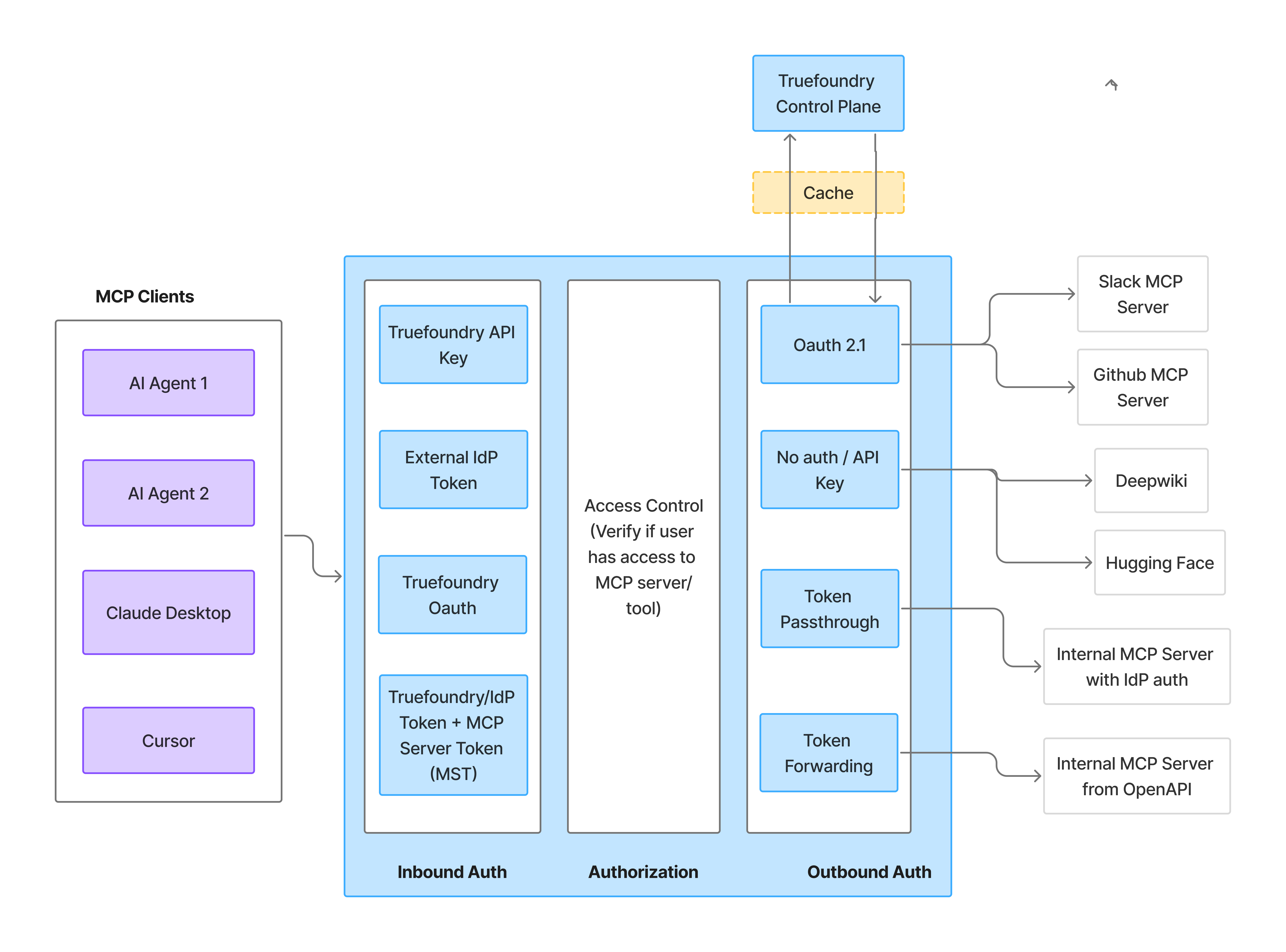 Before writing any code, answer two questions — they map directly to the two auth layers above:
| Question | What it determines? |
| ---------------------------------------------------- | ------------------------------------------------------------------------------------------------ |
| **Who is calling the AI Gateway?** | The **Gateway Token** — identifies the caller for inbound authentication |
| **Whose credentials access the downstream service?** | The **MCP Server Auth** — determines whose data and permissions are used at the upstream service |
These layers are independent. The rest of this guide walks through each layer in turn, then shows how to combine them and code patterns for common implementations.
How clients authenticate to the AI Gateway
Who can use which MCP servers and tools
How the AI Gateway authenticates to MCP servers
***
## Inbound Authentication
Inbound authentication controls how clients authenticate to the AI Gateway. Any user or application requires valid credentials to talk to the AI Gateway, which allows the AI Gateway to identify the caller and apply authorization rules.
### When to use which method?
| Method | When to use? |
| ----------------------------- | -------------------------------------------------------------------------------------------------------------------------------------------------------------------- |
| **TrueFoundry API Key (PAT)** | Internal developers with TrueFoundry accounts |
| **Virtual Account Token** | Service-to-service callers and shared application tokens |
| **Identity Provider Token** | End customers or services authenticating with a JWT from your IdP (B2B SaaS, CIAM, service-to-service). See [Identity Providers](/docs/platform/identity-providers). |
| **TrueFoundry OAuth** | IDE tools (Cursor, VS Code) that need delegated user access |
### Setup
Expand the method that matches your use case for the full setup steps and a code snippet.
For internal developers and applications with TrueFoundry accounts. Users generate a Personal Access Token (PAT) from the TrueFoundry UI.
1. On the left menu panel, navigate to **Access > API KEYS > Personal Access Tokens** in the TrueFoundry UI
2. Click **+ New Personal Access Token**
3. Store the token securely
```python theme={"dark"}
from fastmcp import Client
from fastmcp.client.transports import StreamableHttpTransport
transport = StreamableHttpTransport(
url="{GATEWAY_BASE_URL}/mcp//server",
headers={"Authorization": "Bearer "}
)
async with Client(transport) as client:
result = await client.call_tool("tool_name", {"arg": "value"})
```
Virtual Accounts are service accounts with specific permissions to access MCP servers. Use Virtual Accounts when you need a shared token for server-to-server communication, or when building applications where individual user identity isn't required at the AI Gateway level.
1. On the left menu panel, navigate to **Access > API KEYS > Virtual Accounts** in the TrueFoundry UI
2. Click **+ New Virtual Account**
3. Give it a descriptive name (e.g., `my-agent-mcp-access`)
4. Add permissions for the MCP servers your application needs to access
```python theme={"dark"}
from fastmcp import Client
from fastmcp.client.transports import StreamableHttpTransport
# Virtual Account token - same for all requests from your application
VA_TOKEN = "your-virtual-account-token"
transport = StreamableHttpTransport(
url="{GATEWAY_BASE_URL}/mcp//server",
headers={"Authorization": f"Bearer {VA_TOKEN}"}
)
async with Client(transport) as client:
result = await client.call_tool("tool_name", {"arg": "value"})
```
VAT provides the same level of access for all requests. For MCP servers that require user-specific access (like accessing a user's GitHub repositories), use OAuth2 with individual user tokens instead.
For end customers or when you want to use your own identity provider (Okta, Azure AD, Auth0, Cognito, etc.). The AI Gateway validates a JWT issued by your IdP, and resolves it to a TrueFoundry user or virtual account using a configured [Identity Provider](/docs/platform/identity-providers).
This approach is ideal for:
* B2B SaaS applications where your customers don't have TrueFoundry accounts
* Applications that want to use their existing identity infrastructure
* Customer Identity and Access Management (CIAM) scenarios
* Service-to-service authentication where the caller already holds an IdP-issued JWT
Register your IdP with TrueFoundry:
1. On the left menu panel at bottom, navigate to **Settings > Security & Access > Identity Providers**
2. Click **+** (Add Identity Provider)
3. Fill in the form with the issuer URL, allowed audiences, and JWKS URI for your IdP (e.g., Okta, Azure AD)
4. Choose whether validated tokens resolve to a **virtual account** (machine-to-machine callers), or a **TrueFoundry user with team mapping** (human users)
For the full field reference and example configurations, see [Identity Providers](/docs/platform/identity-providers).
Add the matching Identity Provider mapping directly on the target identity:
* For a **virtual account**, add an [identity provider mapping](/docs/platform/virtual-account-management#identity-provider-mappings) that matches the configured **Name Claim**.
* For a **team**, add an [identity provider mapping](/docs/platform/team-management#identity-provider-mappings) that matches the configured **Team Claim**, and ensure the target users exist in the tenant.
Grant access to the resolved TrueFoundry identity:
1. Navigate to the MCP server's settings
2. Go to **Collaborators**
3. Add the mapped team, user, or virtual account with appropriate permissions
When your end user logs into your platform, your application receives their JWT. Use that JWT to authenticate with the AI Gateway:
```python theme={"dark"}
from fastmcp import Client
from fastmcp.client.transports import StreamableHttpTransport
# JWT from your IdP (e.g., Auth0, Okta)
user_jwt = "eyJhbGciOiJSUzI1NiIsInR5cCI6IkpXVCJ9..."
transport = StreamableHttpTransport(
url="{GATEWAY_BASE_URL}/mcp//server",
headers={"Authorization": f"Bearer {user_jwt}"}
)
async with Client(transport) as client:
result = await client.call_tool("tool_name", {"arg": "value"})
```
TrueFoundry OAuth lets IDE tools like **Cursor**, **Claude Code**, and **VS Code** connect to the MCP Gateway by signing in with TrueFoundry — no need to generate or manage API keys.
**When to use TrueFoundry OAuth?**
* Connecting to MCP servers from Cursor, Claude Code, VS Code, or other MCP-compatible IDEs.
* Enabling team members to access MCP tools without sharing or managing API keys.
* Leveraging existing TrueFoundry user authentication for MCP access.
**What you do?**
1. Add the MCP server's Gateway URL in your IDE, or click **Connect** on the server in TrueFoundry.
2. Your browser opens and you sign in to TrueFoundry (using SSO if your organization has it configured).
3. You review and approve the access request, which shows your IDE and the MCP Gateway URL.
4. If the server connects to a third-party provider (such as GitHub or Slack), you authorize that provider with your own account.
After that, your IDE shows the server's tools as connected. For per-IDE setup steps and screenshots, see [Connect MCP Servers from Your IDE](/docs/ai-gateway/mcp/connect-mcp-from-ide).
TrueFoundry OAuth can be combined with Token Forwarding (outbound) to pass additional MCP server-specific headers alongside the sign-in.
***
## Access Control
Once authenticated, the AI Gateway verifies whether the user has permission to access the requested MCP servers and tools.
Before writing any code, answer two questions — they map directly to the two auth layers above:
| Question | What it determines? |
| ---------------------------------------------------- | ------------------------------------------------------------------------------------------------ |
| **Who is calling the AI Gateway?** | The **Gateway Token** — identifies the caller for inbound authentication |
| **Whose credentials access the downstream service?** | The **MCP Server Auth** — determines whose data and permissions are used at the upstream service |
These layers are independent. The rest of this guide walks through each layer in turn, then shows how to combine them and code patterns for common implementations.
How clients authenticate to the AI Gateway
Who can use which MCP servers and tools
How the AI Gateway authenticates to MCP servers
***
## Inbound Authentication
Inbound authentication controls how clients authenticate to the AI Gateway. Any user or application requires valid credentials to talk to the AI Gateway, which allows the AI Gateway to identify the caller and apply authorization rules.
### When to use which method?
| Method | When to use? |
| ----------------------------- | -------------------------------------------------------------------------------------------------------------------------------------------------------------------- |
| **TrueFoundry API Key (PAT)** | Internal developers with TrueFoundry accounts |
| **Virtual Account Token** | Service-to-service callers and shared application tokens |
| **Identity Provider Token** | End customers or services authenticating with a JWT from your IdP (B2B SaaS, CIAM, service-to-service). See [Identity Providers](/docs/platform/identity-providers). |
| **TrueFoundry OAuth** | IDE tools (Cursor, VS Code) that need delegated user access |
### Setup
Expand the method that matches your use case for the full setup steps and a code snippet.
For internal developers and applications with TrueFoundry accounts. Users generate a Personal Access Token (PAT) from the TrueFoundry UI.
1. On the left menu panel, navigate to **Access > API KEYS > Personal Access Tokens** in the TrueFoundry UI
2. Click **+ New Personal Access Token**
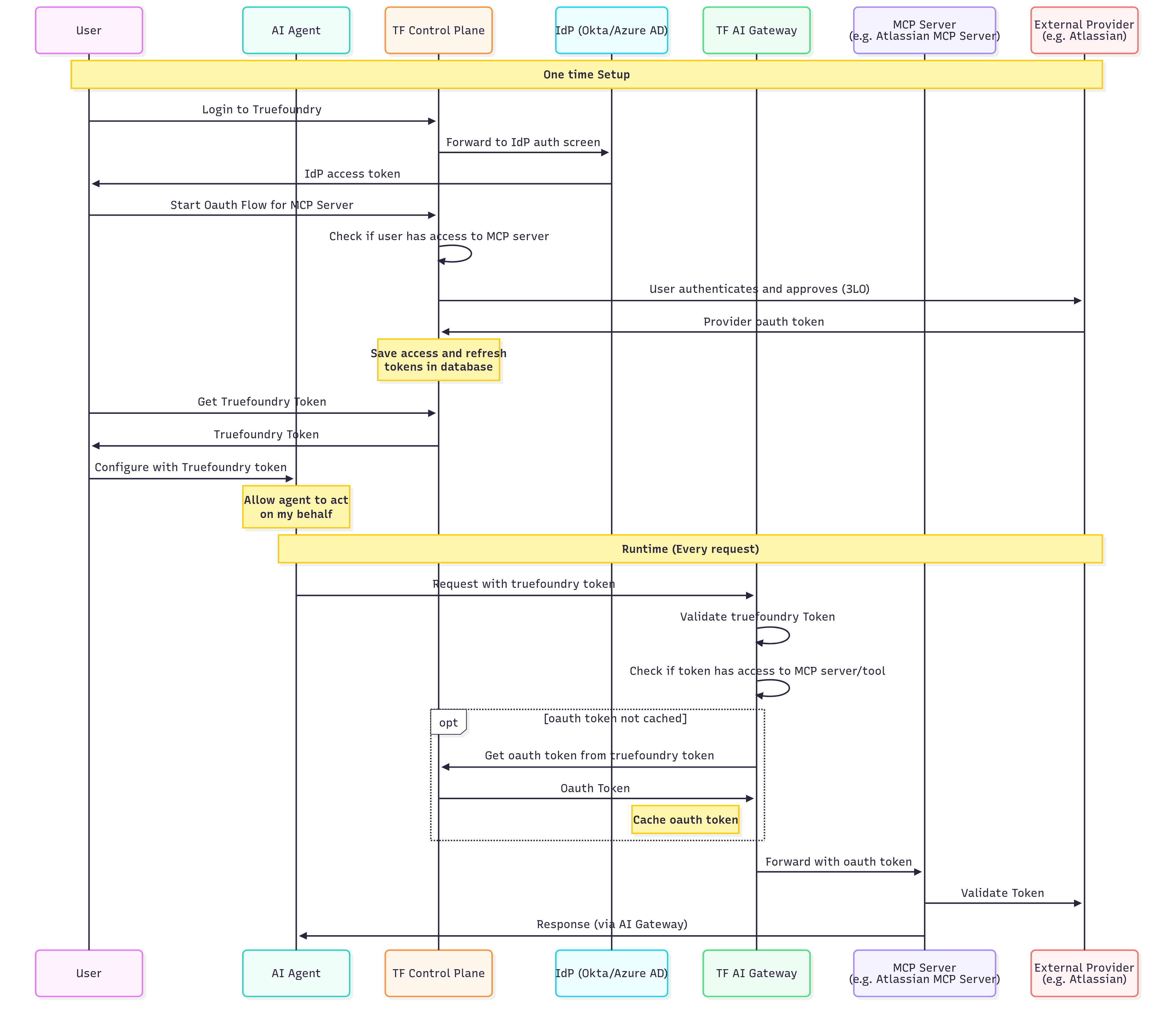
3. Store the token securely
```python theme={"dark"}
from fastmcp import Client
from fastmcp.client.transports import StreamableHttpTransport
transport = StreamableHttpTransport(
url="{GATEWAY_BASE_URL}/mcp//server",
headers={"Authorization": "Bearer "}
)
async with Client(transport) as client:
result = await client.call_tool("tool_name", {"arg": "value"})
```
Virtual Accounts are service accounts with specific permissions to access MCP servers. Use Virtual Accounts when you need a shared token for server-to-server communication, or when building applications where individual user identity isn't required at the AI Gateway level.
1. On the left menu panel, navigate to **Access > API KEYS > Virtual Accounts** in the TrueFoundry UI
2. Click **+ New Virtual Account**
3. Give it a descriptive name (e.g., `my-agent-mcp-access`)
4. Add permissions for the MCP servers your application needs to access
```python theme={"dark"}
from fastmcp import Client
from fastmcp.client.transports import StreamableHttpTransport
# Virtual Account token - same for all requests from your application
VA_TOKEN = "your-virtual-account-token"
transport = StreamableHttpTransport(
url="{GATEWAY_BASE_URL}/mcp//server",
headers={"Authorization": f"Bearer {VA_TOKEN}"}
)
async with Client(transport) as client:
result = await client.call_tool("tool_name", {"arg": "value"})
```
VAT provides the same level of access for all requests. For MCP servers that require user-specific access (like accessing a user's GitHub repositories), use OAuth2 with individual user tokens instead.
For end customers or when you want to use your own identity provider (Okta, Azure AD, Auth0, Cognito, etc.). The AI Gateway validates a JWT issued by your IdP, and resolves it to a TrueFoundry user or virtual account using a configured [Identity Provider](/docs/platform/identity-providers).
This approach is ideal for:
* B2B SaaS applications where your customers don't have TrueFoundry accounts
* Applications that want to use their existing identity infrastructure
* Customer Identity and Access Management (CIAM) scenarios
* Service-to-service authentication where the caller already holds an IdP-issued JWT
Register your IdP with TrueFoundry:
1. On the left menu panel at bottom, navigate to **Settings > Security & Access > Identity Providers**
2. Click **+** (Add Identity Provider)
3. Fill in the form with the issuer URL, allowed audiences, and JWKS URI for your IdP (e.g., Okta, Azure AD)
4. Choose whether validated tokens resolve to a **virtual account** (machine-to-machine callers), or a **TrueFoundry user with team mapping** (human users)
For the full field reference and example configurations, see [Identity Providers](/docs/platform/identity-providers).
Add the matching Identity Provider mapping directly on the target identity:
* For a **virtual account**, add an [identity provider mapping](/docs/platform/virtual-account-management#identity-provider-mappings) that matches the configured **Name Claim**.
* For a **team**, add an [identity provider mapping](/docs/platform/team-management#identity-provider-mappings) that matches the configured **Team Claim**, and ensure the target users exist in the tenant.
Grant access to the resolved TrueFoundry identity:
1. Navigate to the MCP server's settings
2. Go to **Collaborators**
3. Add the mapped team, user, or virtual account with appropriate permissions
When your end user logs into your platform, your application receives their JWT. Use that JWT to authenticate with the AI Gateway:
```python theme={"dark"}
from fastmcp import Client
from fastmcp.client.transports import StreamableHttpTransport
# JWT from your IdP (e.g., Auth0, Okta)
user_jwt = "eyJhbGciOiJSUzI1NiIsInR5cCI6IkpXVCJ9..."
transport = StreamableHttpTransport(
url="{GATEWAY_BASE_URL}/mcp//server",
headers={"Authorization": f"Bearer {user_jwt}"}
)
async with Client(transport) as client:
result = await client.call_tool("tool_name", {"arg": "value"})
```
TrueFoundry OAuth lets IDE tools like **Cursor**, **Claude Code**, and **VS Code** connect to the MCP Gateway by signing in with TrueFoundry — no need to generate or manage API keys.
**When to use TrueFoundry OAuth?**
* Connecting to MCP servers from Cursor, Claude Code, VS Code, or other MCP-compatible IDEs.
* Enabling team members to access MCP tools without sharing or managing API keys.
* Leveraging existing TrueFoundry user authentication for MCP access.
**What you do?**
1. Add the MCP server's Gateway URL in your IDE, or click **Connect** on the server in TrueFoundry.
2. Your browser opens and you sign in to TrueFoundry (using SSO if your organization has it configured).
3. You review and approve the access request, which shows your IDE and the MCP Gateway URL.
4. If the server connects to a third-party provider (such as GitHub or Slack), you authorize that provider with your own account.
After that, your IDE shows the server's tools as connected. For per-IDE setup steps and screenshots, see [Connect MCP Servers from Your IDE](/docs/ai-gateway/mcp/connect-mcp-from-ide).
TrueFoundry OAuth can be combined with Token Forwarding (outbound) to pass additional MCP server-specific headers alongside the sign-in.
***
## Access Control
Once authenticated, the AI Gateway verifies whether the user has permission to access the requested MCP servers and tools.
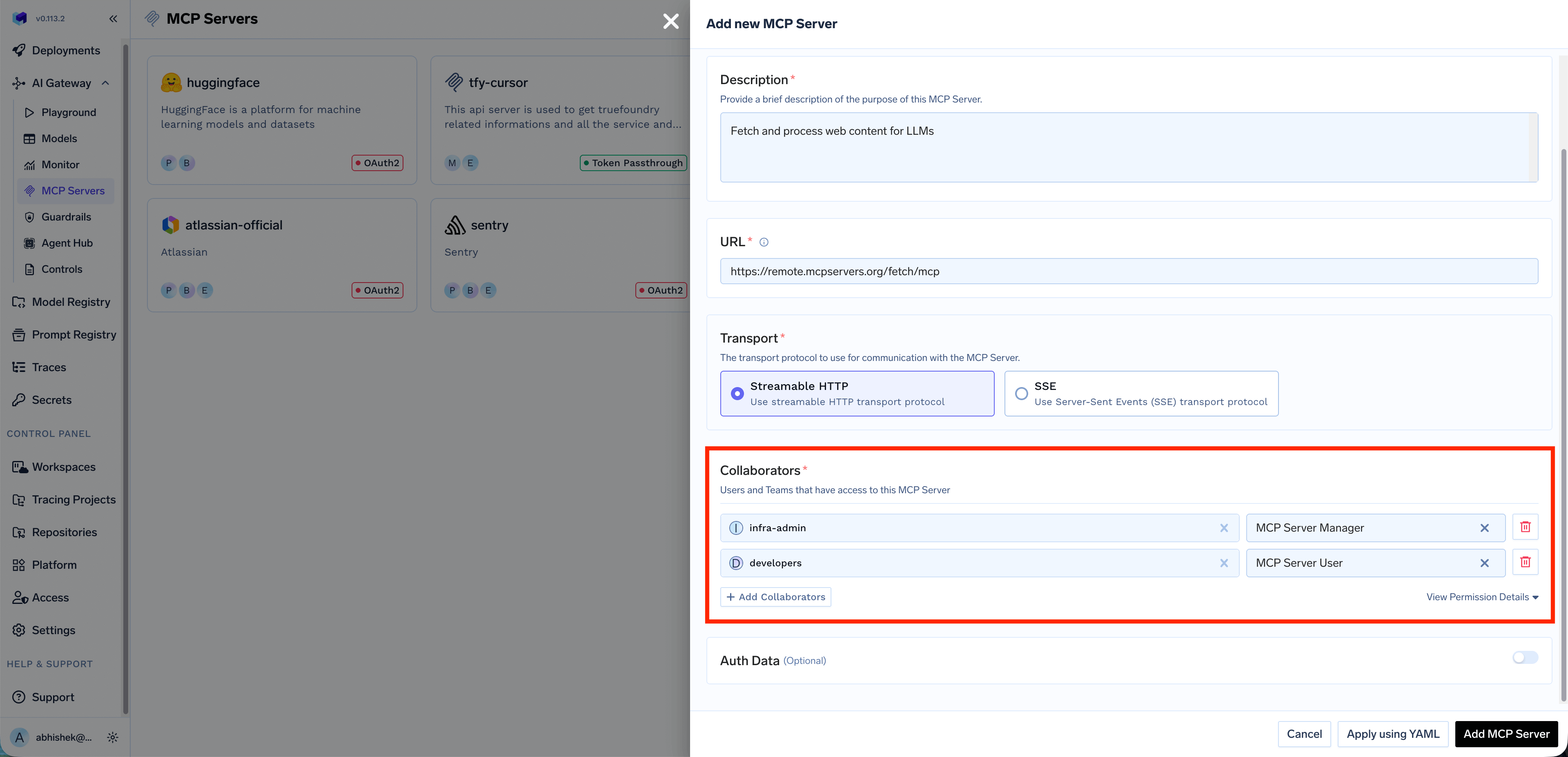 Access control is enforced based on the resolved TrueFoundry identity (user, team, or virtual account). You can define granular permissions for:
* Which MCP servers a user can access?
* Which tools within an MCP server a user can invoke?
You can also create a [Virtual MCP Server](/docs/ai-gateway/mcp/virtual-mcp-server) to expose a subset of tools from different MCP servers, and grant access to specific users or teams.
***
## Outbound Authentication
Outbound authentication controls how the AI Gateway authenticates to downstream MCP servers. TrueFoundry supports multiple authentication models to handle different MCP servers requirements.
### When to use which method?
| Method | When to use? | Example MCP servers |
| --------------------------------- | -------------------------------------------------------------------------------------------------------------------------------------------------------------------------------------------------------------------------------------------------------- | ------------------------------------------------- |
| **OAuth2 (Authorization Code)** | Per-user access to third-party services where each user authorizes their own account | Gmail, Slack, GitHub, Atlassian |
| **OAuth2 (Client Credentials)** | Server-to-server access with no user interaction | Backend microservices, internal analytics |
| **OAuth2 (Token Exchange / OBO)** | Upstream must see a delegated user token. For **Okta**, - see [Scenario 7](#end-to-end-authentication-scenarios). For **Microsoft Entra**, use jwt-bearer On-Behalf-Of - see [Azure Entra OBO for MCP](/docs/ai-gateway/mcp/mcp-server-oauth-azure-obo). | Internal APIs validating Okta or Entra OBO tokens |
| **API Key — Shared** | Shared resources or public APIs where one credential serves all users | Hugging Face, DeepWiki |
| **API Key — Individual** | Per-user upstream API keys (each user provides their own via [Auth Overrides](/docs/ai-gateway/mcp/mcp-server-auth-overrides)) | Third-party per-user APIs |
| **No Auth** | Public APIs that require no authentication | Calculator, public DeepWiki |
| **Token Passthrough** | Internal MCP servers that validate your IdP tokens directly | Internal MCP server with IdP auth |
| **Token Forwarding** | MCP servers with their own auth systems where the client provides credentials via `x-tfy-mcp-headers` | Internal MCP server from OpenAPI |
| **AWS SigV4** | Amazon Bedrock AgentCore (and similar AWS MCP endpoints) that require SigV4-signed requests with shared IAM credentials (access key or assumed role) | Bedrock AgentCore runtime MCP |
### Setup
Expand each method below for configuration details and example use cases.
**No Auth:** The MCP server doesn't require any authentication. Suitable for:
* Demo or sandbox APIs
* Public tools like a Calculator or DeepWiki MCP server
Not recommended for production MCP servers or any server that provides access to sensitive data.
**API Key:** Authenticate using a static API key or token sent as a request header. When configuring API Key auth, you can choose between two credential modes:
* **Shared Credentials:** One key is used by everyone. You configure the credential once, and the AI Gateway injects it into every request regardless of which end user is calling.
* **Individual Credentials:** Each user provides their own key. Users must supply their own API key through [Auth Overrides](/docs/ai-gateway/mcp/mcp-server-auth-overrides) before they can use the MCP server. The AI Gateway injects the user-specific key into requests.
**Example (Shared):** A Hugging Face MCP server uses a shared API token. Users connect through the AI Gateway with their TrueFoundry credentials, while the AI Gateway injects the shared token and enforces which models or datasets each role can access.
**Example (Individual):** Each developer has their own API key for a third-party service. The admin configures the MCP server with Individual Credentials and a `Bearer {{API_KEY}}` placeholder. Each developer provides their API key via [Auth Overrides](/docs/ai-gateway/mcp/mcp-server-auth-overrides), and the AI Gateway injects the correct key per user.
OAuth2 allows the AI Gateway to authenticate with downstream MCP servers using tokens obtained through standard OAuth2 flows. TrueFoundry supports two grant types:
### Authorization Code
The Authorization Code flow is a user-facing flow where each end user is redirected to the provider (e.g., GitHub, Slack, Atlassian) to authorize access to **their** resources. The AI Gateway manages the full OAuth lifecycle — consent, token storage, and automatic refresh.
**How it works?**
1. End user authenticates with the AI Gateway (using a TrueFoundry token or an Identity Provider token)
2. End user attempts to call an MCP tool → AI Gateway returns an auth error with the authorization URL
3. End user visits the URL and completes OAuth consent on the third-party service (e.g., GitHub)
4. TrueFoundry stores the OAuth token for that end user
5. Future requests automatically include the end user's OAuth token
**Example:** A Slack MCP server prompts each employee to authorize their Slack account during first use. TrueFoundry stores the OAuth refresh token, rotates it automatically, and injects it only when that user invokes a Slack tool. Each user can only access their own messages and channels.
With the Authorization Code flow, end users authenticate **twice** — once with the AI Gateway (inbound), and once with the third-party service (GitHub, Slack, etc.) to grant access to their resources there (outbound).
### Client Credentials
The Client Credentials flow is a server-to-server flow where the AI Gateway authenticates to the downstream MCP server using a shared client ID and secret. No user interaction is required — the AI Gateway obtains an access token directly from the provider's token endpoint.
**How it works?**
1. The AI Gateway sends the client ID and secret to the provider's token endpoint
2. The provider returns an access token
3. The AI Gateway uses this token to authenticate requests to the MCP server
4. Tokens are automatically refreshed when they expire
**Example:** An internal analytics MCP server requires OAuth2 Client Credentials for authentication. The admin configures the client ID and secret once, and the AI Gateway handles token acquisition and refresh for all users accessing this server.
Use Client Credentials when the downstream MCP server authenticates the **application** rather than individual users — common for internal services, shared APIs, and backend integrations.
The incoming token used for inbound authentication (TrueFoundry token or Identity Provider token) is forwarded directly to the MCP server. The MCP server validates and uses this token for authorization.
**When to use Token Passthrough?**
* Your MCP server trusts the same IdP that authenticated the user to the AI Gateway
* The MCP server is configured to validate TrueFoundry tokens or your IdP's JWTs
* You want the MCP server to make authorization decisions based on the user's identity
**How Token Passthrough works?**
1. User authenticates to the AI Gateway with their token (TrueFoundry or IdP)
2. Gateway validates the token and checks access control
3. Gateway forwards the **same token** to the MCP server
4. MCP server validates the token and processes the request
**Example:** An internal MCP server that connects to your organization's services validates the user's IdP token to ensure they have access to specific resources based on their role claims.
**Key point**: Token Passthrough is ideal when your MCP server needs to know the user's identity and can validate tokens from TrueFoundry or your IdP.
AWS SigV4 signs every upstream request to Amazon Bedrock AgentCore (and similar AWS MCP endpoints) with shared IAM credentials stored on the MCP server. Users do **not** complete a Connect / OAuth consent flow.
**When to use AWS SigV4?**
* The MCP server is an AgentCore runtime (or other AWS endpoint) that requires SigV4
* The runtime is configured for IAM inbound auth
* You authenticate with either an IAM access key pair **or** an IAM role the gateway can assume
**How AWS SigV4 works?**
1. Admin registers the remote MCP server with auth type **AWS SigV4**, region, and either access key credentials or an assumed-role ARN (prefer `tfy-secret://` FQNs)
2. User authenticates to the AI Gateway (TrueFoundry or IdP token)
3. Gateway checks RBAC, then SigV4-signs the upstream request with the stored credentials (or temporary STS credentials from the assumed role)
4. AgentCore validates the signature and processes the MCP call
**Example:** An AgentCore runtime exposes math tools over MCP. The admin stores either an IAM access key or an assumed-role ARN that allows `bedrock-agentcore:InvokeAgentRuntime` on that runtime ARN. Every tools/list and tools/call is signed by the gateway.
Region in the MCP URL, the runtime ARN, and the AWS Region field must all match. See [Register an AWS Bedrock AgentCore MCP Server](/docs/ai-gateway/mcp/mcp-server-agentcore-sigv4) for the full setup guide.
Token Forwarding allows clients to pass additional headers to MCP servers using the `x-tfy-mcp-headers` header. This is useful when the MCP server requires specific authentication tokens or metadata that are different from the AI Gateway authentication.
**When to use Token Forwarding?**
* The MCP server requires a specific token format that differs from Gateway authentication
* You need to pass additional metadata or authentication headers
* The client has direct credentials for the MCP server
**How Token Forwarding works?**
1. Client authenticates to the AI Gateway with TrueFoundry token or IdP token (inbound auth)
2. Client includes `x-tfy-mcp-headers` with additional headers for the MCP server
3. Gateway validates the inbound token and checks access control
4. Gateway forwards the custom headers to the MCP server
For full code examples, see [Overriding auth with x-tfy-mcp-headers](#overriding-auth-with-x-tfy-mcp-headers) in the Implementation Recipes section.
Custom headers from `x-tfy-mcp-headers` always override the default authentication configured for the MCP server.
***
## Quick Decision Guide
Now that you've seen the inbound and outbound auth options, use this flowchart to pick the combination that matches your agent. Each outcome below includes a starter code snippet you can copy.
```mermaid theme={"dark"}
flowchart TD
Q1[Is your agent acting on behalf of individual users?]
Q1 -->|NO| A[Virtual Account + Shared Credentials]
Q1 -->|YES| Q2[Does the user have a TrueFoundry account?]
Q2 -->|YES| B[TrueFoundry PAT + Per-User OAuth]
Q2 -->|NO| C[Identity Provider Token + Per-User OAuth]
```
| Outcome | Gateway Token | MCP Server Auth |
| -------------------------------------------- | ---------------------------------------------------------------------------- | ---------------------------------------------------------------------------- |
| **Virtual Account + Shared Credentials** | Virtual Account | Static headers (configured once in UI). All users get the same access level. |
| **TrueFoundry PAT + Per-User OAuth** | User's TrueFoundry API Key | Per-user OAuth; user completes consent once. |
| **Identity Provider Token + Per-User OAuth** | JWT from a configured [Identity Provider](/docs/platform/identity-providers) | Per-user OAuth; user completes consent once. |
### Starter code for each outcome
**Your agent performs actions using your organization's credentials** — like a service account that does work on behalf of your company.
**Examples:**
* An internal support bot that queries your company's knowledge base
* A code assistant that uses a shared GitHub service account
* A data analysis agent that accesses shared analytics databases
**What to use?**
| Token Type | What to use? | Why |
| ------------------- | ----------------------------------- | ----------------------------------------- |
| **Gateway Token** | Virtual Account token | Identifies your service/application |
| **MCP Server Auth** | Shared credentials (pre-configured) | All requests use the same service account |
You pass ONE token (Virtual Account). The MCP server's shared credentials are configured in the UI, not in your code.
```python theme={"dark"}
import os
from fastmcp import Client
from fastmcp.client.transports import StreamableHttpTransport
VA_TOKEN = os.environ["VIRTUAL_ACCOUNT_TOKEN"]
async def call_tool_as_service():
transport = StreamableHttpTransport(
url="https:///mcp//server",
headers={"Authorization": f"Bearer {VA_TOKEN}"}
)
async with Client(transport) as client:
result = await client.call_tool("query_knowledge_base", {"question": "..."})
return result
```
With this approach, all requests from your agent have the same permissions. User A and User B get identical access to the downstream service.
**Your agent performs actions using the end user's credentials** — the agent accesses each user's own data and respects their permissions.
**Examples:**
* A productivity agent that accesses the user's own Gmail, Slack, or Calendar
* A development assistant that accesses the user's GitHub repositories
* A CRM agent that sees only what the logged-in user can see
**What to use?**
| Token Type | What to use? | Why |
| ------------------- | ------------------------------------------------------- | ------------------------------------------- |
| **Gateway Token** | User's token (TrueFoundry PAT or Identity Provider JWT) | Identifies which user is making the request |
| **MCP Server Auth** | Per-user OAuth (managed by TrueFoundry) | Each user's own credentials |
You pass the USER's token. TrueFoundry looks up and injects the OAuth token for that specific user.
```python theme={"dark"}
from fastmcp import Client
from fastmcp.client.transports import StreamableHttpTransport
async def call_tool_as_user(user_token: str):
transport = StreamableHttpTransport(
url="https:///mcp//server",
headers={"Authorization": f"Bearer {user_token}"}
)
async with Client(transport) as client:
result = await client.call_tool("search_emails", {"query": "..."})
return result
```
With this approach, User A and User B get different data based on their own OAuth authorizations. Each user must complete OAuth consent once — see [Handling OAuth-protected MCP servers](#handling-oauth-protected-mcp-servers).
**Your agent uses some tools with shared credentials, and other tools with per-user credentials.**
**Examples:**
* An assistant that searches the web (shared API key), and sends emails on the user's behalf (per-user OAuth)
* A dev tool that queries documentation (shared), but accesses the user's GitHub (per-user)
**What to use?**
| Token Type | What to use? | Why |
| ------------------- | --------------------------------- | -------------------------------- |
| **Gateway Token** | User's token | Identifies the caller |
| **MCP Server Auth** | Mixed — configured per MCP server | Gateway handles it automatically |
You pass ONE Gateway token. The AI Gateway routes to different MCP servers, each with its own auth model configured.
```python theme={"dark"}
from fastmcp import Client
from fastmcp.client.transports import StreamableHttpTransport
async def call_mixed_tools(user_token: str):
transport = StreamableHttpTransport(
url="https:///mcp//server",
headers={"Authorization": f"Bearer {user_token}"}
)
async with Client(transport) as client:
# Web search uses shared API key (configured on MCP server)
await client.call_tool("web_search", {"query": "..."})
# Gmail uses user's OAuth token (user must have completed OAuth)
await client.call_tool("send_email", {"to": "...", "body": "..."})
```
The AI Gateway abstracts away the complexity. You don't need to pass different tokens for different MCP servers — the AI Gateway injects the right credentials per server based on its configuration. See [Mixing OAuth and header-based MCP servers](#mixing-oauth-and-header-based-mcp-servers).
***
## Implementation Recipes
Code patterns for common implementation needs. The AI Gateway uses standard MCP transports — install the `fastmcp` Python client to follow these examples.
```bash theme={"dark"}
pip install fastmcp
```
### Connecting to an MCP server
The MCP Gateway exposes each registered MCP server at a unique URL. You can copy each server's URL from the TrueFoundry UI.
```python theme={"dark"}
import asyncio
from fastmcp import Client
from fastmcp.client.transports import StreamableHttpTransport
async def call_mcp_tool():
mcp_url = "https:///mcp//server"
auth_token = "your-token"
transport = StreamableHttpTransport(
url=mcp_url,
headers={"Authorization": f"Bearer {auth_token}"}
)
async with Client(transport) as client:
# List available tools
tools = await client.list_tools()
print(f"Available tools: {[t.name for t in tools]}")
# Call a specific tool
result = await client.call_tool("tool_name", {"arg1": "value1"})
print(f"Result: {result}")
asyncio.run(call_mcp_tool())
```
### Handling OAuth-protected MCP servers
When an MCP server is configured with OAuth2, each user authorizes the upstream provider (such as GitHub or Slack) once before they can use the server's tools. How that authorization happens depends on how you connect.
#### From an IDE or MCP client
If you connect from Cursor, Claude Code, VS Code, or another MCP client, this is handled for you in the browser. The first time you use the server, you sign in to TrueFoundry, approve the access request, and authorize the upstream provider if the server needs it. After that, the tools are available — no code required.
For per-IDE setup steps and what to expect, see [Connect MCP Servers from Your IDE](/docs/ai-gateway/mcp/connect-mcp-from-ide).
#### From a programmatic agent or SDK
If you call the AI Gateway directly from your own agent or SDK, you handle the authorization prompt yourself. When the user hasn't completed the OAuth flow, the AI Gateway returns a `401` HTTP error whose JSON body contains `authorization_urls` the user must visit.
```mermaid theme={"dark"}
sequenceDiagram
participant User
participant Agent as Your Agent
participant Gateway as MCP Gateway
participant OAuth as OAuth Provider
User->>Agent: "Show me my GitHub repos"
Agent->>Gateway: Request with user token
Gateway->>Gateway: User hasn't authorized GitHub
Gateway-->>Agent: 401 McpAuthRequiredError with authorization URLs
Agent-->>User: "Please authorize: [URL]"
User->>OAuth: Visits URL, grants access
OAuth-->>Gateway: Stores OAuth tokens
User->>Agent: Retry request
Agent->>Gateway: Request with user token
Gateway->>Gateway: Finds stored OAuth token
Gateway-->>Agent: User's repositories
Agent-->>User: "Here are your repos..."
```
**Handling OAuth errors in code:**
```python theme={"dark"}
import httpx
from fastmcp import Client
from fastmcp.client.transports import StreamableHttpTransport
def _make_httpx_client(**kwargs) -> httpx.AsyncClient:
"""Factory that creates an httpx client which reads error response bodies.
The MCP library uses streaming requests, so response bodies are not
automatically read. This hook ensures 4xx/5xx bodies are loaded before
raise_for_status() discards them.
"""
async def _read_error_body(response: httpx.Response):
if response.status_code >= 400:
await response.aread()
hooks = kwargs.pop("event_hooks", {})
hooks.setdefault("response", []).append(_read_error_body)
return httpx.AsyncClient(event_hooks=hooks, **kwargs)
async def call_mcp_with_oauth(
mcp_url: str,
user_token: str,
tool_name: str,
tool_args: dict
):
"""Call an MCP tool, handling OAuth authorization if needed."""
transport = StreamableHttpTransport(
url=mcp_url,
headers={"Authorization": f"Bearer {user_token}"},
httpx_client_factory=_make_httpx_client,
)
try:
async with Client(transport) as client:
result = await client.call_tool(tool_name, tool_args)
return {"success": True, "result": result}
except httpx.HTTPStatusError as e:
if e.response.status_code == 401:
body = e.response.json()
if body.get("error", {}).get("type") == "McpAuthRequiredError":
return {
"success": False,
"auth_required": True,
"authorization_urls": body.get("authorization_urls", {}),
"server_names": body.get("server_names", {}),
"message": body.get("message", ""),
}
raise
async def main():
result = await call_mcp_with_oauth(
mcp_url="https:///mcp//server",
user_token="user-tfy-token-or-idp-jwt",
tool_name="get_repositories",
tool_args={}
)
if result.get("auth_required"):
print(result["message"])
for server, url in result["authorization_urls"].items():
print(f" Authorize {server}: {url}")
# After user completes OAuth, retry the request
else:
print(f"Success: {result['result']}")
```
**OAuth errors are returned as HTTP 401 responses** with a JSON body containing `error.type` set to `"McpAuthRequiredError"`. The `authorization_urls` field is a dictionary keyed by server name, and each value is the URL the user must visit to complete the OAuth consent flow.
**After OAuth completion**: Once the user completes the OAuth consent flow, TrueFoundry stores their token. Future requests automatically include the OAuth credentials — no code changes needed.
### Mixing OAuth and header-based MCP servers
A common question: "My agent uses Gmail (OAuth), and a web search API (header-based). Do I need to handle them differently?"
**Answer: No.** The AI Gateway handles this for you.
1. **Configure each MCP server with its auth model in the UI:**
* Gmail MCP Server → OAuth2
* Web Search MCP Server → Static Header (API key)
2. **In your code, pass ONE AI Gateway token:**
```python theme={"dark"}
# Same code for all MCP servers - AI Gateway handles auth injection
transport = StreamableHttpTransport(
url="https:///mcp//server",
headers={"Authorization": f"Bearer {user_token}"}
)
async with Client(transport) as client:
# Web search - AI Gateway injects the pre-configured API key
await client.call_tool("web_search", {"query": "AI news"})
# Gmail - AI Gateway injects THIS user's OAuth token
await client.call_tool("search_emails", {"query": "from:boss"})
```
3. **The AI Gateway handles auth per server:**
| MCP Server | Auth Model | What the AI Gateway does? |
| ---------- | ------------- | --------------------------------------- |
| Web Search | Static Header | Injects pre-configured API key |
| Gmail | OAuth2 | Looks up user's OAuth token, injects it |
| Calculator | No Auth | Passes request as-is |
### Overriding auth with `x-tfy-mcp-headers`
If you need to override the default auth for a specific MCP server, use the `x-tfy-mcp-headers` header. This is the implementation of the [Token Forwarding](#outbound-authentication) outbound auth model.
```python Single MCP Server theme={"dark"}
import json
from fastmcp import Client
from fastmcp.client.transports import StreamableHttpTransport
async def call_with_custom_headers():
custom_headers = json.dumps({
"Authorization": "Bearer custom-token",
"X-Custom-Header": "custom-value"
})
transport = StreamableHttpTransport(
url="https:///mcp//server",
headers={
"Authorization": "Bearer your-gateway-token", # Inbound auth
"x-tfy-mcp-headers": custom_headers # Outbound - forwarded
}
)
async with Client(transport) as client:
return await client.call_tool("tool_name", {})
```
```python Virtual MCP Server theme={"dark"}
import json
from fastmcp import Client
from fastmcp.client.transports import StreamableHttpTransport
async def call_virtual_mcp_with_headers():
# Headers for each underlying MCP server (nested by server identifier)
custom_headers = json.dumps({
"server-1": {"Authorization": "Bearer token-for-server-1"},
"server-2": {"Authorization": "Bearer token-for-server-2"}
})
transport = StreamableHttpTransport(
url="https:///mcp//server",
headers={
"Authorization": "Bearer your-gateway-token",
"x-tfy-mcp-headers": custom_headers
}
)
async with Client(transport) as client:
return await client.call_tool("tool_from_server_1", {})
```
For virtual MCP servers, use the remote MCP server identifier as the key (e.g., `server-1`). Copy the identifier from the UI since virtual MCP servers contain multiple remote MCP servers.
Custom headers **override** the default authentication. Use this sparingly, as it bypasses TrueFoundry's token management.
### Building a complete MCP-enabled agent
A reusable wrapper that handles connection, OAuth errors, and multiple MCP servers:
```python expandable theme={"dark"}
import asyncio
import os
from dataclasses import dataclass
import httpx
from fastmcp import Client
from fastmcp.client.transports import StreamableHttpTransport
def _make_httpx_client(**kwargs) -> httpx.AsyncClient:
"""Reads 4xx/5xx response bodies before raise_for_status() discards them."""
async def _read_error_body(response: httpx.Response):
if response.status_code >= 400:
await response.aread()
hooks = kwargs.pop("event_hooks", {})
hooks.setdefault("response", []).append(_read_error_body)
return httpx.AsyncClient(event_hooks=hooks, **kwargs)
@dataclass
class MCPConfig:
url: str
name: str
class MCPAgent:
"""An agent that can call tools from multiple MCP servers."""
def __init__(self, auth_token: str):
self.auth_token = auth_token
self.mcp_configs: dict[str, MCPConfig] = {}
def register_mcp_server(self, name: str, url: str):
self.mcp_configs[name] = MCPConfig(url=url, name=name)
async def call_tool(self, server_name: str, tool_name: str, tool_args: dict) -> dict:
if server_name not in self.mcp_configs:
raise ValueError(f"MCP server '{server_name}' not registered")
config = self.mcp_configs[server_name]
transport = StreamableHttpTransport(
url=config.url,
headers={"Authorization": f"Bearer {self.auth_token}"},
httpx_client_factory=_make_httpx_client,
)
try:
async with Client(transport) as client:
result = await client.call_tool(tool_name, tool_args)
return {"success": True, "result": result}
except httpx.HTTPStatusError as e:
if e.response.status_code == 401:
body = e.response.json()
if body.get("error", {}).get("type") == "McpAuthRequiredError":
return {
"success": False,
"auth_required": True,
"authorization_urls": body.get("authorization_urls", {}),
"server_names": body.get("server_names", {}),
"server": server_name,
"message": body.get("message", ""),
}
return {"success": False, "error": str(e)}
async def list_tools(self, server_name: str) -> list[str]:
if server_name not in self.mcp_configs:
raise ValueError(f"MCP server '{server_name}' not registered")
config = self.mcp_configs[server_name]
transport = StreamableHttpTransport(
url=config.url,
headers={"Authorization": f"Bearer {self.auth_token}"},
httpx_client_factory=_make_httpx_client,
)
async with Client(transport) as client:
tools = await client.list_tools()
return [tool.name for tool in tools]
async def main():
# Initialize with user token for per-user access
# Or use Virtual Account token for shared access
agent = MCPAgent(auth_token=os.environ["TFY_API_KEY"])
agent.register_mcp_server(
name="github",
url="https:///mcp/github-integration/server"
)
agent.register_mcp_server(
name="web-search",
url="https:///mcp/web-search/server"
)
result = await agent.call_tool(
server_name="github",
tool_name="list_repositories",
tool_args={"owner": "truefoundry"}
)
if result.get("auth_required"):
print("OAuth authorization required:")
for server, url in result["authorization_urls"].items():
print(f" Authorize {server}: {url}")
elif result.get("success"):
print(f"Result: {result['result']}")
else:
print(f"Error: {result.get('error')}")
if __name__ == "__main__":
asyncio.run(main())
```
***
## End-to-End Authentication Scenarios
The accordions below show how inbound and outbound auth combinations work end-to-end, with sequence diagrams and step-by-step request flow tables. Most readers can skip this section unless they're auditing the full request flow or implementing a less common combination.
**Inbound:** TrueFoundry API Key | **Outbound:** OAuth2 (Authorization Code)
**Use case:** Internal developers with TrueFoundry accounts accessing OAuth-protected services like Slack, GitHub, or Atlassian.
This is the most common enterprise scenario where your developers authenticate to TrueFoundry and the AI Gateway handles OAuth token management for downstream MCP servers.
Access control is enforced based on the resolved TrueFoundry identity (user, team, or virtual account). You can define granular permissions for:
* Which MCP servers a user can access?
* Which tools within an MCP server a user can invoke?
You can also create a [Virtual MCP Server](/docs/ai-gateway/mcp/virtual-mcp-server) to expose a subset of tools from different MCP servers, and grant access to specific users or teams.
***
## Outbound Authentication
Outbound authentication controls how the AI Gateway authenticates to downstream MCP servers. TrueFoundry supports multiple authentication models to handle different MCP servers requirements.
### When to use which method?
| Method | When to use? | Example MCP servers |
| --------------------------------- | -------------------------------------------------------------------------------------------------------------------------------------------------------------------------------------------------------------------------------------------------------- | ------------------------------------------------- |
| **OAuth2 (Authorization Code)** | Per-user access to third-party services where each user authorizes their own account | Gmail, Slack, GitHub, Atlassian |
| **OAuth2 (Client Credentials)** | Server-to-server access with no user interaction | Backend microservices, internal analytics |
| **OAuth2 (Token Exchange / OBO)** | Upstream must see a delegated user token. For **Okta**, - see [Scenario 7](#end-to-end-authentication-scenarios). For **Microsoft Entra**, use jwt-bearer On-Behalf-Of - see [Azure Entra OBO for MCP](/docs/ai-gateway/mcp/mcp-server-oauth-azure-obo). | Internal APIs validating Okta or Entra OBO tokens |
| **API Key — Shared** | Shared resources or public APIs where one credential serves all users | Hugging Face, DeepWiki |
| **API Key — Individual** | Per-user upstream API keys (each user provides their own via [Auth Overrides](/docs/ai-gateway/mcp/mcp-server-auth-overrides)) | Third-party per-user APIs |
| **No Auth** | Public APIs that require no authentication | Calculator, public DeepWiki |
| **Token Passthrough** | Internal MCP servers that validate your IdP tokens directly | Internal MCP server with IdP auth |
| **Token Forwarding** | MCP servers with their own auth systems where the client provides credentials via `x-tfy-mcp-headers` | Internal MCP server from OpenAPI |
| **AWS SigV4** | Amazon Bedrock AgentCore (and similar AWS MCP endpoints) that require SigV4-signed requests with shared IAM credentials (access key or assumed role) | Bedrock AgentCore runtime MCP |
### Setup
Expand each method below for configuration details and example use cases.
**No Auth:** The MCP server doesn't require any authentication. Suitable for:
* Demo or sandbox APIs
* Public tools like a Calculator or DeepWiki MCP server
Not recommended for production MCP servers or any server that provides access to sensitive data.
**API Key:** Authenticate using a static API key or token sent as a request header. When configuring API Key auth, you can choose between two credential modes:
* **Shared Credentials:** One key is used by everyone. You configure the credential once, and the AI Gateway injects it into every request regardless of which end user is calling.
* **Individual Credentials:** Each user provides their own key. Users must supply their own API key through [Auth Overrides](/docs/ai-gateway/mcp/mcp-server-auth-overrides) before they can use the MCP server. The AI Gateway injects the user-specific key into requests.
**Example (Shared):** A Hugging Face MCP server uses a shared API token. Users connect through the AI Gateway with their TrueFoundry credentials, while the AI Gateway injects the shared token and enforces which models or datasets each role can access.
**Example (Individual):** Each developer has their own API key for a third-party service. The admin configures the MCP server with Individual Credentials and a `Bearer {{API_KEY}}` placeholder. Each developer provides their API key via [Auth Overrides](/docs/ai-gateway/mcp/mcp-server-auth-overrides), and the AI Gateway injects the correct key per user.
OAuth2 allows the AI Gateway to authenticate with downstream MCP servers using tokens obtained through standard OAuth2 flows. TrueFoundry supports two grant types:
### Authorization Code
The Authorization Code flow is a user-facing flow where each end user is redirected to the provider (e.g., GitHub, Slack, Atlassian) to authorize access to **their** resources. The AI Gateway manages the full OAuth lifecycle — consent, token storage, and automatic refresh.
**How it works?**
1. End user authenticates with the AI Gateway (using a TrueFoundry token or an Identity Provider token)
2. End user attempts to call an MCP tool → AI Gateway returns an auth error with the authorization URL
3. End user visits the URL and completes OAuth consent on the third-party service (e.g., GitHub)
4. TrueFoundry stores the OAuth token for that end user
5. Future requests automatically include the end user's OAuth token
**Example:** A Slack MCP server prompts each employee to authorize their Slack account during first use. TrueFoundry stores the OAuth refresh token, rotates it automatically, and injects it only when that user invokes a Slack tool. Each user can only access their own messages and channels.
With the Authorization Code flow, end users authenticate **twice** — once with the AI Gateway (inbound), and once with the third-party service (GitHub, Slack, etc.) to grant access to their resources there (outbound).
### Client Credentials
The Client Credentials flow is a server-to-server flow where the AI Gateway authenticates to the downstream MCP server using a shared client ID and secret. No user interaction is required — the AI Gateway obtains an access token directly from the provider's token endpoint.
**How it works?**
1. The AI Gateway sends the client ID and secret to the provider's token endpoint
2. The provider returns an access token
3. The AI Gateway uses this token to authenticate requests to the MCP server
4. Tokens are automatically refreshed when they expire
**Example:** An internal analytics MCP server requires OAuth2 Client Credentials for authentication. The admin configures the client ID and secret once, and the AI Gateway handles token acquisition and refresh for all users accessing this server.
Use Client Credentials when the downstream MCP server authenticates the **application** rather than individual users — common for internal services, shared APIs, and backend integrations.
The incoming token used for inbound authentication (TrueFoundry token or Identity Provider token) is forwarded directly to the MCP server. The MCP server validates and uses this token for authorization.
**When to use Token Passthrough?**
* Your MCP server trusts the same IdP that authenticated the user to the AI Gateway
* The MCP server is configured to validate TrueFoundry tokens or your IdP's JWTs
* You want the MCP server to make authorization decisions based on the user's identity
**How Token Passthrough works?**
1. User authenticates to the AI Gateway with their token (TrueFoundry or IdP)
2. Gateway validates the token and checks access control
3. Gateway forwards the **same token** to the MCP server
4. MCP server validates the token and processes the request
**Example:** An internal MCP server that connects to your organization's services validates the user's IdP token to ensure they have access to specific resources based on their role claims.
**Key point**: Token Passthrough is ideal when your MCP server needs to know the user's identity and can validate tokens from TrueFoundry or your IdP.
AWS SigV4 signs every upstream request to Amazon Bedrock AgentCore (and similar AWS MCP endpoints) with shared IAM credentials stored on the MCP server. Users do **not** complete a Connect / OAuth consent flow.
**When to use AWS SigV4?**
* The MCP server is an AgentCore runtime (or other AWS endpoint) that requires SigV4
* The runtime is configured for IAM inbound auth
* You authenticate with either an IAM access key pair **or** an IAM role the gateway can assume
**How AWS SigV4 works?**
1. Admin registers the remote MCP server with auth type **AWS SigV4**, region, and either access key credentials or an assumed-role ARN (prefer `tfy-secret://` FQNs)
2. User authenticates to the AI Gateway (TrueFoundry or IdP token)
3. Gateway checks RBAC, then SigV4-signs the upstream request with the stored credentials (or temporary STS credentials from the assumed role)
4. AgentCore validates the signature and processes the MCP call
**Example:** An AgentCore runtime exposes math tools over MCP. The admin stores either an IAM access key or an assumed-role ARN that allows `bedrock-agentcore:InvokeAgentRuntime` on that runtime ARN. Every tools/list and tools/call is signed by the gateway.
Region in the MCP URL, the runtime ARN, and the AWS Region field must all match. See [Register an AWS Bedrock AgentCore MCP Server](/docs/ai-gateway/mcp/mcp-server-agentcore-sigv4) for the full setup guide.
Token Forwarding allows clients to pass additional headers to MCP servers using the `x-tfy-mcp-headers` header. This is useful when the MCP server requires specific authentication tokens or metadata that are different from the AI Gateway authentication.
**When to use Token Forwarding?**
* The MCP server requires a specific token format that differs from Gateway authentication
* You need to pass additional metadata or authentication headers
* The client has direct credentials for the MCP server
**How Token Forwarding works?**
1. Client authenticates to the AI Gateway with TrueFoundry token or IdP token (inbound auth)
2. Client includes `x-tfy-mcp-headers` with additional headers for the MCP server
3. Gateway validates the inbound token and checks access control
4. Gateway forwards the custom headers to the MCP server
For full code examples, see [Overriding auth with x-tfy-mcp-headers](#overriding-auth-with-x-tfy-mcp-headers) in the Implementation Recipes section.
Custom headers from `x-tfy-mcp-headers` always override the default authentication configured for the MCP server.
***
## Quick Decision Guide
Now that you've seen the inbound and outbound auth options, use this flowchart to pick the combination that matches your agent. Each outcome below includes a starter code snippet you can copy.
```mermaid theme={"dark"}
flowchart TD
Q1[Is your agent acting on behalf of individual users?]
Q1 -->|NO| A[Virtual Account + Shared Credentials]
Q1 -->|YES| Q2[Does the user have a TrueFoundry account?]
Q2 -->|YES| B[TrueFoundry PAT + Per-User OAuth]
Q2 -->|NO| C[Identity Provider Token + Per-User OAuth]
```
| Outcome | Gateway Token | MCP Server Auth |
| -------------------------------------------- | ---------------------------------------------------------------------------- | ---------------------------------------------------------------------------- |
| **Virtual Account + Shared Credentials** | Virtual Account | Static headers (configured once in UI). All users get the same access level. |
| **TrueFoundry PAT + Per-User OAuth** | User's TrueFoundry API Key | Per-user OAuth; user completes consent once. |
| **Identity Provider Token + Per-User OAuth** | JWT from a configured [Identity Provider](/docs/platform/identity-providers) | Per-user OAuth; user completes consent once. |
### Starter code for each outcome
**Your agent performs actions using your organization's credentials** — like a service account that does work on behalf of your company.
**Examples:**
* An internal support bot that queries your company's knowledge base
* A code assistant that uses a shared GitHub service account
* A data analysis agent that accesses shared analytics databases
**What to use?**
| Token Type | What to use? | Why |
| ------------------- | ----------------------------------- | ----------------------------------------- |
| **Gateway Token** | Virtual Account token | Identifies your service/application |
| **MCP Server Auth** | Shared credentials (pre-configured) | All requests use the same service account |
You pass ONE token (Virtual Account). The MCP server's shared credentials are configured in the UI, not in your code.
```python theme={"dark"}
import os
from fastmcp import Client
from fastmcp.client.transports import StreamableHttpTransport
VA_TOKEN = os.environ["VIRTUAL_ACCOUNT_TOKEN"]
async def call_tool_as_service():
transport = StreamableHttpTransport(
url="https:///mcp//server",
headers={"Authorization": f"Bearer {VA_TOKEN}"}
)
async with Client(transport) as client:
result = await client.call_tool("query_knowledge_base", {"question": "..."})
return result
```
With this approach, all requests from your agent have the same permissions. User A and User B get identical access to the downstream service.
**Your agent performs actions using the end user's credentials** — the agent accesses each user's own data and respects their permissions.
**Examples:**
* A productivity agent that accesses the user's own Gmail, Slack, or Calendar
* A development assistant that accesses the user's GitHub repositories
* A CRM agent that sees only what the logged-in user can see
**What to use?**
| Token Type | What to use? | Why |
| ------------------- | ------------------------------------------------------- | ------------------------------------------- |
| **Gateway Token** | User's token (TrueFoundry PAT or Identity Provider JWT) | Identifies which user is making the request |
| **MCP Server Auth** | Per-user OAuth (managed by TrueFoundry) | Each user's own credentials |
You pass the USER's token. TrueFoundry looks up and injects the OAuth token for that specific user.
```python theme={"dark"}
from fastmcp import Client
from fastmcp.client.transports import StreamableHttpTransport
async def call_tool_as_user(user_token: str):
transport = StreamableHttpTransport(
url="https:///mcp//server",
headers={"Authorization": f"Bearer {user_token}"}
)
async with Client(transport) as client:
result = await client.call_tool("search_emails", {"query": "..."})
return result
```
With this approach, User A and User B get different data based on their own OAuth authorizations. Each user must complete OAuth consent once — see [Handling OAuth-protected MCP servers](#handling-oauth-protected-mcp-servers).
**Your agent uses some tools with shared credentials, and other tools with per-user credentials.**
**Examples:**
* An assistant that searches the web (shared API key), and sends emails on the user's behalf (per-user OAuth)
* A dev tool that queries documentation (shared), but accesses the user's GitHub (per-user)
**What to use?**
| Token Type | What to use? | Why |
| ------------------- | --------------------------------- | -------------------------------- |
| **Gateway Token** | User's token | Identifies the caller |
| **MCP Server Auth** | Mixed — configured per MCP server | Gateway handles it automatically |
You pass ONE Gateway token. The AI Gateway routes to different MCP servers, each with its own auth model configured.
```python theme={"dark"}
from fastmcp import Client
from fastmcp.client.transports import StreamableHttpTransport
async def call_mixed_tools(user_token: str):
transport = StreamableHttpTransport(
url="https:///mcp//server",
headers={"Authorization": f"Bearer {user_token}"}
)
async with Client(transport) as client:
# Web search uses shared API key (configured on MCP server)
await client.call_tool("web_search", {"query": "..."})
# Gmail uses user's OAuth token (user must have completed OAuth)
await client.call_tool("send_email", {"to": "...", "body": "..."})
```
The AI Gateway abstracts away the complexity. You don't need to pass different tokens for different MCP servers — the AI Gateway injects the right credentials per server based on its configuration. See [Mixing OAuth and header-based MCP servers](#mixing-oauth-and-header-based-mcp-servers).
***
## Implementation Recipes
Code patterns for common implementation needs. The AI Gateway uses standard MCP transports — install the `fastmcp` Python client to follow these examples.
```bash theme={"dark"}
pip install fastmcp
```
### Connecting to an MCP server
The MCP Gateway exposes each registered MCP server at a unique URL. You can copy each server's URL from the TrueFoundry UI.
```python theme={"dark"}
import asyncio
from fastmcp import Client
from fastmcp.client.transports import StreamableHttpTransport
async def call_mcp_tool():
mcp_url = "https:///mcp//server"
auth_token = "your-token"
transport = StreamableHttpTransport(
url=mcp_url,
headers={"Authorization": f"Bearer {auth_token}"}
)
async with Client(transport) as client:
# List available tools
tools = await client.list_tools()
print(f"Available tools: {[t.name for t in tools]}")
# Call a specific tool
result = await client.call_tool("tool_name", {"arg1": "value1"})
print(f"Result: {result}")
asyncio.run(call_mcp_tool())
```
### Handling OAuth-protected MCP servers
When an MCP server is configured with OAuth2, each user authorizes the upstream provider (such as GitHub or Slack) once before they can use the server's tools. How that authorization happens depends on how you connect.
#### From an IDE or MCP client
If you connect from Cursor, Claude Code, VS Code, or another MCP client, this is handled for you in the browser. The first time you use the server, you sign in to TrueFoundry, approve the access request, and authorize the upstream provider if the server needs it. After that, the tools are available — no code required.
For per-IDE setup steps and what to expect, see [Connect MCP Servers from Your IDE](/docs/ai-gateway/mcp/connect-mcp-from-ide).
#### From a programmatic agent or SDK
If you call the AI Gateway directly from your own agent or SDK, you handle the authorization prompt yourself. When the user hasn't completed the OAuth flow, the AI Gateway returns a `401` HTTP error whose JSON body contains `authorization_urls` the user must visit.
```mermaid theme={"dark"}
sequenceDiagram
participant User
participant Agent as Your Agent
participant Gateway as MCP Gateway
participant OAuth as OAuth Provider
User->>Agent: "Show me my GitHub repos"
Agent->>Gateway: Request with user token
Gateway->>Gateway: User hasn't authorized GitHub
Gateway-->>Agent: 401 McpAuthRequiredError with authorization URLs
Agent-->>User: "Please authorize: [URL]"
User->>OAuth: Visits URL, grants access
OAuth-->>Gateway: Stores OAuth tokens
User->>Agent: Retry request
Agent->>Gateway: Request with user token
Gateway->>Gateway: Finds stored OAuth token
Gateway-->>Agent: User's repositories
Agent-->>User: "Here are your repos..."
```
**Handling OAuth errors in code:**
```python theme={"dark"}
import httpx
from fastmcp import Client
from fastmcp.client.transports import StreamableHttpTransport
def _make_httpx_client(**kwargs) -> httpx.AsyncClient:
"""Factory that creates an httpx client which reads error response bodies.
The MCP library uses streaming requests, so response bodies are not
automatically read. This hook ensures 4xx/5xx bodies are loaded before
raise_for_status() discards them.
"""
async def _read_error_body(response: httpx.Response):
if response.status_code >= 400:
await response.aread()
hooks = kwargs.pop("event_hooks", {})
hooks.setdefault("response", []).append(_read_error_body)
return httpx.AsyncClient(event_hooks=hooks, **kwargs)
async def call_mcp_with_oauth(
mcp_url: str,
user_token: str,
tool_name: str,
tool_args: dict
):
"""Call an MCP tool, handling OAuth authorization if needed."""
transport = StreamableHttpTransport(
url=mcp_url,
headers={"Authorization": f"Bearer {user_token}"},
httpx_client_factory=_make_httpx_client,
)
try:
async with Client(transport) as client:
result = await client.call_tool(tool_name, tool_args)
return {"success": True, "result": result}
except httpx.HTTPStatusError as e:
if e.response.status_code == 401:
body = e.response.json()
if body.get("error", {}).get("type") == "McpAuthRequiredError":
return {
"success": False,
"auth_required": True,
"authorization_urls": body.get("authorization_urls", {}),
"server_names": body.get("server_names", {}),
"message": body.get("message", ""),
}
raise
async def main():
result = await call_mcp_with_oauth(
mcp_url="https:///mcp//server",
user_token="user-tfy-token-or-idp-jwt",
tool_name="get_repositories",
tool_args={}
)
if result.get("auth_required"):
print(result["message"])
for server, url in result["authorization_urls"].items():
print(f" Authorize {server}: {url}")
# After user completes OAuth, retry the request
else:
print(f"Success: {result['result']}")
```
**OAuth errors are returned as HTTP 401 responses** with a JSON body containing `error.type` set to `"McpAuthRequiredError"`. The `authorization_urls` field is a dictionary keyed by server name, and each value is the URL the user must visit to complete the OAuth consent flow.
**After OAuth completion**: Once the user completes the OAuth consent flow, TrueFoundry stores their token. Future requests automatically include the OAuth credentials — no code changes needed.
### Mixing OAuth and header-based MCP servers
A common question: "My agent uses Gmail (OAuth), and a web search API (header-based). Do I need to handle them differently?"
**Answer: No.** The AI Gateway handles this for you.
1. **Configure each MCP server with its auth model in the UI:**
* Gmail MCP Server → OAuth2
* Web Search MCP Server → Static Header (API key)
2. **In your code, pass ONE AI Gateway token:**
```python theme={"dark"}
# Same code for all MCP servers - AI Gateway handles auth injection
transport = StreamableHttpTransport(
url="https:///mcp//server",
headers={"Authorization": f"Bearer {user_token}"}
)
async with Client(transport) as client:
# Web search - AI Gateway injects the pre-configured API key
await client.call_tool("web_search", {"query": "AI news"})
# Gmail - AI Gateway injects THIS user's OAuth token
await client.call_tool("search_emails", {"query": "from:boss"})
```
3. **The AI Gateway handles auth per server:**
| MCP Server | Auth Model | What the AI Gateway does? |
| ---------- | ------------- | --------------------------------------- |
| Web Search | Static Header | Injects pre-configured API key |
| Gmail | OAuth2 | Looks up user's OAuth token, injects it |
| Calculator | No Auth | Passes request as-is |
### Overriding auth with `x-tfy-mcp-headers`
If you need to override the default auth for a specific MCP server, use the `x-tfy-mcp-headers` header. This is the implementation of the [Token Forwarding](#outbound-authentication) outbound auth model.
```python Single MCP Server theme={"dark"}
import json
from fastmcp import Client
from fastmcp.client.transports import StreamableHttpTransport
async def call_with_custom_headers():
custom_headers = json.dumps({
"Authorization": "Bearer custom-token",
"X-Custom-Header": "custom-value"
})
transport = StreamableHttpTransport(
url="https:///mcp//server",
headers={
"Authorization": "Bearer your-gateway-token", # Inbound auth
"x-tfy-mcp-headers": custom_headers # Outbound - forwarded
}
)
async with Client(transport) as client:
return await client.call_tool("tool_name", {})
```
```python Virtual MCP Server theme={"dark"}
import json
from fastmcp import Client
from fastmcp.client.transports import StreamableHttpTransport
async def call_virtual_mcp_with_headers():
# Headers for each underlying MCP server (nested by server identifier)
custom_headers = json.dumps({
"server-1": {"Authorization": "Bearer token-for-server-1"},
"server-2": {"Authorization": "Bearer token-for-server-2"}
})
transport = StreamableHttpTransport(
url="https:///mcp//server",
headers={
"Authorization": "Bearer your-gateway-token",
"x-tfy-mcp-headers": custom_headers
}
)
async with Client(transport) as client:
return await client.call_tool("tool_from_server_1", {})
```
For virtual MCP servers, use the remote MCP server identifier as the key (e.g., `server-1`). Copy the identifier from the UI since virtual MCP servers contain multiple remote MCP servers.
Custom headers **override** the default authentication. Use this sparingly, as it bypasses TrueFoundry's token management.
### Building a complete MCP-enabled agent
A reusable wrapper that handles connection, OAuth errors, and multiple MCP servers:
```python expandable theme={"dark"}
import asyncio
import os
from dataclasses import dataclass
import httpx
from fastmcp import Client
from fastmcp.client.transports import StreamableHttpTransport
def _make_httpx_client(**kwargs) -> httpx.AsyncClient:
"""Reads 4xx/5xx response bodies before raise_for_status() discards them."""
async def _read_error_body(response: httpx.Response):
if response.status_code >= 400:
await response.aread()
hooks = kwargs.pop("event_hooks", {})
hooks.setdefault("response", []).append(_read_error_body)
return httpx.AsyncClient(event_hooks=hooks, **kwargs)
@dataclass
class MCPConfig:
url: str
name: str
class MCPAgent:
"""An agent that can call tools from multiple MCP servers."""
def __init__(self, auth_token: str):
self.auth_token = auth_token
self.mcp_configs: dict[str, MCPConfig] = {}
def register_mcp_server(self, name: str, url: str):
self.mcp_configs[name] = MCPConfig(url=url, name=name)
async def call_tool(self, server_name: str, tool_name: str, tool_args: dict) -> dict:
if server_name not in self.mcp_configs:
raise ValueError(f"MCP server '{server_name}' not registered")
config = self.mcp_configs[server_name]
transport = StreamableHttpTransport(
url=config.url,
headers={"Authorization": f"Bearer {self.auth_token}"},
httpx_client_factory=_make_httpx_client,
)
try:
async with Client(transport) as client:
result = await client.call_tool(tool_name, tool_args)
return {"success": True, "result": result}
except httpx.HTTPStatusError as e:
if e.response.status_code == 401:
body = e.response.json()
if body.get("error", {}).get("type") == "McpAuthRequiredError":
return {
"success": False,
"auth_required": True,
"authorization_urls": body.get("authorization_urls", {}),
"server_names": body.get("server_names", {}),
"server": server_name,
"message": body.get("message", ""),
}
return {"success": False, "error": str(e)}
async def list_tools(self, server_name: str) -> list[str]:
if server_name not in self.mcp_configs:
raise ValueError(f"MCP server '{server_name}' not registered")
config = self.mcp_configs[server_name]
transport = StreamableHttpTransport(
url=config.url,
headers={"Authorization": f"Bearer {self.auth_token}"},
httpx_client_factory=_make_httpx_client,
)
async with Client(transport) as client:
tools = await client.list_tools()
return [tool.name for tool in tools]
async def main():
# Initialize with user token for per-user access
# Or use Virtual Account token for shared access
agent = MCPAgent(auth_token=os.environ["TFY_API_KEY"])
agent.register_mcp_server(
name="github",
url="https:///mcp/github-integration/server"
)
agent.register_mcp_server(
name="web-search",
url="https:///mcp/web-search/server"
)
result = await agent.call_tool(
server_name="github",
tool_name="list_repositories",
tool_args={"owner": "truefoundry"}
)
if result.get("auth_required"):
print("OAuth authorization required:")
for server, url in result["authorization_urls"].items():
print(f" Authorize {server}: {url}")
elif result.get("success"):
print(f"Result: {result['result']}")
else:
print(f"Error: {result.get('error')}")
if __name__ == "__main__":
asyncio.run(main())
```
***
## End-to-End Authentication Scenarios
The accordions below show how inbound and outbound auth combinations work end-to-end, with sequence diagrams and step-by-step request flow tables. Most readers can skip this section unless they're auditing the full request flow or implementing a less common combination.
**Inbound:** TrueFoundry API Key | **Outbound:** OAuth2 (Authorization Code)
**Use case:** Internal developers with TrueFoundry accounts accessing OAuth-protected services like Slack, GitHub, or Atlassian.
This is the most common enterprise scenario where your developers authenticate to TrueFoundry and the AI Gateway handles OAuth token management for downstream MCP servers.
 **One-Time Setup (what the user does):**
1. Sign in to TrueFoundry (using SSO if your organization has it configured).
2. Start the connection for the MCP server — add its Gateway URL in your IDE, or click **Connect** on the server in TrueFoundry.
3. Approve the access request.
4. Authorize the upstream provider (e.g., Atlassian) with your own account.
TrueFoundry stores your authorization, so you only do this once per provider.
**Runtime Flow (Every Request):**
| Step | Action | Description |
| ---- | ------------------------------ | ---------------------------------------------------------------- |
| 1 | Agent → Gateway | AI Agent sends request with TrueFoundry token (inbound auth) |
| 2 | Gateway | Validates the TrueFoundry token |
| 3 | Gateway | Checks if the token has access to the requested MCP server/tool |
| 4 | Gateway → Control Plane | (If not cached) Retrieves user's OAuth token for this MCP server |
| 5 | Gateway | Caches the OAuth token for subsequent requests |
| 6 | Gateway → MCP Server | Forwards request with the user's OAuth token (outbound auth) |
| 7 | MCP Server → External Provider | Validates token and fetches user-specific data |
| 8 | MCP Server → Agent | Returns response through the AI Gateway |
**Key benefits of this flow:**
* Users authenticate once to TrueFoundry and access multiple OAuth-protected services
* Tokens are automatically refreshed when they expire
* Each user's actions are attributed to their individual identity
* Users can revoke access to specific services at any time
**Inbound:** Identity Provider Token | **Outbound:** OAuth2 (Authorization Code)
**Use case:** Your end customers (who don't have TrueFoundry accounts) accessing OAuth-protected services through your application.
This scenario is common for Customer Identity and Access Management (CIAM) where you want your customers to connect their own accounts (e.g., their Gmail, Slack, or CRM) to your AI-powered application.
**One-Time Setup (what the user does):**
1. Sign in to TrueFoundry (using SSO if your organization has it configured).
2. Start the connection for the MCP server — add its Gateway URL in your IDE, or click **Connect** on the server in TrueFoundry.
3. Approve the access request.
4. Authorize the upstream provider (e.g., Atlassian) with your own account.
TrueFoundry stores your authorization, so you only do this once per provider.
**Runtime Flow (Every Request):**
| Step | Action | Description |
| ---- | ------------------------------ | ---------------------------------------------------------------- |
| 1 | Agent → Gateway | AI Agent sends request with TrueFoundry token (inbound auth) |
| 2 | Gateway | Validates the TrueFoundry token |
| 3 | Gateway | Checks if the token has access to the requested MCP server/tool |
| 4 | Gateway → Control Plane | (If not cached) Retrieves user's OAuth token for this MCP server |
| 5 | Gateway | Caches the OAuth token for subsequent requests |
| 6 | Gateway → MCP Server | Forwards request with the user's OAuth token (outbound auth) |
| 7 | MCP Server → External Provider | Validates token and fetches user-specific data |
| 8 | MCP Server → Agent | Returns response through the AI Gateway |
**Key benefits of this flow:**
* Users authenticate once to TrueFoundry and access multiple OAuth-protected services
* Tokens are automatically refreshed when they expire
* Each user's actions are attributed to their individual identity
* Users can revoke access to specific services at any time
**Inbound:** Identity Provider Token | **Outbound:** OAuth2 (Authorization Code)
**Use case:** Your end customers (who don't have TrueFoundry accounts) accessing OAuth-protected services through your application.
This scenario is common for Customer Identity and Access Management (CIAM) where you want your customers to connect their own accounts (e.g., their Gmail, Slack, or CRM) to your AI-powered application.
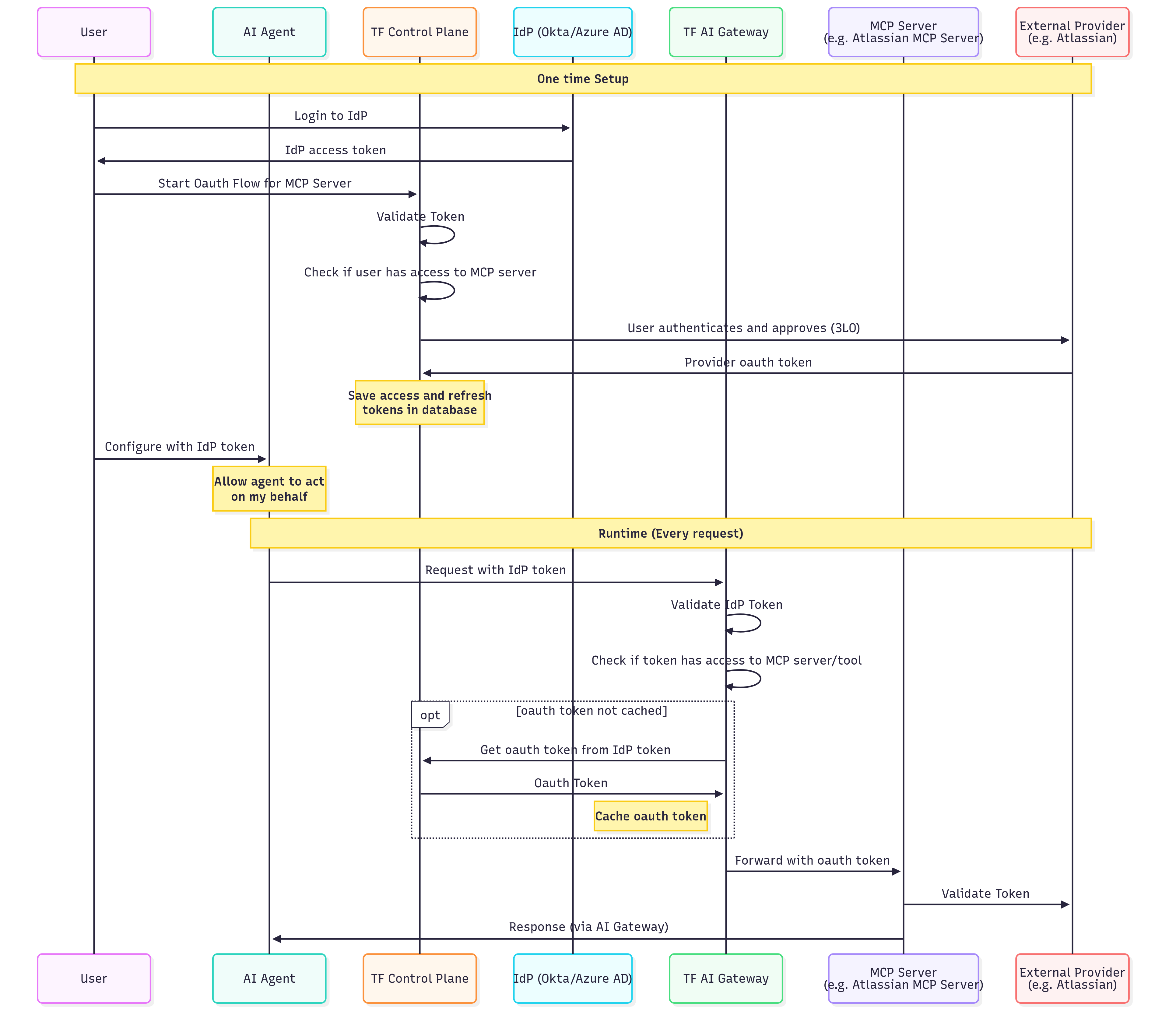 **One-Time Setup (what the user does):**
1. Sign in to your application, which authenticates the user with your identity provider.
2. Start the connection for the MCP server.
3. Approve the access request.
4. Authorize the upstream provider with their own account.
TrueFoundry stores the user's authorization, so they only do this once per provider.
**Runtime Flow (Every Request):**
| Step | Action | Description |
| ---- | ------------------------------ | ------------------------------------------------------------------------- |
| 1 | Agent → Gateway | AI Agent sends request with IdP token (inbound auth) |
| 2 | Gateway | Validates the IdP token using your SSO configuration |
| 3 | Gateway | Checks if the extracted user identity has access to the MCP server/tool |
| 4 | Gateway → Control Plane | (If not cached) Retrieves the user's OAuth token using their IdP identity |
| 5 | Gateway | Caches the OAuth token for performance |
| 6 | Gateway → MCP Server | Forwards request with user's OAuth token (outbound auth) |
| 7 | MCP Server → External Provider | Validates and processes the request |
| 8 | MCP Server → Agent | Returns response through the AI Gateway |
**Key differences from Scenario 1:**
* Users authenticate with your IdP, not TrueFoundry (different inbound auth)
* The AI Gateway validates your IdP tokens directly
* Useful for B2B SaaS applications with end-customer integrations
You can also use this method for internal developers if you prefer not to use TrueFoundry tokens and want to leverage your existing identity infrastructure.
**Inbound:** TrueFoundry API Key or Identity Provider Token | **Outbound:** No Auth / API Key (Shared or Individual)
**Use case:** Accessing MCP servers with shared credentials where individual user identity at the downstream service is not required.
This scenario is ideal for read-only access to shared resources, internal tools, or services that don't support per-user OAuth. For Amazon Bedrock AgentCore specifically, use [Scenario 4: AWS SigV4 outbound](#scenario-4-truefoundryidp-token--aws-sigv4-outbound) instead.
**One-Time Setup (what the user does):**
1. Sign in to your application, which authenticates the user with your identity provider.
2. Start the connection for the MCP server.
3. Approve the access request.
4. Authorize the upstream provider with their own account.
TrueFoundry stores the user's authorization, so they only do this once per provider.
**Runtime Flow (Every Request):**
| Step | Action | Description |
| ---- | ------------------------------ | ------------------------------------------------------------------------- |
| 1 | Agent → Gateway | AI Agent sends request with IdP token (inbound auth) |
| 2 | Gateway | Validates the IdP token using your SSO configuration |
| 3 | Gateway | Checks if the extracted user identity has access to the MCP server/tool |
| 4 | Gateway → Control Plane | (If not cached) Retrieves the user's OAuth token using their IdP identity |
| 5 | Gateway | Caches the OAuth token for performance |
| 6 | Gateway → MCP Server | Forwards request with user's OAuth token (outbound auth) |
| 7 | MCP Server → External Provider | Validates and processes the request |
| 8 | MCP Server → Agent | Returns response through the AI Gateway |
**Key differences from Scenario 1:**
* Users authenticate with your IdP, not TrueFoundry (different inbound auth)
* The AI Gateway validates your IdP tokens directly
* Useful for B2B SaaS applications with end-customer integrations
You can also use this method for internal developers if you prefer not to use TrueFoundry tokens and want to leverage your existing identity infrastructure.
**Inbound:** TrueFoundry API Key or Identity Provider Token | **Outbound:** No Auth / API Key (Shared or Individual)
**Use case:** Accessing MCP servers with shared credentials where individual user identity at the downstream service is not required.
This scenario is ideal for read-only access to shared resources, internal tools, or services that don't support per-user OAuth. For Amazon Bedrock AgentCore specifically, use [Scenario 4: AWS SigV4 outbound](#scenario-4-truefoundryidp-token--aws-sigv4-outbound) instead.
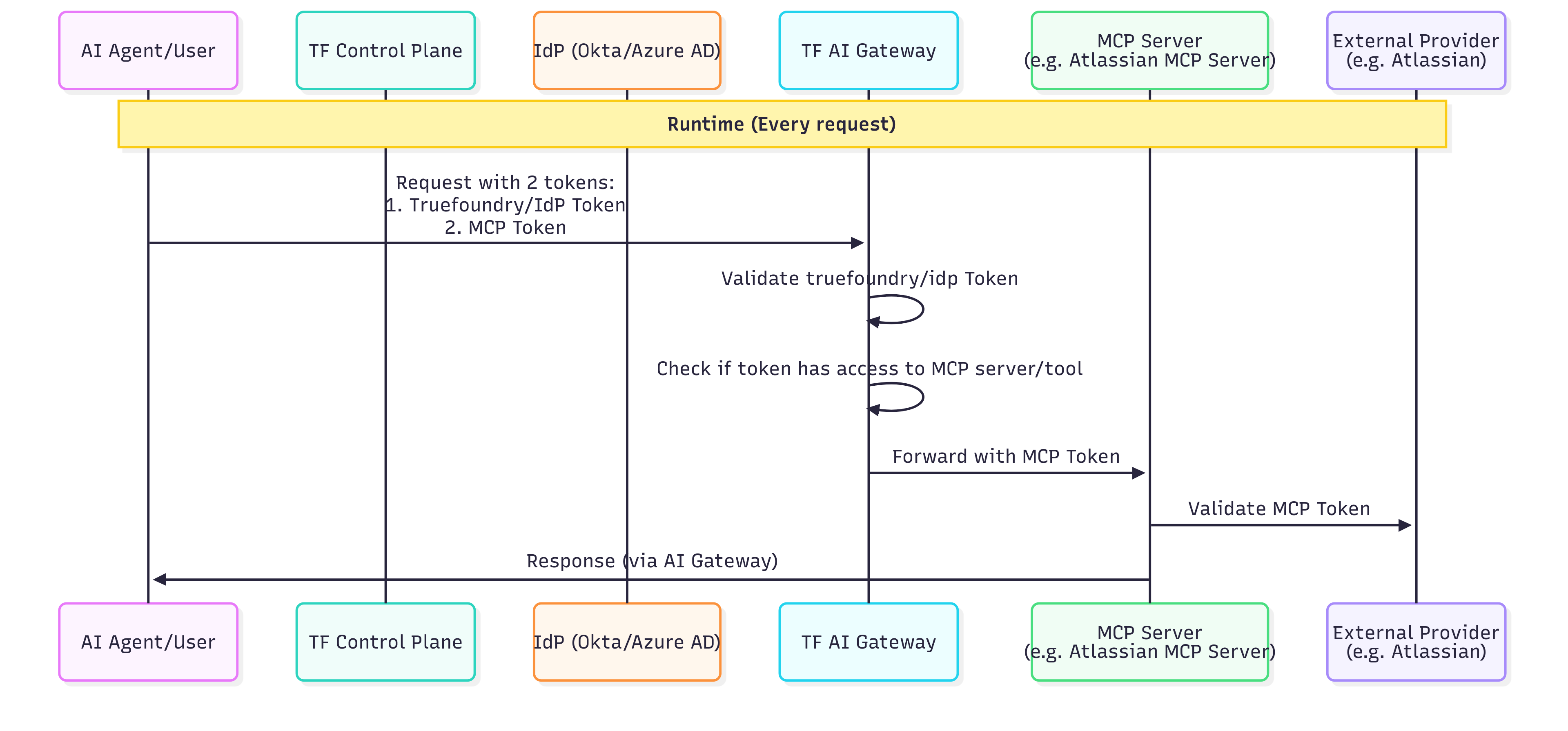 **Administrator Setup (One-Time):**
| Step | Action | Description |
| ---- | --------------------- | ----------------------------------------------------------------------------------- |
| 1 | Admin → Control Plane | Administrator registers the MCP server with static header authentication (outbound) |
| 2 | Admin | Configures the shared API key or bearer token in the MCP server settings |
| 3 | Admin | Defines which users/roles have access to this MCP server through RBAC policies |
The shared credentials are stored securely and never exposed to end users.
**Runtime Flow (Every Request):**
| Step | Action | Description |
| ---- | -------------------- | -------------------------------------------------------------------------------- |
| 1 | Agent → Gateway | AI Agent sends request with user's TrueFoundry or IdP token (inbound auth) |
| 2 | Gateway | Validates the user token |
| 3 | Gateway | Checks if the user has access to this MCP server (RBAC) |
| 4 | Gateway | Injects the shared credentials (static headers) into the request (outbound auth) |
| 5 | Gateway → MCP Server | Forwards request with shared service account credentials |
| 6 | MCP Server | Processes request using the shared credentials |
| 7 | MCP Server → Agent | Returns response through the AI Gateway |
**Security considerations:**
* All users share the same level of access to the downstream service
* Actions cannot be attributed to individual users at the downstream service level
* TrueFoundry's audit logs still track which user made each request at the AI Gateway level
**Inbound:** TrueFoundry API Key or Identity Provider Token | **Outbound:** AWS SigV4
**Use case:** Calling an Amazon Bedrock AgentCore runtime MCP endpoint that requires SigV4-signed requests.
Credentials are **shared** on the MCP server: either an access key ID + secret, or an IAM role ARN the gateway assumes. Prefer `tfy-secret://` refs.
**Administrator Setup (One-Time):**
| Step | Action | Description |
| ---- | --------------------- | ------------------------------------------------------------------------------------------------------------------------------------------------------------------------- |
| 1 | Admin → AWS | Create an IAM user/key **or** an IAM role with `bedrock-agentcore:InvokeAgentRuntime` on the runtime ARN (assumed-role also needs a trust policy for the AI Gateway role) |
| 2 | Admin → Control Plane | Register a remote MCP server with the AgentCore invoke URL and **AWS SigV4** auth (region + access key **or** assumed-role ARN) |
| 3 | Admin | Grant users/roles access to the MCP server via RBAC |
See [Register an AWS Bedrock AgentCore MCP Server](/docs/ai-gateway/mcp/mcp-server-agentcore-sigv4) for URL encoding, IAM, and field details.
**Runtime Flow (Every Request):**
| Step | Action | Description |
| ---- | ------------------- | -------------------------------------------------------------------------- |
| 1 | Agent → Gateway | AI Agent sends request with user's TrueFoundry or IdP token (inbound auth) |
| 2 | Gateway | Validates the user token and checks RBAC |
| 3 | Gateway | Resolves SigV4 credentials from the MCP server auth config |
| 4 | Gateway | Signs the upstream request (URL + body) with SigV4 for `bedrock-agentcore` |
| 5 | Gateway → AgentCore | Forwards the signed MCP JSON-RPC request |
| 6 | AgentCore → Agent | Returns the MCP response through the AI Gateway |
**Security considerations:**
* Downstream AgentCore sees the shared IAM principal (the access-key user or the assumed role), not the end-user identity
* TrueFoundry audit logs still attribute each call to the inbound user
* Region in the URL, ARN, and SigV4 region field must match or AWS returns 403
**Inbound:** TrueFoundry API Key or Identity Provider Token | **Outbound:** Token Passthrough
**Use case:** Accessing MCP servers that validate the same token used for Gateway authentication.
This scenario is for organizations where the MCP server itself can validate the user's TrueFoundry token or IdP JWT.
```mermaid theme={"dark"}
sequenceDiagram
participant User
participant IdP as Your IdP / TrueFoundry
participant Agent as AI Agent
participant Gateway as MCP Gateway
participant MCP as MCP Server
rect rgb(240, 248, 255)
Note over User, IdP: Initial Authentication (Inbound)
User->>IdP: 1. Authenticate
IdP-->>User: JWT Token (TrueFoundry or IdP)
end
rect rgb(245, 245, 245)
Note over Agent, MCP: Runtime Request Flow
User->>Agent: Request action
Agent->>Gateway: 2. Request + User's Token (Inbound Auth)
Gateway->>Gateway: 3. Validate token
Gateway->>Gateway: 4. Check RBAC permissions
Gateway->>MCP: 5. Forward request with same token (Outbound: Token Passthrough)
MCP->>MCP: 6. Validate token
MCP-->>Gateway: 7. Response
Gateway-->>Agent: Response
Agent-->>User: Result
end
```
**Setup Requirements:**
| Step | Action | Description |
| ---- | ---------------------- | ------------------------------------------------------------------------------------- |
| 1 | Configure Inbound Auth | Set up TrueFoundry API key or [Identity Provider token](#identity-provider-token) |
| 2 | Register MCP Server | Register the MCP server with Token Passthrough as outbound authentication |
| 3 | Configure MCP Server | Ensure the MCP server is configured to validate TrueFoundry tokens or your IdP's JWTs |
**Runtime Flow (Every Request):**
| Step | Action | Description |
| ---- | ---------------------- | -------------------------------------------------------------------------- |
| 1 | User → IdP/TrueFoundry | User authenticates and receives a token |
| 2 | Agent → Gateway | AI Agent sends request with user's token (inbound auth) |
| 3 | Gateway | Validates the token |
| 4 | Gateway | Checks if the user has access to this MCP server (RBAC) |
| 5 | Gateway → MCP Server | Forwards request with user's token unchanged (outbound: token passthrough) |
| 6 | MCP Server | Validates the token and processes the request |
| 7 | MCP Server → Agent | Returns response through the AI Gateway |
**When to use Token Passthrough:**
* Your MCP server can validate TrueFoundry tokens or your IdP's JWTs
* You want the MCP server to know the user's identity
* The MCP server makes authorization decisions based on token claims
**Inbound:** TrueFoundry API Key or Identity Provider Token | **Outbound:** Token Forwarding
**Use case:** The client has specific credentials for the MCP server that are different from the AI Gateway authentication token.
This scenario is useful when the MCP server requires its own authentication that cannot be managed by the AI Gateway (e.g., internal APIs with their own token systems).
```mermaid theme={"dark"}
sequenceDiagram
participant User
participant Agent as AI Agent
participant Gateway as MCP Gateway
participant MCP as MCP Server
rect rgb(245, 245, 245)
Note over Agent, MCP: Runtime Request Flow
User->>Agent: Request action
Agent->>Gateway: 1. Request + TrueFoundry Token (Inbound) + x-tfy-mcp-headers (Outbound)
Gateway->>Gateway: 2. Validate TrueFoundry token
Gateway->>Gateway: 3. Check RBAC permissions
Gateway->>Gateway: 4. Extract headers from x-tfy-mcp-headers
Gateway->>MCP: 5. Forward request with custom headers
MCP->>MCP: 6. Validate custom headers
MCP-->>Gateway: 7. Response
Gateway-->>Agent: Response
Agent-->>User: Result
end
```
**Setup Requirements:**
| Step | Action | Description |
| ---- | ---------------------- | ----------------------------------------------------------------------------------------------------------------------------------------------------------- |
| 1 | Configure Inbound Auth | Set up TrueFoundry API key or Identity Provider token |
| 2 | Register MCP Server | Register the MCP server (no outbound auth configured, or Token Forwarding mode) |
| 3 | Client Configuration | Client must include `x-tfy-mcp-headers` with MCP server credentials (see [Overriding auth with x-tfy-mcp-headers](#overriding-auth-with-x-tfy-mcp-headers)) |
**Runtime Flow (Every Request):**
| Step | Action | Description |
| ---- | -------------------- | ----------------------------------------------------------------------- |
| 1 | Agent → Gateway | AI Agent sends request with TrueFoundry/IdP token + `x-tfy-mcp-headers` |
| 2 | Gateway | Validates the inbound token |
| 3 | Gateway | Checks if the user has access to this MCP server (RBAC) |
| 4 | Gateway | Extracts headers from `x-tfy-mcp-headers` |
| 5 | Gateway → MCP Server | Forwards request with extracted headers (outbound auth) |
| 6 | MCP Server | Validates the custom headers and processes the request |
| 7 | MCP Server → Agent | Returns response through the AI Gateway |
**When to use Token Forwarding:**
* The MCP server has its own authentication system separate from Gateway authentication
* You need to pass user-specific tokens that the client manages
* The MCP server requires additional metadata alongside authentication
**Inbound:** Identity Provider Token (Okta SSO access token) | **Outbound:** OAuth2 (Token Exchange / On-Behalf-Of)
**Use case:** Your downstream API must distinguish "an agent acting on behalf of a user" from "the user directly", and the user's broad SSO token should never leave the gateway perimeter.
Instead of forwarding the inbound token, the AI Gateway exchanges it on every request — via [RFC 8693 Token Exchange](https://www.rfc-editor.org/rfc/rfc8693.html) against your Okta org — for a fresh, narrowly-scoped On-Behalf-Of (OBO) token, and sends **that** upstream. In the exchanged token, `sub`/`uid` stay the **original user**, while `cid` becomes the **service app** that performed the exchange (Okta conveys the actor via `cid` rather than a nested RFC 8693 `act` claim), and `iss`/`aud`/`scp` flip to the service-side authorization server, its audience, and the API scopes requested in the exchange. If you need a standard nested `act` claim with the agent as a first-class identity, use ID-JAG (Cross App Access) instead.
```mermaid theme={"dark"}
sequenceDiagram
participant Agent as Agent / MCP Client
participant Gateway as AI Gateway
participant Okta
participant MCP as Upstream MCP Server
Agent->>Gateway: MCP request + Bearer SSO access token
Gateway->>Gateway: Validate JWT (Identity Provider)
**Administrator Setup (One-Time):**
| Step | Action | Description |
| ---- | --------------------- | ----------------------------------------------------------------------------------- |
| 1 | Admin → Control Plane | Administrator registers the MCP server with static header authentication (outbound) |
| 2 | Admin | Configures the shared API key or bearer token in the MCP server settings |
| 3 | Admin | Defines which users/roles have access to this MCP server through RBAC policies |
The shared credentials are stored securely and never exposed to end users.
**Runtime Flow (Every Request):**
| Step | Action | Description |
| ---- | -------------------- | -------------------------------------------------------------------------------- |
| 1 | Agent → Gateway | AI Agent sends request with user's TrueFoundry or IdP token (inbound auth) |
| 2 | Gateway | Validates the user token |
| 3 | Gateway | Checks if the user has access to this MCP server (RBAC) |
| 4 | Gateway | Injects the shared credentials (static headers) into the request (outbound auth) |
| 5 | Gateway → MCP Server | Forwards request with shared service account credentials |
| 6 | MCP Server | Processes request using the shared credentials |
| 7 | MCP Server → Agent | Returns response through the AI Gateway |
**Security considerations:**
* All users share the same level of access to the downstream service
* Actions cannot be attributed to individual users at the downstream service level
* TrueFoundry's audit logs still track which user made each request at the AI Gateway level
**Inbound:** TrueFoundry API Key or Identity Provider Token | **Outbound:** AWS SigV4
**Use case:** Calling an Amazon Bedrock AgentCore runtime MCP endpoint that requires SigV4-signed requests.
Credentials are **shared** on the MCP server: either an access key ID + secret, or an IAM role ARN the gateway assumes. Prefer `tfy-secret://` refs.
**Administrator Setup (One-Time):**
| Step | Action | Description |
| ---- | --------------------- | ------------------------------------------------------------------------------------------------------------------------------------------------------------------------- |
| 1 | Admin → AWS | Create an IAM user/key **or** an IAM role with `bedrock-agentcore:InvokeAgentRuntime` on the runtime ARN (assumed-role also needs a trust policy for the AI Gateway role) |
| 2 | Admin → Control Plane | Register a remote MCP server with the AgentCore invoke URL and **AWS SigV4** auth (region + access key **or** assumed-role ARN) |
| 3 | Admin | Grant users/roles access to the MCP server via RBAC |
See [Register an AWS Bedrock AgentCore MCP Server](/docs/ai-gateway/mcp/mcp-server-agentcore-sigv4) for URL encoding, IAM, and field details.
**Runtime Flow (Every Request):**
| Step | Action | Description |
| ---- | ------------------- | -------------------------------------------------------------------------- |
| 1 | Agent → Gateway | AI Agent sends request with user's TrueFoundry or IdP token (inbound auth) |
| 2 | Gateway | Validates the user token and checks RBAC |
| 3 | Gateway | Resolves SigV4 credentials from the MCP server auth config |
| 4 | Gateway | Signs the upstream request (URL + body) with SigV4 for `bedrock-agentcore` |
| 5 | Gateway → AgentCore | Forwards the signed MCP JSON-RPC request |
| 6 | AgentCore → Agent | Returns the MCP response through the AI Gateway |
**Security considerations:**
* Downstream AgentCore sees the shared IAM principal (the access-key user or the assumed role), not the end-user identity
* TrueFoundry audit logs still attribute each call to the inbound user
* Region in the URL, ARN, and SigV4 region field must match or AWS returns 403
**Inbound:** TrueFoundry API Key or Identity Provider Token | **Outbound:** Token Passthrough
**Use case:** Accessing MCP servers that validate the same token used for Gateway authentication.
This scenario is for organizations where the MCP server itself can validate the user's TrueFoundry token or IdP JWT.
```mermaid theme={"dark"}
sequenceDiagram
participant User
participant IdP as Your IdP / TrueFoundry
participant Agent as AI Agent
participant Gateway as MCP Gateway
participant MCP as MCP Server
rect rgb(240, 248, 255)
Note over User, IdP: Initial Authentication (Inbound)
User->>IdP: 1. Authenticate
IdP-->>User: JWT Token (TrueFoundry or IdP)
end
rect rgb(245, 245, 245)
Note over Agent, MCP: Runtime Request Flow
User->>Agent: Request action
Agent->>Gateway: 2. Request + User's Token (Inbound Auth)
Gateway->>Gateway: 3. Validate token
Gateway->>Gateway: 4. Check RBAC permissions
Gateway->>MCP: 5. Forward request with same token (Outbound: Token Passthrough)
MCP->>MCP: 6. Validate token
MCP-->>Gateway: 7. Response
Gateway-->>Agent: Response
Agent-->>User: Result
end
```
**Setup Requirements:**
| Step | Action | Description |
| ---- | ---------------------- | ------------------------------------------------------------------------------------- |
| 1 | Configure Inbound Auth | Set up TrueFoundry API key or [Identity Provider token](#identity-provider-token) |
| 2 | Register MCP Server | Register the MCP server with Token Passthrough as outbound authentication |
| 3 | Configure MCP Server | Ensure the MCP server is configured to validate TrueFoundry tokens or your IdP's JWTs |
**Runtime Flow (Every Request):**
| Step | Action | Description |
| ---- | ---------------------- | -------------------------------------------------------------------------- |
| 1 | User → IdP/TrueFoundry | User authenticates and receives a token |
| 2 | Agent → Gateway | AI Agent sends request with user's token (inbound auth) |
| 3 | Gateway | Validates the token |
| 4 | Gateway | Checks if the user has access to this MCP server (RBAC) |
| 5 | Gateway → MCP Server | Forwards request with user's token unchanged (outbound: token passthrough) |
| 6 | MCP Server | Validates the token and processes the request |
| 7 | MCP Server → Agent | Returns response through the AI Gateway |
**When to use Token Passthrough:**
* Your MCP server can validate TrueFoundry tokens or your IdP's JWTs
* You want the MCP server to know the user's identity
* The MCP server makes authorization decisions based on token claims
**Inbound:** TrueFoundry API Key or Identity Provider Token | **Outbound:** Token Forwarding
**Use case:** The client has specific credentials for the MCP server that are different from the AI Gateway authentication token.
This scenario is useful when the MCP server requires its own authentication that cannot be managed by the AI Gateway (e.g., internal APIs with their own token systems).
```mermaid theme={"dark"}
sequenceDiagram
participant User
participant Agent as AI Agent
participant Gateway as MCP Gateway
participant MCP as MCP Server
rect rgb(245, 245, 245)
Note over Agent, MCP: Runtime Request Flow
User->>Agent: Request action
Agent->>Gateway: 1. Request + TrueFoundry Token (Inbound) + x-tfy-mcp-headers (Outbound)
Gateway->>Gateway: 2. Validate TrueFoundry token
Gateway->>Gateway: 3. Check RBAC permissions
Gateway->>Gateway: 4. Extract headers from x-tfy-mcp-headers
Gateway->>MCP: 5. Forward request with custom headers
MCP->>MCP: 6. Validate custom headers
MCP-->>Gateway: 7. Response
Gateway-->>Agent: Response
Agent-->>User: Result
end
```
**Setup Requirements:**
| Step | Action | Description |
| ---- | ---------------------- | ----------------------------------------------------------------------------------------------------------------------------------------------------------- |
| 1 | Configure Inbound Auth | Set up TrueFoundry API key or Identity Provider token |
| 2 | Register MCP Server | Register the MCP server (no outbound auth configured, or Token Forwarding mode) |
| 3 | Client Configuration | Client must include `x-tfy-mcp-headers` with MCP server credentials (see [Overriding auth with x-tfy-mcp-headers](#overriding-auth-with-x-tfy-mcp-headers)) |
**Runtime Flow (Every Request):**
| Step | Action | Description |
| ---- | -------------------- | ----------------------------------------------------------------------- |
| 1 | Agent → Gateway | AI Agent sends request with TrueFoundry/IdP token + `x-tfy-mcp-headers` |
| 2 | Gateway | Validates the inbound token |
| 3 | Gateway | Checks if the user has access to this MCP server (RBAC) |
| 4 | Gateway | Extracts headers from `x-tfy-mcp-headers` |
| 5 | Gateway → MCP Server | Forwards request with extracted headers (outbound auth) |
| 6 | MCP Server | Validates the custom headers and processes the request |
| 7 | MCP Server → Agent | Returns response through the AI Gateway |
**When to use Token Forwarding:**
* The MCP server has its own authentication system separate from Gateway authentication
* You need to pass user-specific tokens that the client manages
* The MCP server requires additional metadata alongside authentication
**Inbound:** Identity Provider Token (Okta SSO access token) | **Outbound:** OAuth2 (Token Exchange / On-Behalf-Of)
**Use case:** Your downstream API must distinguish "an agent acting on behalf of a user" from "the user directly", and the user's broad SSO token should never leave the gateway perimeter.
Instead of forwarding the inbound token, the AI Gateway exchanges it on every request — via [RFC 8693 Token Exchange](https://www.rfc-editor.org/rfc/rfc8693.html) against your Okta org — for a fresh, narrowly-scoped On-Behalf-Of (OBO) token, and sends **that** upstream. In the exchanged token, `sub`/`uid` stay the **original user**, while `cid` becomes the **service app** that performed the exchange (Okta conveys the actor via `cid` rather than a nested RFC 8693 `act` claim), and `iss`/`aud`/`scp` flip to the service-side authorization server, its audience, and the API scopes requested in the exchange. If you need a standard nested `act` claim with the agent as a first-class identity, use ID-JAG (Cross App Access) instead.
```mermaid theme={"dark"}
sequenceDiagram
participant Agent as Agent / MCP Client
participant Gateway as AI Gateway
participant Okta
participant MCP as Upstream MCP Server
Agent->>Gateway: MCP request + Bearer SSO access token
Gateway->>Gateway: Validate JWT (Identity Provider)
Resolve to Virtual Account (cid mapping) + RBAC
Gateway->>Okta: RFC 8693 token exchange (service authz server)
subject_token = inbound token
Okta-->>Gateway: OBO access token (sub = user, cid = service app)
Gateway->>MCP: Forward request with OBO Bearer token
MCP-->>Gateway: Response
Gateway-->>Agent: Response
```
The current implementation assumes the **inbound token is issued by the same Okta org** as the outbound exchange target — the inbound access token is used directly as the RFC 8693 `subject_token`.
**Setup Requirements:**
| Step | Action | Description |
| ---- | ----------------- | ------------------------------------------------------------------------------------------------------------------------------------------------------------------------------------------------------------------------------------------------------------------------------------------------------- |
| 1 | Okta setup | Two authorization servers (user + service) with a trusted-server link, a native app for user sign-in, and an API Services app with the Token Exchange grant. See [Okta setup for On-Behalf-Of (OBO) token exchange](/docs/ai-gateway/mcp/okta-app-setup#okta-setup-for-on-behalf-of-obo-token-exchange) |
| 2 | Identity Provider | Validates the inbound SSO access token against the **user** authorization server, resolving to a virtual account via the `cid` claim |
| 3 | Virtual Account | Carries the identity provider mapping (value = the native app's client ID) and the MCP server permission |
| 4 | MCP Server | `auth_data` with `grant_type: token_exchange`, pointing at the **service** authorization server |
```yaml MCP server theme={"dark"}
name: okta-obo-mcp
type: mcp-server/remote
description: Internal API fronted by Okta OBO token exchange
url: https://your-mcp-server.example.com/mcp
collaborators:
- subject: user:admin@example.com
role_id: mcp-server-manager
auth_data:
type: oauth2
grant_type: token_exchange
provider: okta
token_url: https://your-org.okta.com/oauth2//v1/token
audience: service
client_id:
client_secret:
scopes:
- api:access:read
- api:access:write
```
```yaml Identity provider theme={"dark"}
name: okta-sso
type: identity-provider
provider: okta
config:
type: jwt
issuer: https://your-org.okta.com/oauth2/
jwks_uri: https://your-org.okta.com/oauth2//v1/keys
audiences:
- user
resolve_token_to:
virtual_account:
name_claim: cid
slug_claim: sub
```
```yaml Virtual account theme={"dark"}
name: okta-sso-va
type: virtual-account
permissions:
- resource_fqn: :mcp-server:okta-obo-mcp
resource_type: mcp-server
role_id: mcp-server-user
identity_provider_mapping:
- identity_provider: okta-sso
value:
```
The `audience` field is sent as the RFC 8693 `audience` parameter and becomes the `aud` claim of the OBO token; `scopes` must be allowed by the service authorization server's access policy. The gateway automatically sets `grant_type=urn:ietf:params:oauth:grant-type:token-exchange` and `subject_token_type=urn:ietf:params:oauth:token-type:access_token`. Store `client_secret` as a [TrueFoundry Secret](/docs/manage-secrets) FQN rather than a raw value.
Two verified gotchas:
* Set the identity provider's **Name Claim** to `cid`, not `client_id` — Okta access tokens carry the requesting app's client ID in a claim named `cid`; a `client_id` claim does not exist.
* Without the virtual account's identity provider mapping (value = the token's `cid`), the gateway returns `401 Unauthorized: Forbidden: Invalid token` **even though JWT validation succeeds**. If your token validates but you still get 401, check this mapping first.
**Caller contract and test:** send the user's Okta SSO access token as the inbound bearer — there is no interactive consent step for this grant type (ignore any "Connect Now" prompt in the UI; the exchange happens server-side per request):
```bash theme={"dark"}
curl -sS -X POST "https:///mcp/okta-obo-mcp/server" \
-H "Authorization: Bearer " \
-H "Content-Type: application/json" \
-H "Accept: application/json, text/event-stream" \
-d '{"jsonrpc":"2.0","id":1,"method":"initialize","params":{"protocolVersion":"2025-03-26","capabilities":{},"clientInfo":{"name":"curl-test","version":"1.0"}}}'
```
To see exactly what the upstream receives, point the MCP server's `url` at an echo endpoint (e.g. `https://postman-echo.com/post`) during testing. The echoed request carries the freshly exchanged OBO token:
```json theme={"dark"}
{
"iss": "https://your-org.okta.com/oauth2/",
"aud": "service",
"cid": "",
"uid": "",
"sub": "jane@example.com",
"scp": ["api:access:read", "api:access:write"],
"iat": 1783063802,
"exp": 1783067402
}
```
**Token lifecycle:**
* **No refresh token** — Okta's exchange response contains only an access token (typically 1 hour).
* **Cached per resolved subject** — sequential and concurrent requests from the same user reuse the same OBO token (same `jti`); no duplicate exchanges.
* **Re-exchange on expiry** — the next request after expiry triggers a fresh exchange using that request's inbound token, so callers must always present a currently valid SSO access token. An expired or missing inbound token fails with a 401 before any exchange is attempted.
- **401 "Invalid token" although the JWT is valid** — the token could not be resolved to a TrueFoundry identity: check the virtual account mapping (`value` must equal the token's `cid`), the `name_claim: cid` setting, and that `issuer`/`audiences` exactly match the token's `iss`/`aud`.
- **The Okta exchange itself fails** — verify the Token Exchange grant is enabled on both the API Services app and the service authorization server's policy rule, DPoP is unchecked on the service app, the service authorization server lists the user authorization server under **Trusted Servers**, and every requested scope is allowed by the policy. Reproduce with the manual curl in the [Okta setup runbook](/docs/ai-gateway/mcp/okta-app-setup#okta-setup-for-on-behalf-of-obo-token-exchange).
- **`invalid_client` from the token endpoint** — Okta accepts client credentials in the form body (`client_secret_post`) or an `Authorization: Basic` header (`client_secret_basic`), but rejects requests carrying **both**. Also confirm the credentials belong to the API Services app (not the native app).
- **Requests fail after \~1 hour** — an expired OBO token re-exchanges automatically; an expired **inbound** SSO token requires the caller to re-authenticate with Okta.
***
## FAQ
Use this quick reference to pick between OAuth2 and Token Passthrough:
| Question | If yes → |
| ---------------------------------------------------------------------------------- | ------------------------------- |
| Does the MCP server connect to third-party services (GitHub, Slack, Google, etc.)? | **OAuth2 (Authorization Code)** |
| Is this a server-to-server flow with no user interaction? | **OAuth2 (Client Credentials)** |
| Does the MCP server validate the same token used for inbound auth? | **Token Passthrough** |
For full descriptions of each model, see the [Outbound Authentication](#outbound-authentication) reference table.
* **Token Passthrough**: The AI Gateway forwards the **same token** used for inbound authentication to the MCP server. The MCP server must be able to validate TrueFoundry tokens or your IdP tokens.
* **Token Forwarding**: The client provides **separate credentials** for the MCP server via `x-tfy-mcp-headers`. These are different from the inbound auth token and are forwarded as-is to the MCP server.
Use Token Passthrough when your MCP server trusts your existing identity provider. Use Token Forwarding when the MCP server has its own authentication system that doesn't recognize your inbound tokens.
Yes. The AI Gateway validates any supported inbound auth method (TrueFoundry API Key, Identity Provider Token, or TrueFoundry OAuth). Access control is then applied based on the authenticated identity. This means you can have some users authenticate with TrueFoundry tokens and others with IdP tokens, as long as both have appropriate permissions.
Not directly. Virtual Accounts don't have per-user OAuth tokens.
**Options:**
1. Use a TrueFoundry PAT or a JWT from a configured [Identity Provider](/docs/platform/identity-providers) for per-user OAuth
2. Configure the MCP server with Static Header (shared) auth instead
[Auth0 Organizations](https://auth0.com/docs/manage-users/organizations) model each business customer as a separate tenant, and add an organization claim to every JWT issued in an Organization context. The issuer and JWKS URI remain your Auth0 tenant's standard endpoints - they do **not** change per Organization, so a single Identity Provider configuration covers all your Organizations.
1. Navigate to **Settings > Security & Access > Identity Providers**, and click **+** (Add Identity Provider).
2. Select **Auth0** in the **Provider** dropdown and fill in the issuer, allowed audiences, and JWKS URI.
3. Under **Resolve Token To > Virtual Account**, set the **Name Claim** and the **Organization Claim**.
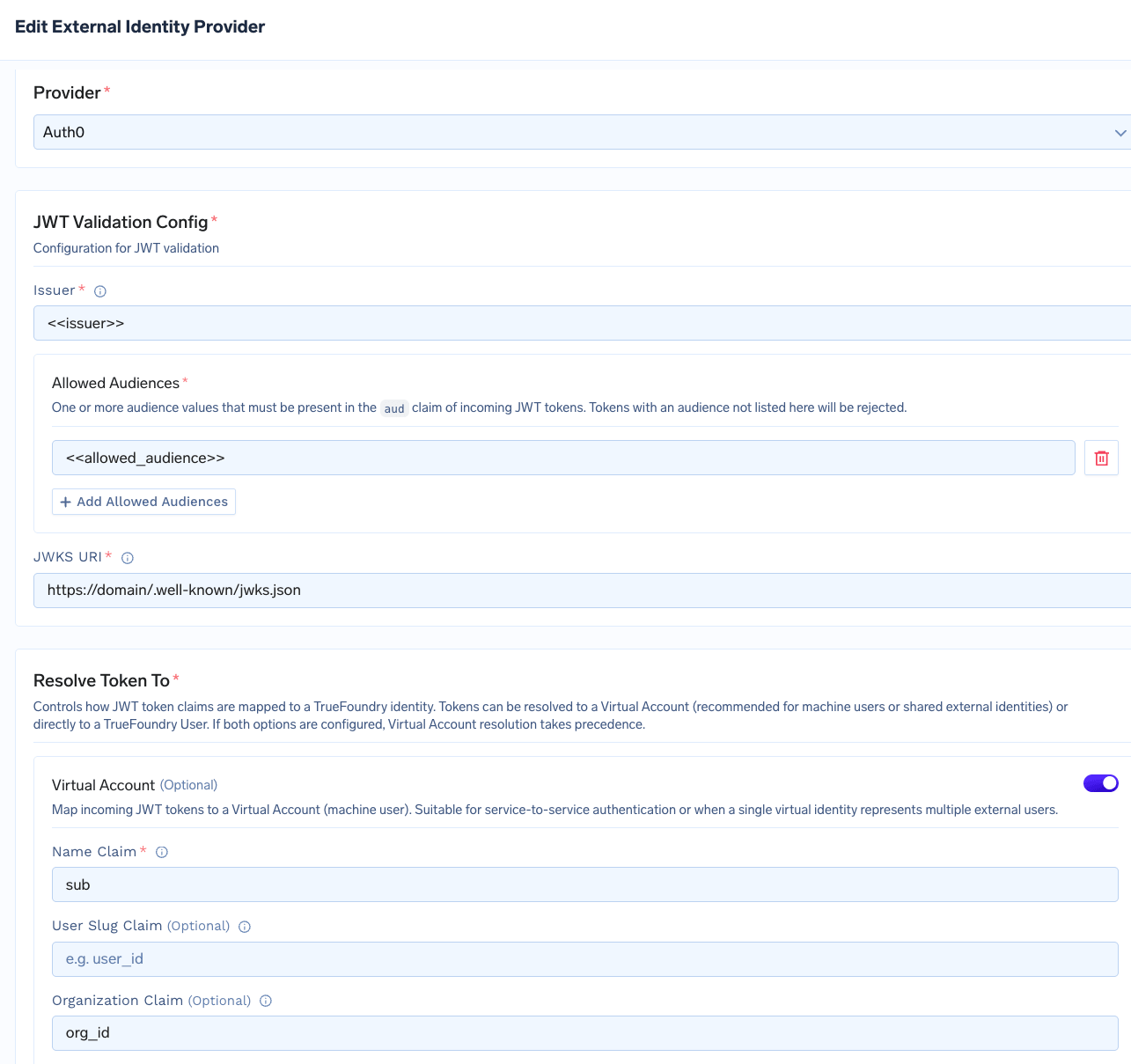 | UI label | Manifest field | Description |
| ---------------------- | ----------------------------------------------------- | ---------------------------------------------------------------------------------------- |
| **Provider** | `provider` | Set to `auth0` to enable Auth0-specific token handling. |
| **Name Claim** | `resolve_token_to.virtual_account.name_claim` | The JWT claim that identifies the caller - typically `sub` for an Auth0 M2M application. |
| **Organization Claim** | `resolve_token_to.virtual_account.organization_claim` | The JWT claim carrying the Auth0 Organization identifier - typically `org_id`. |
For the full field reference, see [Identity Providers](/docs/platform/identity-providers).
On the MCP server's **Auth Data** form:
1. Choose **OAuth2 > Client Credentials**.
2. Enter the **Token URL**, **Client ID**, and **Client Secret** from your Auth0 application.
3. Set **OAuth Provider** to **Auth0** and enable **Use Organization**.
4. Under **Additional Token Parameters**, add `audience` set to the API identifier of the protected resource the MCP server fronts.
The AI Gateway will attach the inbound `organization` parameter when calling the Auth0 token endpoint.
| UI label | Manifest field | Description |
| ---------------------- | ----------------------------------------------------- | ---------------------------------------------------------------------------------------- |
| **Provider** | `provider` | Set to `auth0` to enable Auth0-specific token handling. |
| **Name Claim** | `resolve_token_to.virtual_account.name_claim` | The JWT claim that identifies the caller - typically `sub` for an Auth0 M2M application. |
| **Organization Claim** | `resolve_token_to.virtual_account.organization_claim` | The JWT claim carrying the Auth0 Organization identifier - typically `org_id`. |
For the full field reference, see [Identity Providers](/docs/platform/identity-providers).
On the MCP server's **Auth Data** form:
1. Choose **OAuth2 > Client Credentials**.
2. Enter the **Token URL**, **Client ID**, and **Client Secret** from your Auth0 application.
3. Set **OAuth Provider** to **Auth0** and enable **Use Organization**.
4. Under **Additional Token Parameters**, add `audience` set to the API identifier of the protected resource the MCP server fronts.
The AI Gateway will attach the inbound `organization` parameter when calling the Auth0 token endpoint.
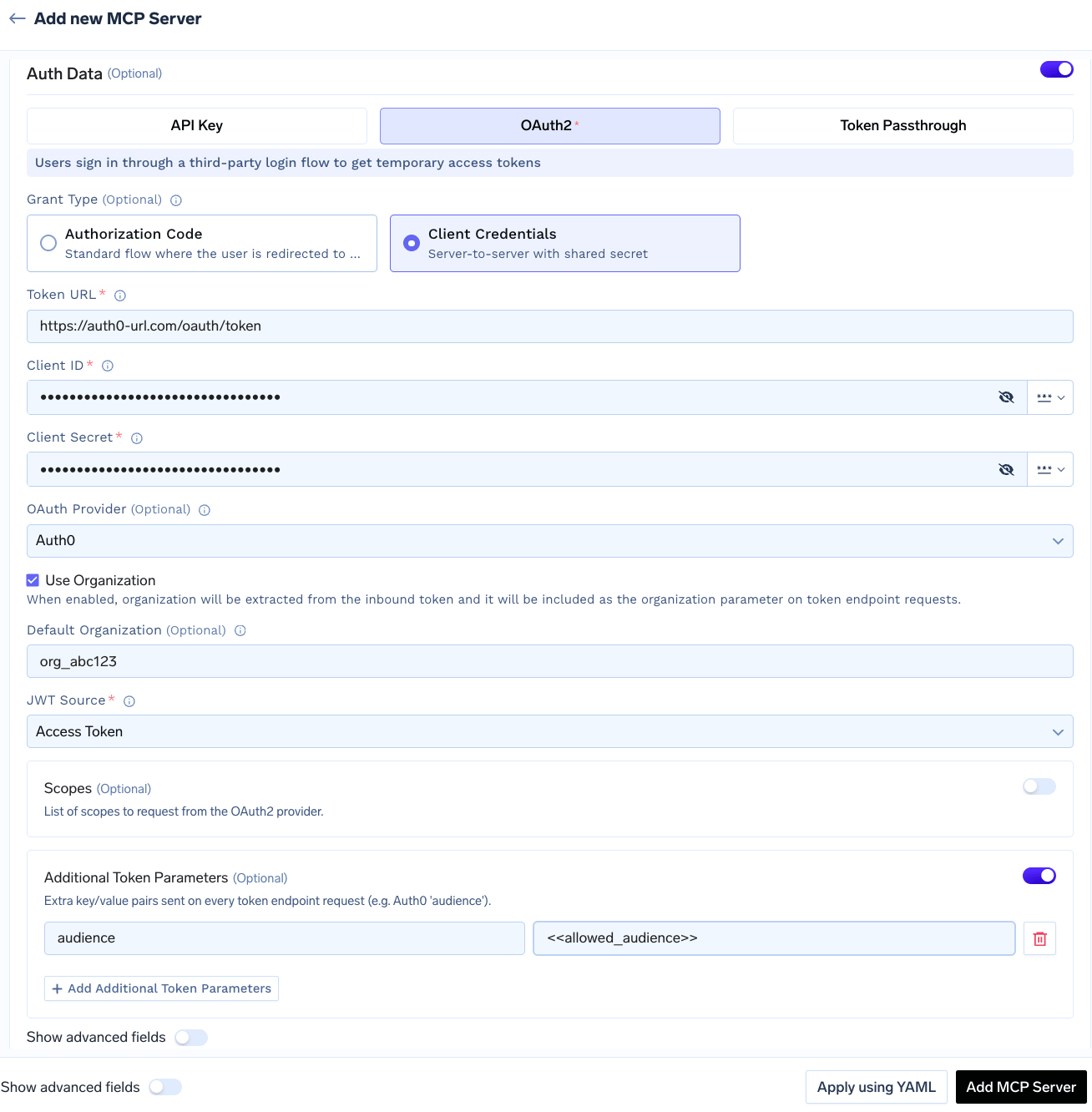 | UI label | Manifest field | Description |
| -------------------------------------------- | ---------------------------------- | -------------------------------------------------------------------------------------------------------------------------------------------------------- |
| **OAuth Provider** | `provider` | Set to `auth0` to enable Auth0-specific token request behavior. |
| **Use Organization** | `use_organization` | When enabled, the AI Gateway extracts organization from the inbound token and attaches it as the `organization` parameter on the token endpoint request. |
| **Default Organization** | `default_organization` | Used when no organization is present in the inbound token. |
| **Additional Token Parameters** > `audience` | `additional_token_params.audience` | API identifier of the protected resource. Required by Auth0 for Organization-aware tokens. |
With **Use Organization** enabled, the per-request organization is always derived from the inbound token. Set **Default Organization** only when the MCP server must also be reachable by callers whose inbound token does not carry organization claim - for example, internal service accounts.
Pass the Auth0-issued access token as the inbound `Authorization` header, exactly as in the [Identity Provider Token](#inbound-authentication) flow.
**What the AI Gateway does on each request:**
1. Resolves the token to a virtual account.
2. Applies that virtual account's permissions for access control.
3. If the MCP server uses outbound Auth0, forwards the same Organization to the downstream token endpoint.
```python theme={"dark"}
from fastmcp import Client
from fastmcp.client.transports import StreamableHttpTransport
# Auth0 access token issued for an Organization, e.g.:
# { "iss": "https://.auth0.com/", "sub": "abc123@clients",
# "org_id": "org_AbCdEf123456" }
auth0_jwt = "eyJhbGciOiJSUzI1NiIs..."
transport = StreamableHttpTransport(
url="{GATEWAY_BASE_URL}/mcp//server",
headers={"Authorization": f"Bearer {auth0_jwt}"}
)
async with Client(transport) as client:
result = await client.call_tool("tool_name", {"arg": "value"})
```
* Verify your authentication token is valid and not expired
* Check that you have access to the MCP server (see collaborators in UI)
* For Virtual Accounts, ensure the account has the required permissions
* For OAuth-protected servers, the user may need to complete the OAuth consent flow first — see [Handling OAuth-protected MCP servers](#handling-oauth-protected-mcp-servers)
* List available tools using `client.list_tools()` to confirm what's exposed
* Tool names are case-sensitive
* The MCP server may have been updated — refresh the tool list
***
## Revoking all tokens
Tenant admins can revoke every stored credential on an MCP server in a single action. This action is only visible to tenant admins; MCP Server Managers do not see it.
To revoke all tokens:
1. Navigate to the MCP server detail page and open the three-dot menu next to **Edit**.
2. Click **Revoke all tokens**.
3. Review the confirmation dialog and click **Revoke All**.
| UI label | Manifest field | Description |
| -------------------------------------------- | ---------------------------------- | -------------------------------------------------------------------------------------------------------------------------------------------------------- |
| **OAuth Provider** | `provider` | Set to `auth0` to enable Auth0-specific token request behavior. |
| **Use Organization** | `use_organization` | When enabled, the AI Gateway extracts organization from the inbound token and attaches it as the `organization` parameter on the token endpoint request. |
| **Default Organization** | `default_organization` | Used when no organization is present in the inbound token. |
| **Additional Token Parameters** > `audience` | `additional_token_params.audience` | API identifier of the protected resource. Required by Auth0 for Organization-aware tokens. |
With **Use Organization** enabled, the per-request organization is always derived from the inbound token. Set **Default Organization** only when the MCP server must also be reachable by callers whose inbound token does not carry organization claim - for example, internal service accounts.
Pass the Auth0-issued access token as the inbound `Authorization` header, exactly as in the [Identity Provider Token](#inbound-authentication) flow.
**What the AI Gateway does on each request:**
1. Resolves the token to a virtual account.
2. Applies that virtual account's permissions for access control.
3. If the MCP server uses outbound Auth0, forwards the same Organization to the downstream token endpoint.
```python theme={"dark"}
from fastmcp import Client
from fastmcp.client.transports import StreamableHttpTransport
# Auth0 access token issued for an Organization, e.g.:
# { "iss": "https://.auth0.com/", "sub": "abc123@clients",
# "org_id": "org_AbCdEf123456" }
auth0_jwt = "eyJhbGciOiJSUzI1NiIs..."
transport = StreamableHttpTransport(
url="{GATEWAY_BASE_URL}/mcp//server",
headers={"Authorization": f"Bearer {auth0_jwt}"}
)
async with Client(transport) as client:
result = await client.call_tool("tool_name", {"arg": "value"})
```
* Verify your authentication token is valid and not expired
* Check that you have access to the MCP server (see collaborators in UI)
* For Virtual Accounts, ensure the account has the required permissions
* For OAuth-protected servers, the user may need to complete the OAuth consent flow first — see [Handling OAuth-protected MCP servers](#handling-oauth-protected-mcp-servers)
* List available tools using `client.list_tools()` to confirm what's exposed
* Tool names are case-sensitive
* The MCP server may have been updated — refresh the tool list
***
## Revoking all tokens
Tenant admins can revoke every stored credential on an MCP server in a single action. This action is only visible to tenant admins; MCP Server Managers do not see it.
To revoke all tokens:
1. Navigate to the MCP server detail page and open the three-dot menu next to **Edit**.
2. Click **Revoke all tokens**.
3. Review the confirmation dialog and click **Revoke All**.
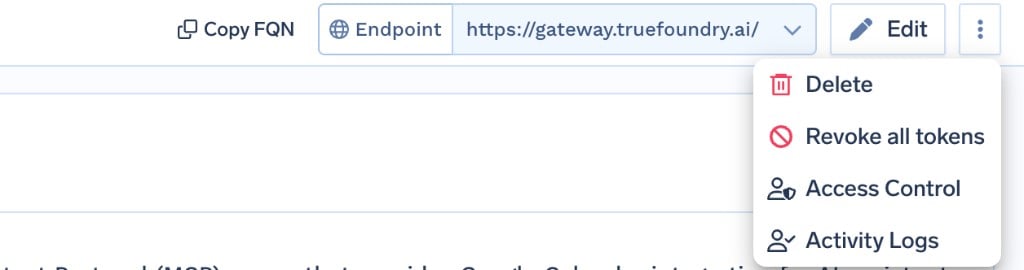 Revoking all tokens:
* Deletes every [auth override](/docs/ai-gateway/mcp/mcp-server-auth-overrides) and stored OAuth token for all users and virtual accounts on the server.
* Takes effect immediately — the AI Gateway stops honouring the cached credentials on the next request.
* Is recorded as an entry in the server's **Activity Logs**.
This action is irreversible. After revocation, every user must re-complete the OAuth consent flow (for OAuth2 servers) or re-add their auth override (for API Key servers) before they can use the server again.
Tokens are deleted from the AI Gateway only — they are not revoked at the upstream OAuth provider. To invalidate them upstream as well, revoke the grants in the provider's own console.
Revoking all tokens:
* Deletes every [auth override](/docs/ai-gateway/mcp/mcp-server-auth-overrides) and stored OAuth token for all users and virtual accounts on the server.
* Takes effect immediately — the AI Gateway stops honouring the cached credentials on the next request.
* Is recorded as an entry in the server's **Activity Logs**.
This action is irreversible. After revocation, every user must re-complete the OAuth consent flow (for OAuth2 servers) or re-add their auth override (for API Key servers) before they can use the server again.
Tokens are deleted from the AI Gateway only — they are not revoked at the upstream OAuth provider. To invalidate them upstream as well, revoke the grants in the provider's own console.