> ## Documentation Index
> Fetch the complete documentation index at: https://www.truefoundry.com/llms.txt
> Use this file to discover all available pages before exploring further.
# Virtual MCP Server
> Combine tools from multiple MCP servers into a single curated virtual MCP server without extra deployments.
## What is Virtual MCP Server?
The Virtual MCP Server enables you to combine tools from multiple MCP servers into a single, curated MCP server that your application can connect to.
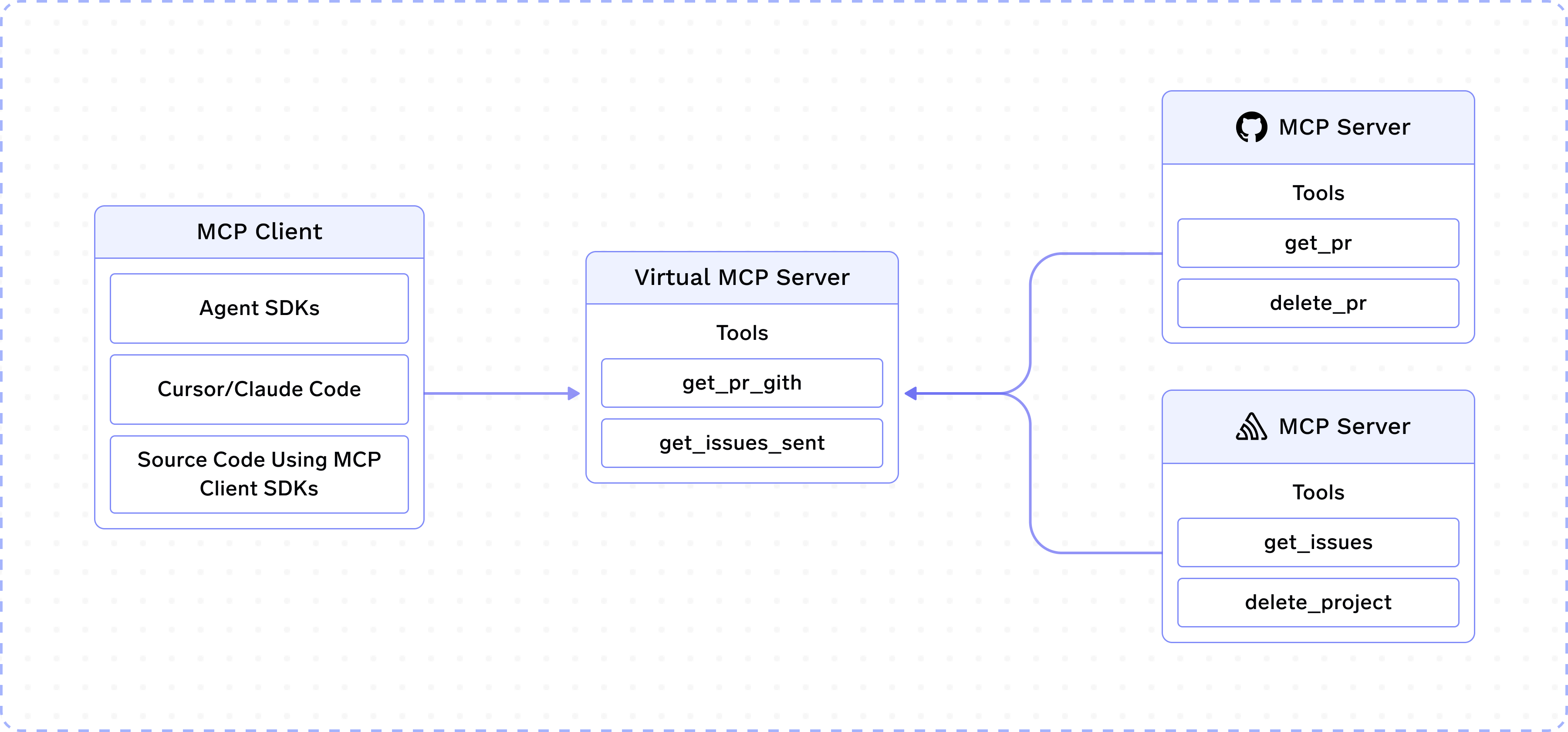 Suppose you have integrated MCP servers for GitHub and Slack on TrueFoundry. A team in your company is working on an Agent that requires access to these two MCP servers. But you do not want to expose tools like `delete_project`, `delete_pr`, etc.
As the name suggests, Virtual MCP Server allows you to create a new MCP server by taking a subset of safe tools from GitHub and Slack MCP servers. This new Virtual MCP server can be accessed like any other remote MCP server and does not require a deployment.
## How to create a Virtual MCP Server?
When you create or edit a Virtual MCP Server, set **Name** as the unique identifier (used in URLs and API references) and optionally set **Display Name**. Display Name is the human-readable label shown throughout the MCP registry — including the MCP servers page and the tool selector — instead of the internal name. If you omit it, **Name** is shown.
## How are tool names decided?
Tools in a Virtual MCP Server keep their original name with a short random suffix appended (`_`, for example `create_issue_a1b2c3`). This suffix handles collisions when multiple underlying MCP servers expose a tool with the same name, so each one stays unique within the virtual server. We avoid prefixing with the MCP server name (e.g. `github-create_issue`) because the MCP spec recommends keeping tool names within 64 characters, and a long server name can consume most of that budget. Since the tool name is the most important signal for the LLM when choosing a tool, preserving it in full while appending a short suffix keeps names both meaningful and unique.
## Best Effort Mode
By default, if any source MCP server backing the virtual server is unreachable or fails (for example, while listing tools), requests to the virtual server fail as a whole. Enabling the **Best Effort Mode** toggle when creating or editing the virtual server changes this behavior: the virtual server continues with the source servers that are available, so clients still get tools from the healthy servers, while tools from the failed servers are simply unavailable until those servers recover. The toggle is off by default.
## Frequently Asked Questions
You can use `x-tfy-mcp-headers` to pass custom headers, which will be passed to the remote MCP servers backing the virtual server.
**For MCP Gateway (direct MCP server access):**
```python theme={"dark"}
import json
from fastmcp import Client
from fastmcp.client.transports import StreamableHttpTransport
tfy_token = "Bearer ****"
# Use the remote server identifier as the key (MCP Gateway format)
extra_headers = json.dumps(
{
# backend-group/sentry is the remote MCP server backing the
# backend-group/restricted-sentry virtual server.
"backend-group/sentry": {"Authorization": "Bearer ****"},
}
)
url = "https://llm-gateway.truefoundry.com/mcp-server/backend-group/restricted-sentry/server"
async def main():
transport = StreamableHttpTransport(
url,
headers={"x-tfy-mcp-headers": extra_headers},
auth=f"Bearer {tfy_token}",
)
async with Client(transport=transport) as client:
tools = await client.list_tools()
```
The Virtual MCP server is managed by the MCP Gateway and does not require a new deployment.
For now, only listing and calling tools are allowed. See [MCP Protocol Support](/docs/ai-gateway/mcp/mcp-protocol-support#gateway-implemented-servers) for the full feature and transport matrix.
Suppose you have integrated MCP servers for GitHub and Slack on TrueFoundry. A team in your company is working on an Agent that requires access to these two MCP servers. But you do not want to expose tools like `delete_project`, `delete_pr`, etc.
As the name suggests, Virtual MCP Server allows you to create a new MCP server by taking a subset of safe tools from GitHub and Slack MCP servers. This new Virtual MCP server can be accessed like any other remote MCP server and does not require a deployment.
## How to create a Virtual MCP Server?
When you create or edit a Virtual MCP Server, set **Name** as the unique identifier (used in URLs and API references) and optionally set **Display Name**. Display Name is the human-readable label shown throughout the MCP registry — including the MCP servers page and the tool selector — instead of the internal name. If you omit it, **Name** is shown.
## How are tool names decided?
Tools in a Virtual MCP Server keep their original name with a short random suffix appended (`_`, for example `create_issue_a1b2c3`). This suffix handles collisions when multiple underlying MCP servers expose a tool with the same name, so each one stays unique within the virtual server. We avoid prefixing with the MCP server name (e.g. `github-create_issue`) because the MCP spec recommends keeping tool names within 64 characters, and a long server name can consume most of that budget. Since the tool name is the most important signal for the LLM when choosing a tool, preserving it in full while appending a short suffix keeps names both meaningful and unique.
## Best Effort Mode
By default, if any source MCP server backing the virtual server is unreachable or fails (for example, while listing tools), requests to the virtual server fail as a whole. Enabling the **Best Effort Mode** toggle when creating or editing the virtual server changes this behavior: the virtual server continues with the source servers that are available, so clients still get tools from the healthy servers, while tools from the failed servers are simply unavailable until those servers recover. The toggle is off by default.
## Frequently Asked Questions
You can use `x-tfy-mcp-headers` to pass custom headers, which will be passed to the remote MCP servers backing the virtual server.
**For MCP Gateway (direct MCP server access):**
```python theme={"dark"}
import json
from fastmcp import Client
from fastmcp.client.transports import StreamableHttpTransport
tfy_token = "Bearer ****"
# Use the remote server identifier as the key (MCP Gateway format)
extra_headers = json.dumps(
{
# backend-group/sentry is the remote MCP server backing the
# backend-group/restricted-sentry virtual server.
"backend-group/sentry": {"Authorization": "Bearer ****"},
}
)
url = "https://llm-gateway.truefoundry.com/mcp-server/backend-group/restricted-sentry/server"
async def main():
transport = StreamableHttpTransport(
url,
headers={"x-tfy-mcp-headers": extra_headers},
auth=f"Bearer {tfy_token}",
)
async with Client(transport=transport) as client:
tools = await client.list_tools()
```
The Virtual MCP server is managed by the MCP Gateway and does not require a new deployment.
For now, only listing and calling tools are allowed. See [MCP Protocol Support](/docs/ai-gateway/mcp/mcp-protocol-support#gateway-implemented-servers) for the full feature and transport matrix.