> ## Documentation Index
> Fetch the complete documentation index at: https://www.truefoundry.com/llms.txt
> Use this file to discover all available pages before exploring further.
# Metadata Validation Guardrail
> Enforce the presence and values of request metadata keys using TrueFoundry's built-in Metadata Validation guardrail.
This guide explains how to use TrueFoundry's built-in **Metadata Validation** guardrail to enforce that requests carry the metadata your organization requires, with the values you expect.
## What is Metadata Validation?
Metadata Validation is a built-in TrueFoundry guardrail that checks the custom metadata sent with a request against a set of rules you define. It runs directly within the AI Gateway without requiring external API calls, providing fast and cost-effective validation.
Metadata is passed to the AI Gateway using the `X-TFY-METADATA` header (see [Log Custom Metadata](/docs/ai-gateway/log-custom-metadata)). This guardrail lets you require that certain keys are always present, constrain their values to a regex pattern or a fixed list, and optionally reject any keys you have not explicitly allowed.
Metadata Validation only runs on the **LLM Input** hook (`beforeRequestHook`). When attached to any other hook (LLM Output, MCP Pre Tool, MCP Post Tool), it passes through without performing any checks.
### Key Features
1. **Required Keys**: Ensure specific metadata keys are always present in the request.
2. **Value Constraints**: Validate a key's value against a regex pattern or restrict it to a fixed set of allowed values.
3. **Unknown Key Control**: Optionally reject any metadata key that is not explicitly declared in your rules.
## Adding Metadata Validation Guardrail
To add Metadata Validation to your TrueFoundry setup, follow these steps:
Go to the AI Gateway dashboard and navigate to the **Guardrails** section.
Create a new guardrails group or select an existing one where you want to add the Metadata Validation guardrail.
Click on **Add Guardrail** and select **Metadata Validation** from the TrueFoundry Guardrails section.
Fill in the configuration form with your desired settings (see Configuration Options below). Toggle **Allow unknown keys** and add a rule for each metadata key you want to enforce.
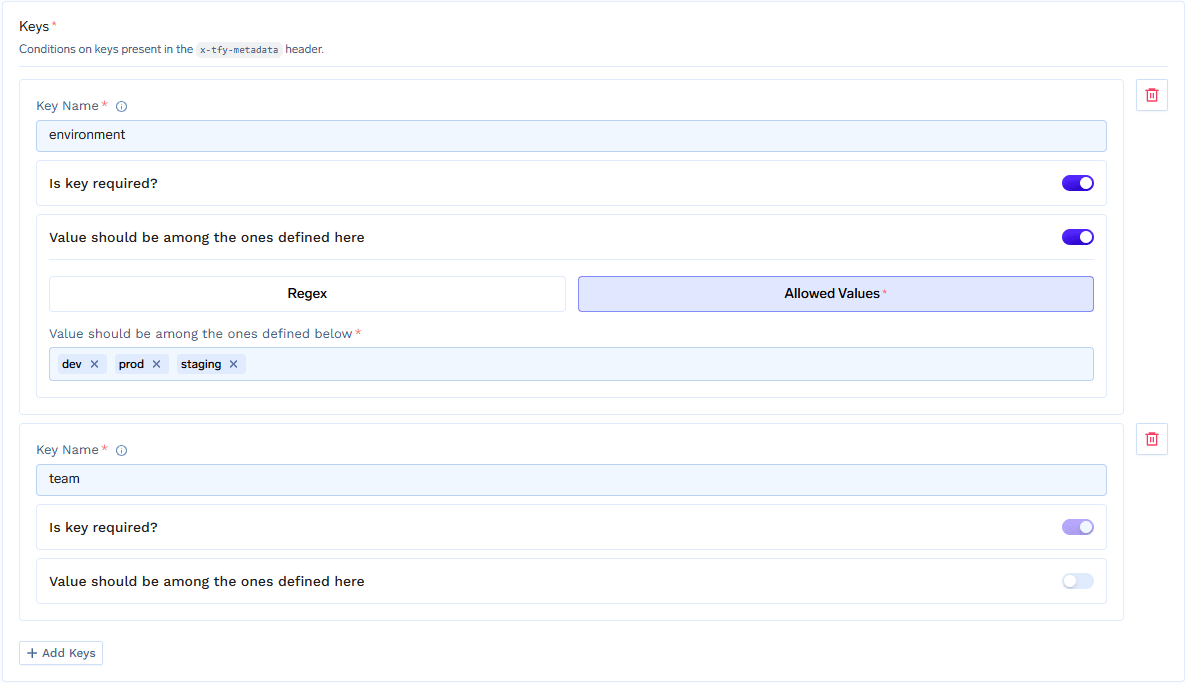 Click **Save** to add the guardrail to your group.
## Configuration Options
| Parameter | Default | Description |
| ---------------------- | ----------------------------- | ---------------------------------------------------------------------------------------------------- |
| **Name** | Required | Unique identifier for this guardrail |
| **Operation** | `validate` | Metadata Validation can only be used for validation |
| **Enforcing Strategy** | `enforce_but_ignore_on_error` | `enforce`, `enforce_but_ignore_on_error`, or `audit` |
| **Allow unknown keys** | `true` | When on, metadata keys not listed in the rules pass through. When off, only listed keys are accepted |
| **Keys** | None | The per-key rules applied to specific metadata fields (see Key Rules below) |
See [Guardrails Overview](/docs/ai-gateway/guardrails-overview#operation-modes) for details on Operation Modes and Enforcing Strategy.
## Key Rules
Each entry under **Keys** maps a metadata key name to a rule. There are two kinds of rules:
### Key must exist
Only the presence of the key is checked — any value passes. Once configured, the key must be present in the request metadata.
### Value must match
Validates the key's value, with an optional requirement that the key be present:
| Field | Default | Description |
| -------------------- | -------- | --------------------------------------------------------------------------------------------------------------------------- |
| **Required** | `true` | When on, the key must be present. When off, the key is optional, but if present its value must still satisfy the constraint |
| **Value constraint** | Required | How the value is validated — either a regex pattern or a fixed list of allowed values |
The value constraint is one of:
| Constraint | Description |
| ------------------ | ----------------------------------------------------------------------------------- |
| **Regex** | The value must match the provided regular expression |
| **Allowed values** | The value must exactly match one of the listed values. Comparison is case-sensitive |
## How It Works
When a request reaches the LLM Input hook, the guardrail evaluates the request metadata as follows:
1. If **Allow unknown keys** is off, every metadata key that is not declared in your rules raises an `unknown_key` violation. Keys injected by the AI Gateway itself (for example `subject`, `subjectType`, `tfy_agent_name`, and any default gateway metadata) are exempt from this check.
2. For each declared key rule:
* **Key must exist**: a missing key raises a `missing_required` violation.
* **Value must match (required)**: a missing key raises a `missing_required` violation.
* **Value must match (regex)**: if the key is present, its value must match the pattern, otherwise a `pattern_mismatch` violation is raised. An invalid regex pattern raises an `invalid_regex_pattern` violation.
* **Value must match (allowed values)**: if the key is present, its value must be in the allowed set, otherwise a `value_not_allowed` violation is raised.
3. If any violations are found, the verdict fails. The response handling then depends on the configured **Enforcing Strategy**.
### Violation Reasons
| Reason | Meaning |
| ----------------------- | ------------------------------------------------------------------------------------------------------ |
| `missing_required` | A required key was not present in the request metadata |
| `pattern_mismatch` | The key's value did not match the configured regex pattern |
| `value_not_allowed` | The key's value was not in the configured allowed values list |
| `unknown_key` | A metadata key was present that is not declared in the rules (only when **Allow unknown keys** is off) |
| `invalid_regex_pattern` | The configured regex pattern itself was invalid |
## Examples
Consider a guardrail with **Allow unknown keys** turned off and the following key rules:
* `environment` — Value must match, allowed values: `prod`, `staging`, `dev`
* `customer_id` — Value must match, regex: `^cust_[0-9]+$`
* `team` — Key must exist
**Metadata**:
```json theme={"dark"}
{"environment": "prod", "customer_id": "cust_12345", "team": "billing"}
```
**Result**: Allowed — all keys are present and valid, and no unknown keys are sent.
**Metadata**:
```json theme={"dark"}
{"environment": "prod", "customer_id": "cust_12345"}
```
**Result**: Blocked — `team:missing_required` (the `team` key is missing).
**Metadata**:
```json theme={"dark"}
{"environment": "production", "customer_id": "cust_12345", "team": "billing"}
```
**Result**: Blocked — `environment:value_not_allowed` (`production` is not in `[prod, staging, dev]`).
**Metadata**:
```json theme={"dark"}
{"environment": "dev", "customer_id": "12345", "team": "billing"}
```
**Result**: Blocked — `customer_id:pattern_mismatch` (`12345` does not match `^cust_[0-9]+$`).
**Metadata**:
```json theme={"dark"}
{"environment": "dev", "customer_id": "cust_1", "team": "billing", "debug": "true"}
```
**Result**: Blocked — `debug:unknown_key` (the `debug` key is not declared and unknown keys are not allowed).
## Sending Metadata
Metadata is sent using the `X-TFY-METADATA` header as a JSON object of string key-value pairs:
```bash theme={"dark"}
curl -X POST "{GATEWAY_BASE_URL}/chat/completions" \
-H "Authorization: Bearer YOUR_API_KEY" \
-H "Content-Type: application/json" \
-H 'X-TFY-METADATA: {"environment":"prod","customer_id":"cust_12345","team":"billing"}' \
-H 'X-TFY-GUARDRAILS: {"llm_input_guardrails":["my-guardrail-group/metadata-validation"],"llm_output_guardrails":[]}' \
-d '{
"model": "openai-main/gpt-4o-mini",
"messages": [
{"role": "user", "content": "Hello"}
]
}'
```
See [Log Custom Metadata](/docs/ai-gateway/log-custom-metadata) for how to attach metadata using the OpenAI, LangChain, and Node.js SDKs.
## Use Cases
| Scenario | Configuration |
| ----------------------------------- | ------------------------------------------------------------------------------------------------------------ |
| **Mandatory cost-attribution tags** | Require keys like `team` or `customer_id` so every request can be attributed in analytics |
| **Restrict environment values** | Constrain `environment` to an allowed list (`prod`, `staging`, `dev`) to prevent typos and unexpected values |
| **Enforce ID formats** | Use a regex to ensure identifiers such as `customer_id` follow your organization's format |
| **Lock down metadata** | Turn off **Allow unknown keys** to reject any metadata field that is not explicitly approved |
## Example use cases
When you run more than one gateway against the same control plane — for example a **dev** gateway and a **prod** gateway — you may want to lock down the prod gateway so only production applications can call it, and a dev application that points at it is rejected.
You can enforce this with Metadata Validation, without changing any application code, by combining two pieces of metadata the AI Gateway already provides:
* **The caller's environment** comes from [virtual account tags](/docs/ai-gateway/request-headers#automatic-metadata-injection). Tagging a virtual account with `env: prod` means every request made with that account's token carries `env: prod`.
* **The AI Gateway's environment** comes from [default gateway metadata](/docs/platform/deploy-control-plane-faq#how-do-you-add-default-metadata-to-all-requests-passing-via-the-gateway). Each gateway stamps every request that passes through it with its own value, for example `tfy_gateway_region: PROD`.
A [guardrail rule](/docs/ai-gateway/guardrails-configuration) then matches on the AI Gateway's stamp (`tfy_gateway_region`) and applies a Metadata Validation guardrail that requires the caller's `env` to be the matching value. Because the rule only fires on the AI Gateway whose stamp it matches, the prod-environment guardrail runs only on the prod gateway:
| Caller (virtual account tag) | Gateway (stamped value) | Result |
| ---------------------------- | ----------------------------------------- | ------- |
| Prod app — `env: prod` | Prod gateway — `tfy_gateway_region: PROD` | Allowed |
| Dev app — `env: dev` | Prod gateway — `tfy_gateway_region: PROD` | Blocked |
Add a tag to every [virtual account](/docs/platform/virtual-account-management): set `env: prod` on the accounts used by production applications and `env: dev` on the ones used by dev applications. These tags are injected as metadata on every request made with that account's token.
Set [`DEFAULT_GATEWAY_METADATA`](/docs/platform/deploy-control-plane-faq#how-do-you-add-default-metadata-to-all-requests-passing-via-the-gateway) on each gateway plane so it tags every request that passes through it. On the **prod** gateway plane's values file:
```yaml theme={"dark"}
tfy-llm-gateway:
env:
DEFAULT_GATEWAY_METADATA: '{"tfy_gateway_region":"PROD"}'
```
On the **dev** gateway plane's values file:
```yaml theme={"dark"}
tfy-llm-gateway:
env:
DEFAULT_GATEWAY_METADATA: '{"tfy_gateway_region":"DEV"}'
```
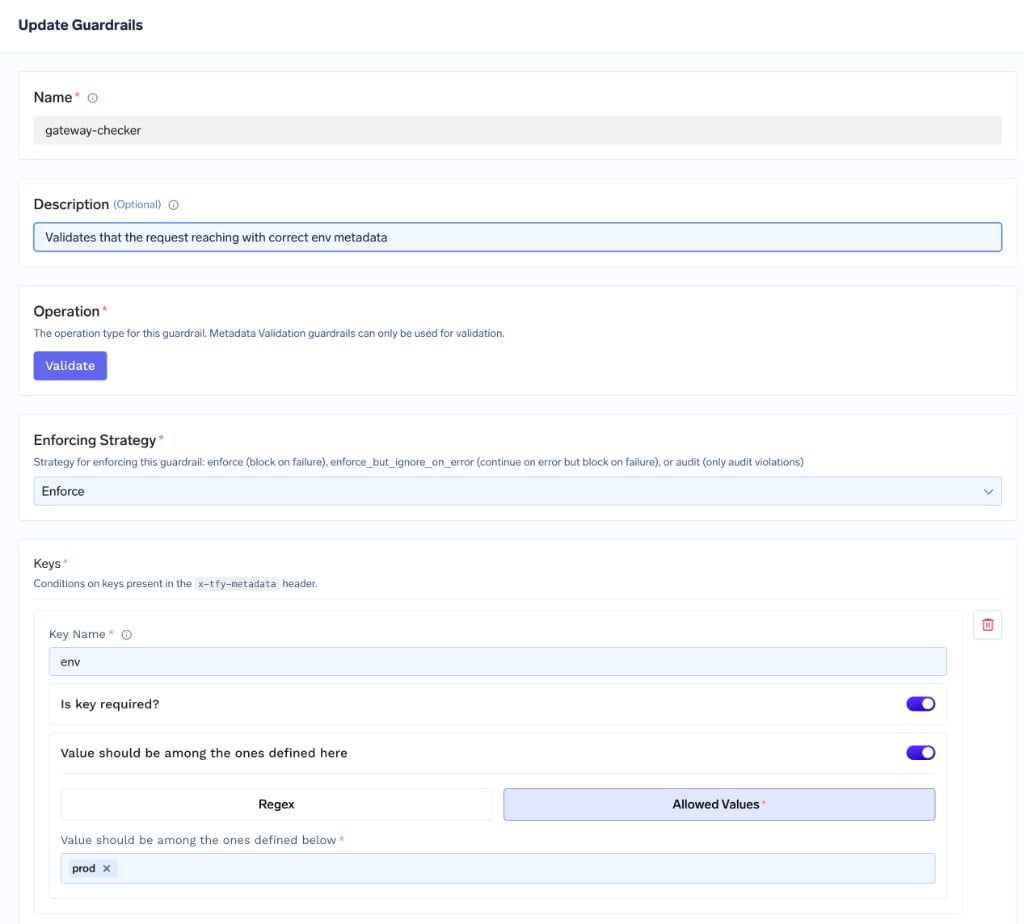
Add a Metadata Validation guardrail (for example `gateway-checker`) with a single key rule:
* **Key Name**: `env`
* **Is key required?**: on
* **Value should be among the ones defined here**: on, with **Allowed Values**: `prod`
Set the **Enforcing Strategy** to **Enforce** so non-matching requests are blocked. This guardrail blocks any request whose `env` is not `prod`.
Click **Save** to add the guardrail to your group.
## Configuration Options
| Parameter | Default | Description |
| ---------------------- | ----------------------------- | ---------------------------------------------------------------------------------------------------- |
| **Name** | Required | Unique identifier for this guardrail |
| **Operation** | `validate` | Metadata Validation can only be used for validation |
| **Enforcing Strategy** | `enforce_but_ignore_on_error` | `enforce`, `enforce_but_ignore_on_error`, or `audit` |
| **Allow unknown keys** | `true` | When on, metadata keys not listed in the rules pass through. When off, only listed keys are accepted |
| **Keys** | None | The per-key rules applied to specific metadata fields (see Key Rules below) |
See [Guardrails Overview](/docs/ai-gateway/guardrails-overview#operation-modes) for details on Operation Modes and Enforcing Strategy.
## Key Rules
Each entry under **Keys** maps a metadata key name to a rule. There are two kinds of rules:
### Key must exist
Only the presence of the key is checked — any value passes. Once configured, the key must be present in the request metadata.
### Value must match
Validates the key's value, with an optional requirement that the key be present:
| Field | Default | Description |
| -------------------- | -------- | --------------------------------------------------------------------------------------------------------------------------- |
| **Required** | `true` | When on, the key must be present. When off, the key is optional, but if present its value must still satisfy the constraint |
| **Value constraint** | Required | How the value is validated — either a regex pattern or a fixed list of allowed values |
The value constraint is one of:
| Constraint | Description |
| ------------------ | ----------------------------------------------------------------------------------- |
| **Regex** | The value must match the provided regular expression |
| **Allowed values** | The value must exactly match one of the listed values. Comparison is case-sensitive |
## How It Works
When a request reaches the LLM Input hook, the guardrail evaluates the request metadata as follows:
1. If **Allow unknown keys** is off, every metadata key that is not declared in your rules raises an `unknown_key` violation. Keys injected by the AI Gateway itself (for example `subject`, `subjectType`, `tfy_agent_name`, and any default gateway metadata) are exempt from this check.
2. For each declared key rule:
* **Key must exist**: a missing key raises a `missing_required` violation.
* **Value must match (required)**: a missing key raises a `missing_required` violation.
* **Value must match (regex)**: if the key is present, its value must match the pattern, otherwise a `pattern_mismatch` violation is raised. An invalid regex pattern raises an `invalid_regex_pattern` violation.
* **Value must match (allowed values)**: if the key is present, its value must be in the allowed set, otherwise a `value_not_allowed` violation is raised.
3. If any violations are found, the verdict fails. The response handling then depends on the configured **Enforcing Strategy**.
### Violation Reasons
| Reason | Meaning |
| ----------------------- | ------------------------------------------------------------------------------------------------------ |
| `missing_required` | A required key was not present in the request metadata |
| `pattern_mismatch` | The key's value did not match the configured regex pattern |
| `value_not_allowed` | The key's value was not in the configured allowed values list |
| `unknown_key` | A metadata key was present that is not declared in the rules (only when **Allow unknown keys** is off) |
| `invalid_regex_pattern` | The configured regex pattern itself was invalid |
## Examples
Consider a guardrail with **Allow unknown keys** turned off and the following key rules:
* `environment` — Value must match, allowed values: `prod`, `staging`, `dev`
* `customer_id` — Value must match, regex: `^cust_[0-9]+$`
* `team` — Key must exist
**Metadata**:
```json theme={"dark"}
{"environment": "prod", "customer_id": "cust_12345", "team": "billing"}
```
**Result**: Allowed — all keys are present and valid, and no unknown keys are sent.
**Metadata**:
```json theme={"dark"}
{"environment": "prod", "customer_id": "cust_12345"}
```
**Result**: Blocked — `team:missing_required` (the `team` key is missing).
**Metadata**:
```json theme={"dark"}
{"environment": "production", "customer_id": "cust_12345", "team": "billing"}
```
**Result**: Blocked — `environment:value_not_allowed` (`production` is not in `[prod, staging, dev]`).
**Metadata**:
```json theme={"dark"}
{"environment": "dev", "customer_id": "12345", "team": "billing"}
```
**Result**: Blocked — `customer_id:pattern_mismatch` (`12345` does not match `^cust_[0-9]+$`).
**Metadata**:
```json theme={"dark"}
{"environment": "dev", "customer_id": "cust_1", "team": "billing", "debug": "true"}
```
**Result**: Blocked — `debug:unknown_key` (the `debug` key is not declared and unknown keys are not allowed).
## Sending Metadata
Metadata is sent using the `X-TFY-METADATA` header as a JSON object of string key-value pairs:
```bash theme={"dark"}
curl -X POST "{GATEWAY_BASE_URL}/chat/completions" \
-H "Authorization: Bearer YOUR_API_KEY" \
-H "Content-Type: application/json" \
-H 'X-TFY-METADATA: {"environment":"prod","customer_id":"cust_12345","team":"billing"}' \
-H 'X-TFY-GUARDRAILS: {"llm_input_guardrails":["my-guardrail-group/metadata-validation"],"llm_output_guardrails":[]}' \
-d '{
"model": "openai-main/gpt-4o-mini",
"messages": [
{"role": "user", "content": "Hello"}
]
}'
```
See [Log Custom Metadata](/docs/ai-gateway/log-custom-metadata) for how to attach metadata using the OpenAI, LangChain, and Node.js SDKs.
## Use Cases
| Scenario | Configuration |
| ----------------------------------- | ------------------------------------------------------------------------------------------------------------ |
| **Mandatory cost-attribution tags** | Require keys like `team` or `customer_id` so every request can be attributed in analytics |
| **Restrict environment values** | Constrain `environment` to an allowed list (`prod`, `staging`, `dev`) to prevent typos and unexpected values |
| **Enforce ID formats** | Use a regex to ensure identifiers such as `customer_id` follow your organization's format |
| **Lock down metadata** | Turn off **Allow unknown keys** to reject any metadata field that is not explicitly approved |
## Example use cases
When you run more than one gateway against the same control plane — for example a **dev** gateway and a **prod** gateway — you may want to lock down the prod gateway so only production applications can call it, and a dev application that points at it is rejected.
You can enforce this with Metadata Validation, without changing any application code, by combining two pieces of metadata the AI Gateway already provides:
* **The caller's environment** comes from [virtual account tags](/docs/ai-gateway/request-headers#automatic-metadata-injection). Tagging a virtual account with `env: prod` means every request made with that account's token carries `env: prod`.
* **The AI Gateway's environment** comes from [default gateway metadata](/docs/platform/deploy-control-plane-faq#how-do-you-add-default-metadata-to-all-requests-passing-via-the-gateway). Each gateway stamps every request that passes through it with its own value, for example `tfy_gateway_region: PROD`.
A [guardrail rule](/docs/ai-gateway/guardrails-configuration) then matches on the AI Gateway's stamp (`tfy_gateway_region`) and applies a Metadata Validation guardrail that requires the caller's `env` to be the matching value. Because the rule only fires on the AI Gateway whose stamp it matches, the prod-environment guardrail runs only on the prod gateway:
| Caller (virtual account tag) | Gateway (stamped value) | Result |
| ---------------------------- | ----------------------------------------- | ------- |
| Prod app — `env: prod` | Prod gateway — `tfy_gateway_region: PROD` | Allowed |
| Dev app — `env: dev` | Prod gateway — `tfy_gateway_region: PROD` | Blocked |
Add a tag to every [virtual account](/docs/platform/virtual-account-management): set `env: prod` on the accounts used by production applications and `env: dev` on the ones used by dev applications. These tags are injected as metadata on every request made with that account's token.
Set [`DEFAULT_GATEWAY_METADATA`](/docs/platform/deploy-control-plane-faq#how-do-you-add-default-metadata-to-all-requests-passing-via-the-gateway) on each gateway plane so it tags every request that passes through it. On the **prod** gateway plane's values file:
```yaml theme={"dark"}
tfy-llm-gateway:
env:
DEFAULT_GATEWAY_METADATA: '{"tfy_gateway_region":"PROD"}'
```
On the **dev** gateway plane's values file:
```yaml theme={"dark"}
tfy-llm-gateway:
env:
DEFAULT_GATEWAY_METADATA: '{"tfy_gateway_region":"DEV"}'
```
Add a Metadata Validation guardrail (for example `gateway-checker`) with a single key rule:
* **Key Name**: `env`
* **Is key required?**: on
* **Value should be among the ones defined here**: on, with **Allowed Values**: `prod`
Set the **Enforcing Strategy** to **Enforce** so non-matching requests are blocked. This guardrail blocks any request whose `env` is not `prod`.
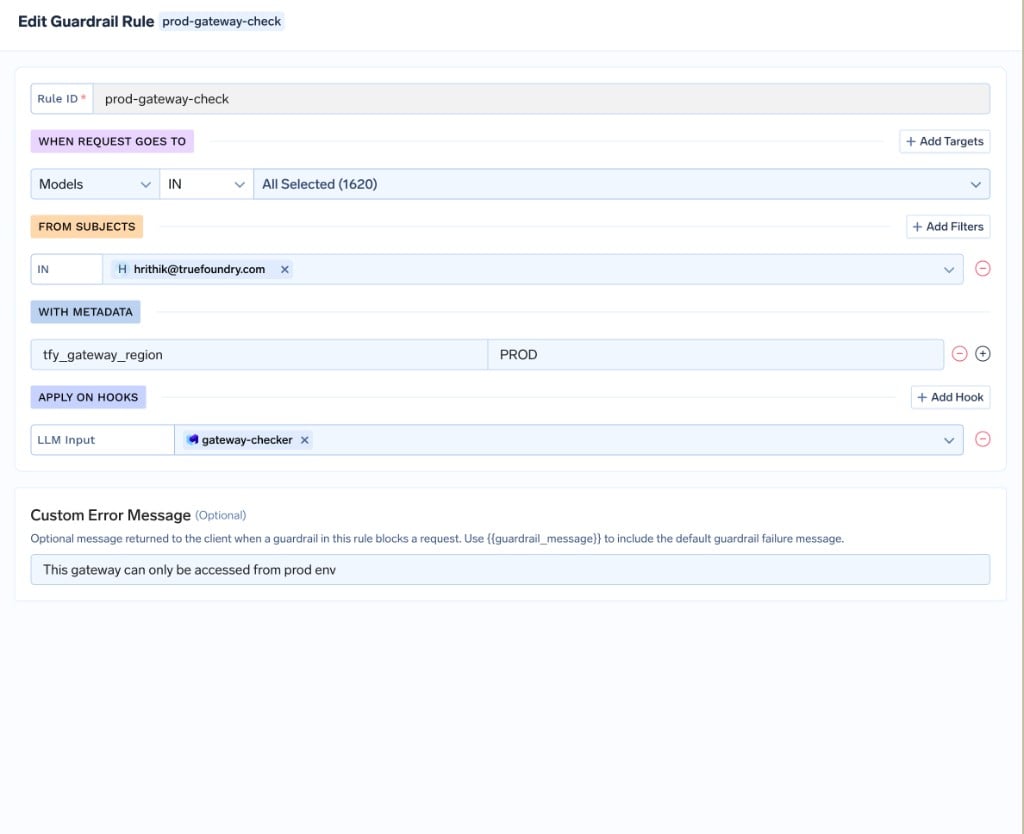
 Create a [guardrail rule](/docs/ai-gateway/guardrails-configuration) under **AI Gateway → Policies → Guardrails** that runs `gateway-checker` on the **LLM Input** hook only when the request carries the prod gateway's stamp. In the rule builder, add a **WITH METADATA** condition of `tfy_gateway_region` = `PROD`, set **APPLY ON HOOKS → LLM Input** to the `gateway-checker` guardrail, and optionally set a **Custom Error Message** such as `This gateway can only be accessed from prod env`.
 The equivalent [GitOps](/docs/setup-gitops-using-truefoundry) configuration is:
```yaml theme={"dark"}
name: gateway-env-pinning
type: gateway-guardrails-config
rules:
- id: prod-gateway-check
when:
target:
operator: or
conditions:
metadata:
tfy_gateway_region: PROD
llm_input_guardrails:
- /gateway-checker
llm_output_guardrails: []
mcp_tool_pre_invoke_guardrails: []
mcp_tool_post_invoke_guardrails: []
custom_error_message: "This gateway can only be accessed from prod env"
```
The rule fires only on requests stamped `tfy_gateway_region: PROD` — that is, requests reaching the prod gateway — so a dev application (`env: dev`) calling the prod gateway is rejected, while it is unaffected on the dev gateway.
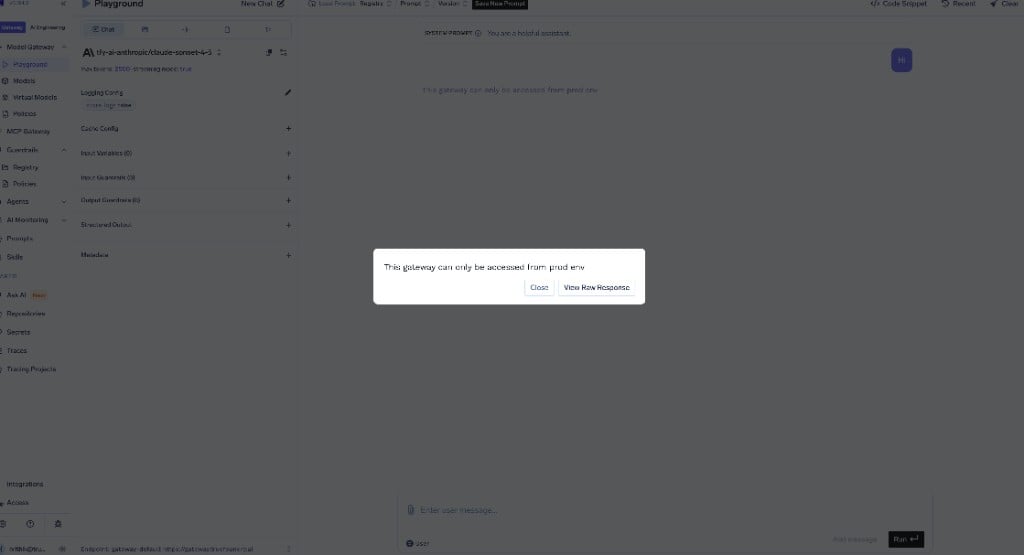
Send a request with `env: prod` in its metadata through the prod gateway — it passes. Send one with any other `env` value (or none) and it is blocked with your custom error message.
The equivalent [GitOps](/docs/setup-gitops-using-truefoundry) configuration is:
```yaml theme={"dark"}
name: gateway-env-pinning
type: gateway-guardrails-config
rules:
- id: prod-gateway-check
when:
target:
operator: or
conditions:
metadata:
tfy_gateway_region: PROD
llm_input_guardrails:
- /gateway-checker
llm_output_guardrails: []
mcp_tool_pre_invoke_guardrails: []
mcp_tool_post_invoke_guardrails: []
custom_error_message: "This gateway can only be accessed from prod env"
```
The rule fires only on requests stamped `tfy_gateway_region: PROD` — that is, requests reaching the prod gateway — so a dev application (`env: dev`) calling the prod gateway is rejected, while it is unaffected on the dev gateway.
Send a request with `env: prod` in its metadata through the prod gateway — it passes. Send one with any other `env` value (or none) and it is blocked with your custom error message.
 Only the **prod** gateway is pinned. Production traffic comes from applications using [virtual accounts](/docs/platform/virtual-account-management), whose `env: prod` tag is injected automatically — so requiring it on the prod gateway is safe. The dev gateway is intentionally left open: developers typically access it interactively with [Personal Access Tokens (PATs)](/docs/generating-truefoundry-api-keys#personal-access-tokens-pats), which do not carry the virtual account's `env` tag. Enforcing the same guardrail on the dev gateway would block those legitimate users.
This assumes every production virtual account is tagged with `env: prod`. With **Is key required?** on, a request that reaches the prod gateway without that tag is blocked. Tag all production virtual accounts first, and consider starting the guardrail in **Audit** mode to confirm legitimate traffic passes before switching to **Enforce**.
To guarantee every request can be attributed in analytics and cost reports, require the metadata keys your finance and platform teams group by — for example `team` and `cost_center` — so no request reaches a model without them.
Add a Metadata Validation guardrail (for example `cost-attribution`) with one rule per key:
* **Key Name**: `team` — **Is key required?**: on (Key must exist)
* **Key Name**: `cost_center` — **Is key required?**: on, **Value should be among the ones defined here**: on, **Regex**: `^cc-[0-9]{4}$`
Set the **Enforcing Strategy** to **Enforce**. Requests missing `team`, or with a `cost_center` that does not match the format, are rejected before reaching the model.
Add a [guardrail rule](/docs/ai-gateway/guardrails-configuration) with an empty `when` block so it applies to every request:
```yaml theme={"dark"}
name: cost-attribution-enforcement
type: gateway-guardrails-config
rules:
- id: require-cost-attribution
when: {}
llm_input_guardrails:
- /cost-attribution
llm_output_guardrails: []
mcp_tool_pre_invoke_guardrails: []
mcp_tool_post_invoke_guardrails: []
```
Combine this with [automatic metadata injection](/docs/ai-gateway/request-headers#automatic-metadata-injection) — tag virtual accounts and teams so `team` and `cost_center` are added without any client-side changes — and the guardrail simply confirms they are always present.
## Recommended Hooks
| Hook | Use Case |
| ------------- | --------------------------------------------------------- |
| **LLM Input** | Validate request metadata before the request is processed |
Metadata Validation runs only on the **LLM Input** hook. Attaching it to other hooks has no effect.
## Best Practices
Start with the **Audit** enforcing strategy to observe metadata violations in Request Traces before switching to **Enforce**. This helps you confirm that callers are already sending the metadata your rules expect.
All metadata values are compared as strings, and allowed-value matching is case-sensitive. Make sure your allowed values and regex patterns account for the exact casing and format your applications send.
Only the **prod** gateway is pinned. Production traffic comes from applications using [virtual accounts](/docs/platform/virtual-account-management), whose `env: prod` tag is injected automatically — so requiring it on the prod gateway is safe. The dev gateway is intentionally left open: developers typically access it interactively with [Personal Access Tokens (PATs)](/docs/generating-truefoundry-api-keys#personal-access-tokens-pats), which do not carry the virtual account's `env` tag. Enforcing the same guardrail on the dev gateway would block those legitimate users.
This assumes every production virtual account is tagged with `env: prod`. With **Is key required?** on, a request that reaches the prod gateway without that tag is blocked. Tag all production virtual accounts first, and consider starting the guardrail in **Audit** mode to confirm legitimate traffic passes before switching to **Enforce**.
To guarantee every request can be attributed in analytics and cost reports, require the metadata keys your finance and platform teams group by — for example `team` and `cost_center` — so no request reaches a model without them.
Add a Metadata Validation guardrail (for example `cost-attribution`) with one rule per key:
* **Key Name**: `team` — **Is key required?**: on (Key must exist)
* **Key Name**: `cost_center` — **Is key required?**: on, **Value should be among the ones defined here**: on, **Regex**: `^cc-[0-9]{4}$`
Set the **Enforcing Strategy** to **Enforce**. Requests missing `team`, or with a `cost_center` that does not match the format, are rejected before reaching the model.
Add a [guardrail rule](/docs/ai-gateway/guardrails-configuration) with an empty `when` block so it applies to every request:
```yaml theme={"dark"}
name: cost-attribution-enforcement
type: gateway-guardrails-config
rules:
- id: require-cost-attribution
when: {}
llm_input_guardrails:
- /cost-attribution
llm_output_guardrails: []
mcp_tool_pre_invoke_guardrails: []
mcp_tool_post_invoke_guardrails: []
```
Combine this with [automatic metadata injection](/docs/ai-gateway/request-headers#automatic-metadata-injection) — tag virtual accounts and teams so `team` and `cost_center` are added without any client-side changes — and the guardrail simply confirms they are always present.
## Recommended Hooks
| Hook | Use Case |
| ------------- | --------------------------------------------------------- |
| **LLM Input** | Validate request metadata before the request is processed |
Metadata Validation runs only on the **LLM Input** hook. Attaching it to other hooks has no effect.
## Best Practices
Start with the **Audit** enforcing strategy to observe metadata violations in Request Traces before switching to **Enforce**. This helps you confirm that callers are already sending the metadata your rules expect.
All metadata values are compared as strings, and allowed-value matching is case-sensitive. Make sure your allowed values and regex patterns account for the exact casing and format your applications send.