> ## Documentation Index
> Fetch the complete documentation index at: https://www.truefoundry.com/llms.txt
> Use this file to discover all available pages before exploring further.
# Security settings
> Tenant-wide security controls in TrueFoundry: Personal Access Token policy, security notifications, UI login IP allowlisting, and emergency revocation of every PAT.
Security settings are the tenant-wide controls that apply to everyone in your organization, regardless of their role or team. They decide how long-lived and how numerous user API tokens can be, who hears about security events, where the TrueFoundry UI can be reached from, and how to cut off every user token at once if one leaks.
They live under **Settings > Organisation > Security & Access**, next to the identity settings that decide how people sign in:
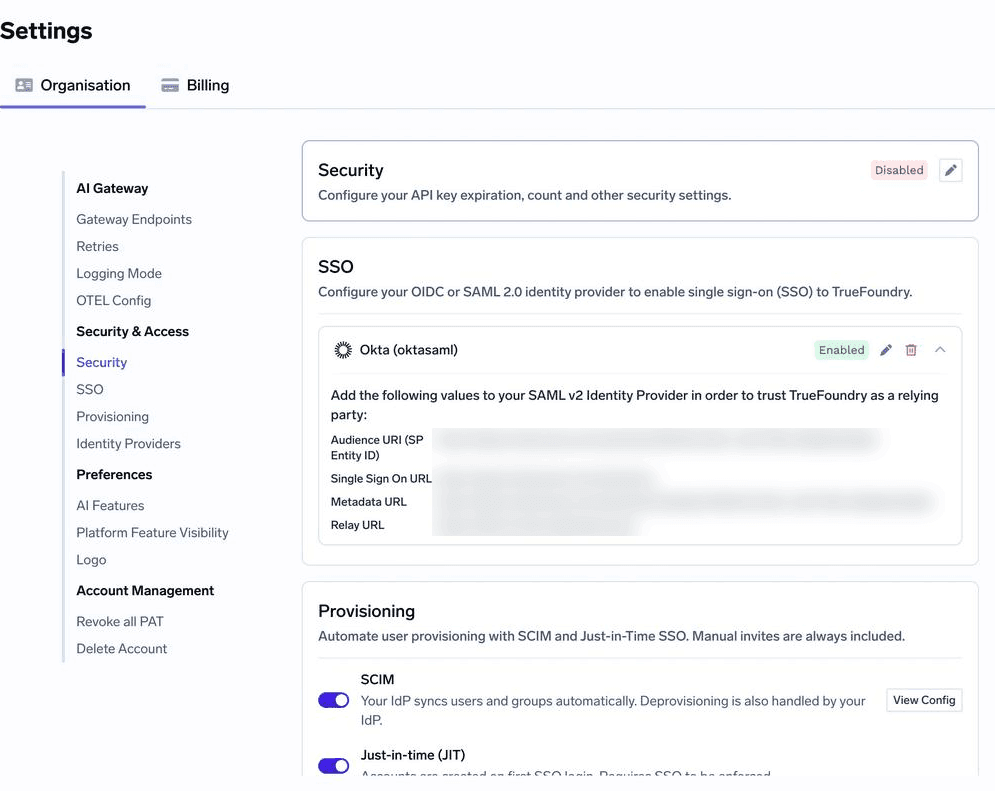 | Setting | What it controls | Covered |
| - | - | - |
| **Security** | PAT expiry, count, and team assignment; security notification recipients; UI login IP allowlist | On this page |
| **SSO** | How users authenticate through your identity provider | [SSO overview](/docs/platform/sso/overview) |
| **Provisioning** | How user records are created — SCIM, just-in-time, or invite | [User provisioning](/docs/platform/user-management#user-provisioning) |
| **Identity Providers** | Which external JWTs TrueFoundry accepts for API and gateway access | [Identity Providers](/docs/platform/identity-providers) |
| **Revoke all PAT** | Immediately revokes every user's Personal Access Tokens | [On this page](#revoke-all-personal-access-tokens) |
| **Delete Account** | Permanently deletes the tenant | [Delete tenant](/docs/platform/tenant-deletion) |
Changing security settings requires the **Tenant Admin** role, or a custom role with the **Manage Settings** (`settings:ManageSettings`) permission.
## How the Security settings apply
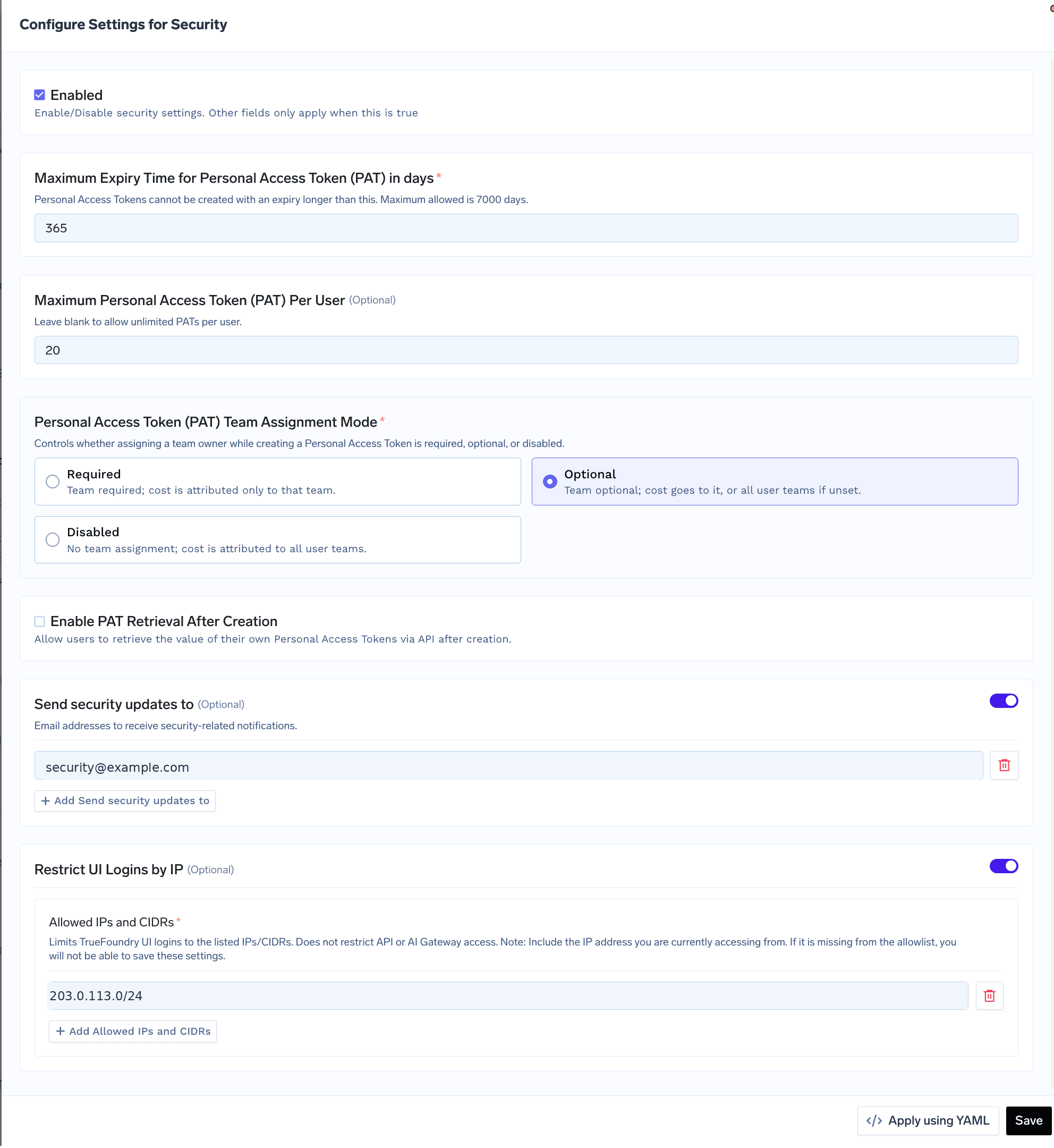
The **Security** card holds a single policy for the tenant. Its **Enabled** switch is a master switch: while it is off, none of the limits below are enforced and the card shows **Disabled**. Turn it on to enforce the policy you configure.
| Setting | What it controls | Covered |
| - | - | - |
| **Security** | PAT expiry, count, and team assignment; security notification recipients; UI login IP allowlist | On this page |
| **SSO** | How users authenticate through your identity provider | [SSO overview](/docs/platform/sso/overview) |
| **Provisioning** | How user records are created — SCIM, just-in-time, or invite | [User provisioning](/docs/platform/user-management#user-provisioning) |
| **Identity Providers** | Which external JWTs TrueFoundry accepts for API and gateway access | [Identity Providers](/docs/platform/identity-providers) |
| **Revoke all PAT** | Immediately revokes every user's Personal Access Tokens | [On this page](#revoke-all-personal-access-tokens) |
| **Delete Account** | Permanently deletes the tenant | [Delete tenant](/docs/platform/tenant-deletion) |
Changing security settings requires the **Tenant Admin** role, or a custom role with the **Manage Settings** (`settings:ManageSettings`) permission.
## How the Security settings apply
The **Security** card holds a single policy for the tenant. Its **Enabled** switch is a master switch: while it is off, none of the limits below are enforced and the card shows **Disabled**. Turn it on to enforce the policy you configure.
 ## Recommended configuration
Start from this baseline and adjust to your organization's policy. It keeps user tokens short-lived and few, makes sure someone hears about security events, and keeps the dashboard off the open internet.
| Setting | Recommended | Why |
| - | - | - |
| **Enabled** | On | None of the other limits are enforced while it is off. |
| **Maximum PAT expiry** | 90 days or less | Forces regular rotation and bounds how long a leaked token stays useful. |
| **Maximum PATs per user** | 5 | Enough for a laptop, a notebook, and a couple of scripts; stops tokens accumulating unnoticed. |
| **PAT team assignment** | **Required** if you budget or charge back per team, otherwise **Optional** | Keeps AI Gateway spend attributable to a single team. |
| **PAT retrieval after creation** | Off | A token shown once cannot be read back by anyone who later gains API access as that user. |
| **Security notifications** | A monitored group address | Notices still land when people change roles or leave. |
| **UI login IP allowlist** (SaaS) | Corporate egress IPs and VPN ranges | Keeps the dashboard unreachable from unmanaged networks. On self-hosted, restrict at the network layer. |
Production workloads should not use PATs at all — give them a [virtual account](/docs/platform/virtual-account-management) with [auto-rotation](/docs/platform/virtual-account-management#configure-auto-rotation-of-virtual-account-tokens) instead.
As a manifest:
```yaml security.yaml theme={"dark"}
type: settings/security
enabled: true
max_pat_expiry_minutes: 129600 # 90 days
max_pats_per_user: 5
pat_team_assignment_mode: required
to_emails:
- security@example.com
access_restrictions: # SaaS only
allowed_ip_cidrs:
- 203.0.113.0/24 # corporate egress
- 198.51.100.0/24 # VPN
```
## Personal Access Token controls
[Personal Access Tokens](/docs/generating-truefoundry-api-keys#personal-access-tokens-pats) (PATs) act with the full permissions of the user who created them, so they are the most sensitive credential most users hold. These settings bound how much damage a single token can do and how long it stays useful.
| Setting | Effect |
| - | - |
| **Maximum Expiry Time for Personal Access Token (PAT) in days** | The longest lifetime a user can choose when creating a PAT. Up to `7000` days. Shorter limits force regular rotation. |
| **Maximum Personal Access Token (PAT) Per User** | How many PATs each user can hold at once. Leave blank for no limit. A low limit keeps tokens from accumulating unnoticed in scripts and laptops. |
| **Personal Access Token (PAT) Team Assignment Mode** | Whether a user must, may, or cannot attach a team to a PAT. See [Team assignment modes](#team-assignment-modes). |
| **Enable PAT Retrieval After Creation** | Lets users read back the value of their own PATs through the API after creation. Off by default, so a token is shown only once. |
Limits apply when a token is created. Tightening the maximum expiry does not shorten tokens that already exist — to cut those off, use [Revoke all Personal Access Tokens](#revoke-all-personal-access-tokens).
Turn on PAT retrieval only when a workflow genuinely depends on it. A token that can be read back can also be leaked again, and anyone holding it acts as its owner.
### Team assignment modes
Attaching a team to a PAT decides which team its AI Gateway usage is billed to. It does **not** change what the token can access — a PAT always carries its owner's permissions.
| Mode | When creating a PAT | Cost is attributed to |
| - | - | - |
| **Required** | The user must select a team. | Only the selected team. |
| **Optional** | The user may select a team. | The selected team, or every team the user belongs to if none is selected. |
| **Disabled** | The user cannot select a team. | Every team the user belongs to. |
Choose **Required** when chargeback to a single team matters, for example when [budget limits](/docs/ai-gateway/budget-limiting-v2) are set per team.
## Security notifications
**Send security updates to** lists the email addresses that receive security-related notifications for the tenant. Use a monitored group address, such as `security@example.com`, so notices still reach someone when people change roles or leave.
## Restrict UI logins by IP
**Restrict UI Logins by IP** limits browser access to the TrueFoundry UI to the IP addresses and CIDR ranges listed under **Allowed IPs and CIDRs**. Use it to keep the dashboard reachable only from your corporate network, VPN egress, or approved administrator locations.
The restriction applies to UI logins only. API calls and AI Gateway traffic are authenticated by tokens and are not affected — to control those, scope tokens with [roles](/docs/platform/manage-user-roles-and-permissions) and [gateway access control](/docs/ai-gateway/gateway-access-control).
Include the public IP you are configuring from. TrueFoundry refuses to save an allowlist that would lock out your current session.
UI login IP allowlisting is available on TrueFoundry SaaS. On a self-hosted control plane, restrict access at the network layer instead — see [Self-Hosted Security](/docs/platform/onprem-security).
## Manage the policy as code
The same policy can be kept in Git and applied with [`tfy apply`](/docs/using-tfy-apply). **Apply using YAML** on the form generates the manifest for your current values:
```yaml security.yaml theme={"dark"}
type: settings/security
enabled: true
max_pat_expiry_minutes: 525600 # 365 days
max_pats_per_user: 20
pat_team_assignment_mode: optional # required | optional | disabled
to_emails:
- security@example.com
access_restrictions:
allowed_ip_cidrs:
- 203.0.113.0/24
```
```bash theme={"dark"}
tfy apply -f security.yaml
```
The manifest expresses PAT expiry in **minutes**, while the form uses days. Multiply days by `1440`.
## Revoke all Personal Access Tokens
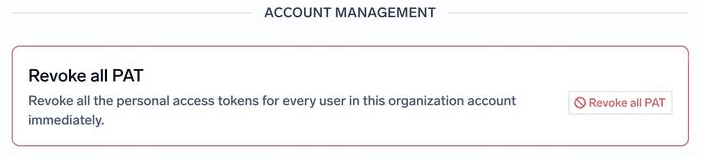
**Settings > Organisation > Account Management > Revoke all PAT** immediately revokes the Personal Access Tokens of every user in the tenant. It is the emergency control for a suspected credential leak, when you cannot tell which tokens were exposed.
## Recommended configuration
Start from this baseline and adjust to your organization's policy. It keeps user tokens short-lived and few, makes sure someone hears about security events, and keeps the dashboard off the open internet.
| Setting | Recommended | Why |
| - | - | - |
| **Enabled** | On | None of the other limits are enforced while it is off. |
| **Maximum PAT expiry** | 90 days or less | Forces regular rotation and bounds how long a leaked token stays useful. |
| **Maximum PATs per user** | 5 | Enough for a laptop, a notebook, and a couple of scripts; stops tokens accumulating unnoticed. |
| **PAT team assignment** | **Required** if you budget or charge back per team, otherwise **Optional** | Keeps AI Gateway spend attributable to a single team. |
| **PAT retrieval after creation** | Off | A token shown once cannot be read back by anyone who later gains API access as that user. |
| **Security notifications** | A monitored group address | Notices still land when people change roles or leave. |
| **UI login IP allowlist** (SaaS) | Corporate egress IPs and VPN ranges | Keeps the dashboard unreachable from unmanaged networks. On self-hosted, restrict at the network layer. |
Production workloads should not use PATs at all — give them a [virtual account](/docs/platform/virtual-account-management) with [auto-rotation](/docs/platform/virtual-account-management#configure-auto-rotation-of-virtual-account-tokens) instead.
As a manifest:
```yaml security.yaml theme={"dark"}
type: settings/security
enabled: true
max_pat_expiry_minutes: 129600 # 90 days
max_pats_per_user: 5
pat_team_assignment_mode: required
to_emails:
- security@example.com
access_restrictions: # SaaS only
allowed_ip_cidrs:
- 203.0.113.0/24 # corporate egress
- 198.51.100.0/24 # VPN
```
## Personal Access Token controls
[Personal Access Tokens](/docs/generating-truefoundry-api-keys#personal-access-tokens-pats) (PATs) act with the full permissions of the user who created them, so they are the most sensitive credential most users hold. These settings bound how much damage a single token can do and how long it stays useful.
| Setting | Effect |
| - | - |
| **Maximum Expiry Time for Personal Access Token (PAT) in days** | The longest lifetime a user can choose when creating a PAT. Up to `7000` days. Shorter limits force regular rotation. |
| **Maximum Personal Access Token (PAT) Per User** | How many PATs each user can hold at once. Leave blank for no limit. A low limit keeps tokens from accumulating unnoticed in scripts and laptops. |
| **Personal Access Token (PAT) Team Assignment Mode** | Whether a user must, may, or cannot attach a team to a PAT. See [Team assignment modes](#team-assignment-modes). |
| **Enable PAT Retrieval After Creation** | Lets users read back the value of their own PATs through the API after creation. Off by default, so a token is shown only once. |
Limits apply when a token is created. Tightening the maximum expiry does not shorten tokens that already exist — to cut those off, use [Revoke all Personal Access Tokens](#revoke-all-personal-access-tokens).
Turn on PAT retrieval only when a workflow genuinely depends on it. A token that can be read back can also be leaked again, and anyone holding it acts as its owner.
### Team assignment modes
Attaching a team to a PAT decides which team its AI Gateway usage is billed to. It does **not** change what the token can access — a PAT always carries its owner's permissions.
| Mode | When creating a PAT | Cost is attributed to |
| - | - | - |
| **Required** | The user must select a team. | Only the selected team. |
| **Optional** | The user may select a team. | The selected team, or every team the user belongs to if none is selected. |
| **Disabled** | The user cannot select a team. | Every team the user belongs to. |
Choose **Required** when chargeback to a single team matters, for example when [budget limits](/docs/ai-gateway/budget-limiting-v2) are set per team.
## Security notifications
**Send security updates to** lists the email addresses that receive security-related notifications for the tenant. Use a monitored group address, such as `security@example.com`, so notices still reach someone when people change roles or leave.
## Restrict UI logins by IP
**Restrict UI Logins by IP** limits browser access to the TrueFoundry UI to the IP addresses and CIDR ranges listed under **Allowed IPs and CIDRs**. Use it to keep the dashboard reachable only from your corporate network, VPN egress, or approved administrator locations.
The restriction applies to UI logins only. API calls and AI Gateway traffic are authenticated by tokens and are not affected — to control those, scope tokens with [roles](/docs/platform/manage-user-roles-and-permissions) and [gateway access control](/docs/ai-gateway/gateway-access-control).
Include the public IP you are configuring from. TrueFoundry refuses to save an allowlist that would lock out your current session.
UI login IP allowlisting is available on TrueFoundry SaaS. On a self-hosted control plane, restrict access at the network layer instead — see [Self-Hosted Security](/docs/platform/onprem-security).
## Manage the policy as code
The same policy can be kept in Git and applied with [`tfy apply`](/docs/using-tfy-apply). **Apply using YAML** on the form generates the manifest for your current values:
```yaml security.yaml theme={"dark"}
type: settings/security
enabled: true
max_pat_expiry_minutes: 525600 # 365 days
max_pats_per_user: 20
pat_team_assignment_mode: optional # required | optional | disabled
to_emails:
- security@example.com
access_restrictions:
allowed_ip_cidrs:
- 203.0.113.0/24
```
```bash theme={"dark"}
tfy apply -f security.yaml
```
The manifest expresses PAT expiry in **minutes**, while the form uses days. Multiply days by `1440`.
## Revoke all Personal Access Tokens
**Settings > Organisation > Account Management > Revoke all PAT** immediately revokes the Personal Access Tokens of every user in the tenant. It is the emergency control for a suspected credential leak, when you cannot tell which tokens were exposed.
 Every script, CI job, and local tool that authenticates with a PAT stops working at once, and each user has to create a new token. This is one more reason to run production workloads on [virtual accounts](/docs/platform/virtual-account-management) instead of PATs. Virtual account tokens are managed separately — rotate them from **Access > Virtual Accounts**.
To cut off a single person rather than everyone, [deactivate the user](/docs/platform/user-management) — their PATs stop working too.
## Related
The full set of controls to review during onboarding and quarterly.
Create, use, and rotate Personal Access Tokens and virtual account tokens.
Require SSO for everyone once it is verified.
Permanently delete the organization and its data.
This documentation is built and hosted on [Mintlify](https://mintlify.com), a developer documentation platform.
Every script, CI job, and local tool that authenticates with a PAT stops working at once, and each user has to create a new token. This is one more reason to run production workloads on [virtual accounts](/docs/platform/virtual-account-management) instead of PATs. Virtual account tokens are managed separately — rotate them from **Access > Virtual Accounts**.
To cut off a single person rather than everyone, [deactivate the user](/docs/platform/user-management) — their PATs stop working too.
## Related
The full set of controls to review during onboarding and quarterly.
Create, use, and rotate Personal Access Tokens and virtual account tokens.
Require SSO for everyone once it is verified.
Permanently delete the organization and its data.
This documentation is built and hosted on [Mintlify](https://mintlify.com), a developer documentation platform.