> ## Documentation Index
> Fetch the complete documentation index at: https://www.truefoundry.com/llms.txt
> Use this file to discover all available pages before exploring further.
# Task Config
> Configure task settings including environment variables, resources, volume mounts, and service accounts for workflows.
Each task takes a task\_config parameter which is used to define the config like resource the task execution will require, the python version, libraries, apt packages, cuda version, etc. for the task.
### Things you can define in task config
* **env**: you can pass the environment variables as `env` in task config, where `env` is a dictionary of key-value pairs.
* **service\_account**: you can pass the service\_account name in the task config which is necessary to save the input and output data of the task.
* **resources**: You can define the resource to allocate to each of the tasks, where you can define the cpu limit, storage limit, memory limit, GPU types, etc. You can refer to [this](/docs/resources-cpu-memory-storage) article for more information on each.
* **mounts**: You can attach volume mounts such as volume mounts, string mounts or secret mounts. You can learn more about mounts and how to use them in workflow in [this](/docs/attaching-mounts) guide.
### Types of task config
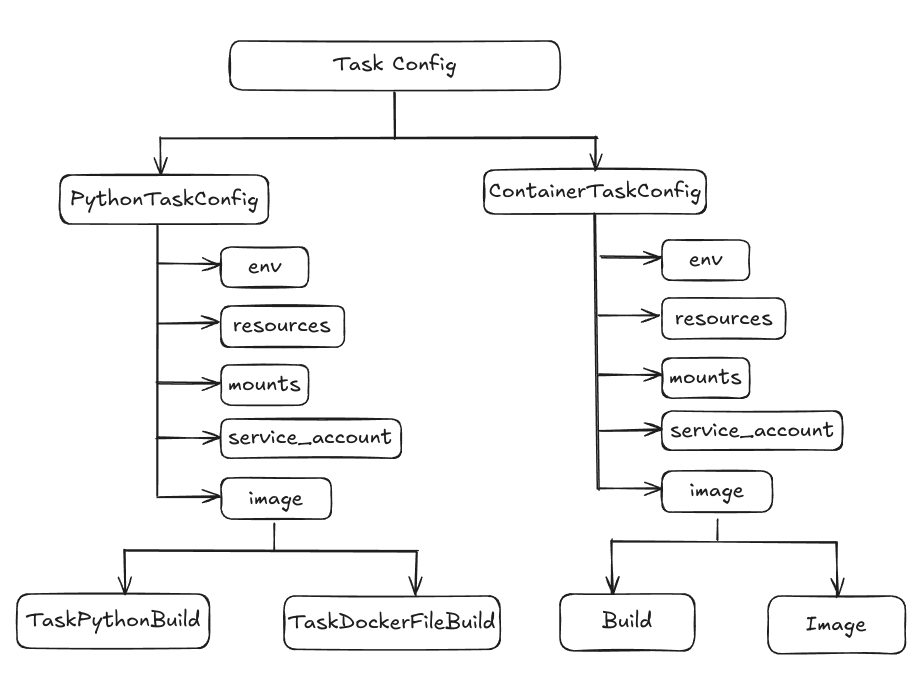 * There are two types of task config PythonTaskConfig and ContainerTaskConfig.
* **PythonTaskConfig**: This task config can be passed in the normal python task in the task decorator. You can define the environment variables, [Resources](/docs/resources-cpu-memory-storage), service account, and the image spec in PythonTaskConfig. The image spec can be of two types TaskPythonBuild and TaskDockerFileBuild.
* **TaskPythonBuild** is used when you do not have a Dockerfile and you want to build an image where you want to specify the pip packages, apt packages or requirements file path in the build spec, then TaskPythonBuild is used.
* **TaskDockerFileBuild** is used when you already have a Dockerfile and you just want to build then you use TaskDockerFileBuild.
* **ContainerTaskConfig**: This task config can be used when you already have a docker image and you want to use that as a task in the workflow directly or you have code uploaded on GitHub or the remote source. There you have a docker file which you want to use as a task in the workflow.
* **PySparkTaskConfig**: This task config is used for Spark tasks that run distributed PySpark jobs. The image spec can be of two types:
* **TaskPySparkBuild** is used when you want TrueFoundry to build a Spark image with your code and dependencies. You can specify the Spark version, pip packages, apt packages, or requirements file path.
* **TaskSparkImage** is used when you already have a pre-built Spark image that contains all your workflow code and dependencies. This **skips the Docker build phase entirely**, making deployments faster. Your image must contain:
1. All workflow source code at `/app` (or appropriate PYTHONPATH)
2. `truefoundry[workflow,spark]` package installed
3. PySpark version matching the `spark_version` parameter
4. Hadoop AWS/GCS/Azure JARs if using cloud storage
### Building a TaskSparkImage-Compatible Image
When using `TaskSparkImage`, your pre-built image must contain everything needed to execute the Spark task. This is because:
1. **The Spark driver pod imports your task function** - Without the code, Python cannot import the module
2. **Flytekit deserializes inputs and calls your function** - The workflow runtime needs to be installed
3. **No code injection happens at deploy time** - Unlike `TaskPySparkBuild`, the image is used as-is
#### Required Directory Structure
```
/opt/venv/bin/
python # Python interpreter (required path)
entrypoint.py # Flytekit entrypoint (auto-installed with flytekit)
/opt/venv/lib/.../site-packages/
flytekit/ # Flytekit for task execution
truefoundry/ # TrueFoundry workflow runtime
pyspark/ # PySpark library
$SPARK_HOME/jars/
hadoop-aws-3.3.4.jar # Required for S3 access
aws-java-sdk-bundle-1.12.262.jar
/app/
workflow.py # Your workflow code (must be importable)
# ... other source files
```
#### Example Dockerfile
```dockerfile theme={"dark"}
FROM apache/spark:3.5.2-scala2.12-java17-python3-ubuntu
USER root
# Install dependencies
RUN apt-get update && apt-get install -y git python3-venv curl && rm -rf /var/lib/apt/lists/*
# Install uv for faster package installation (optional, can use pip instead)
RUN curl -LsSf https://astral.sh/uv/install.sh | sh
ENV PATH="/root/.local/bin:$PATH"
# Install Hadoop AWS JARs for S3 access (required for cloud storage)
RUN curl -fSL -o $SPARK_HOME/jars/hadoop-aws-3.3.4.jar \
https://repo1.maven.org/maven2/org/apache/hadoop/hadoop-aws/3.3.4/hadoop-aws-3.3.4.jar && \
curl -fSL -o $SPARK_HOME/jars/aws-java-sdk-bundle-1.12.262.jar \
https://repo1.maven.org/maven2/com/amazonaws/aws-java-sdk-bundle/1.12.262/aws-java-sdk-bundle-1.12.262.jar
# Create Python virtual environment at the required path
RUN python3 -m venv /opt/venv
ENV PATH="/opt/venv/bin:$PATH"
# Install required dependencies into the venv
RUN uv pip install --python /opt/venv/bin/python --no-cache \
truefoundry[workflow,spark] \
pyspark==3.5.2
# Copy your workflow source code
COPY . /app
WORKDIR /app
ENV PYTHONPATH=/app
```
When building for deployment to a Kubernetes cluster, ensure you build for the correct architecture:
```bash theme={"dark"}
docker build --platform linux/amd64 -t my-spark-image:v1.0 .
```
**When to use TaskSparkImage vs TaskPySparkBuild:**
* Use `TaskSparkImage` when you have a CI/CD pipeline that builds your Spark images, or when you want faster deployments by skipping the build phase.
* Use `TaskPySparkBuild` when you want TrueFoundry to build the image for you with your code and dependencies automatically injected.
```python Python lines theme={"dark"}
from truefoundry.deploy import Image, NvidiaGPU, Resources
from truefoundry.workflow import (
ContainerTask,
ContainerTaskConfig,
ExecutionConfig,
FlyteDirectory,
PySparkTaskConfig,
PythonTaskConfig,
TaskPySparkBuild,
TaskPythonBuild,
TaskSparkImage,
conditional,
map_task,
task,
workflow,
)
from truefoundry.deploy.v2.lib.patched_models import (
SparkDriverConfig,
SparkExecutorConfig,
SparkExecutorFixedInstances,
)
# Python task config example
task_config = PythonTaskConfig(
image=TaskPythonBuild(
python_version="3.9",
pip_packages=["truefoundry[workflow]"],
),
resources=Resources(cpu_request=0.5, cpu_limit=0.5),
service_account="",
)
# Container task config example
echo = ContainerTask(
name="echo",
task_config=ContainerTaskConfig(
image=Image(
image_uri="bash:4.1",
command=["echo", "hello"],
),
service_account="",
),
)
# PySpark task config with TaskPySparkBuild (builds image)
spark_build_config = PySparkTaskConfig(
image=TaskPySparkBuild(
spark_version="3.5.2",
pip_packages=["truefoundry[workflow,spark]"],
),
service_account="spark-service-account",
driver_config=SparkDriverConfig(
resources=Resources(cpu_request=1, cpu_limit=1, memory_request=1024, memory_limit=1024),
),
executor_config=SparkExecutorConfig(
instances=SparkExecutorFixedInstances(count=2),
resources=Resources(cpu_request=1, cpu_limit=1, memory_request=1024, memory_limit=1024),
),
)
# PySpark task config with TaskSparkImage (skips build, uses pre-built image)
spark_image_config = PySparkTaskConfig(
image=TaskSparkImage(
spark_version="3.5.2",
container_image="my-registry.com/my-spark-image:v1.0",
docker_registry="my-docker-registry-fqn", # optional, for private registries
),
service_account="spark-service-account",
driver_config=SparkDriverConfig(
resources=Resources(cpu_request=1, cpu_limit=1, memory_request=1024, memory_limit=1024),
),
executor_config=SparkExecutorConfig(
instances=SparkExecutorFixedInstances(count=2),
resources=Resources(cpu_request=1, cpu_limit=1, memory_request=1024, memory_limit=1024),
),
)
...
```
***
* There are two types of task config PythonTaskConfig and ContainerTaskConfig.
* **PythonTaskConfig**: This task config can be passed in the normal python task in the task decorator. You can define the environment variables, [Resources](/docs/resources-cpu-memory-storage), service account, and the image spec in PythonTaskConfig. The image spec can be of two types TaskPythonBuild and TaskDockerFileBuild.
* **TaskPythonBuild** is used when you do not have a Dockerfile and you want to build an image where you want to specify the pip packages, apt packages or requirements file path in the build spec, then TaskPythonBuild is used.
* **TaskDockerFileBuild** is used when you already have a Dockerfile and you just want to build then you use TaskDockerFileBuild.
* **ContainerTaskConfig**: This task config can be used when you already have a docker image and you want to use that as a task in the workflow directly or you have code uploaded on GitHub or the remote source. There you have a docker file which you want to use as a task in the workflow.
* **PySparkTaskConfig**: This task config is used for Spark tasks that run distributed PySpark jobs. The image spec can be of two types:
* **TaskPySparkBuild** is used when you want TrueFoundry to build a Spark image with your code and dependencies. You can specify the Spark version, pip packages, apt packages, or requirements file path.
* **TaskSparkImage** is used when you already have a pre-built Spark image that contains all your workflow code and dependencies. This **skips the Docker build phase entirely**, making deployments faster. Your image must contain:
1. All workflow source code at `/app` (or appropriate PYTHONPATH)
2. `truefoundry[workflow,spark]` package installed
3. PySpark version matching the `spark_version` parameter
4. Hadoop AWS/GCS/Azure JARs if using cloud storage
### Building a TaskSparkImage-Compatible Image
When using `TaskSparkImage`, your pre-built image must contain everything needed to execute the Spark task. This is because:
1. **The Spark driver pod imports your task function** - Without the code, Python cannot import the module
2. **Flytekit deserializes inputs and calls your function** - The workflow runtime needs to be installed
3. **No code injection happens at deploy time** - Unlike `TaskPySparkBuild`, the image is used as-is
#### Required Directory Structure
```
/opt/venv/bin/
python # Python interpreter (required path)
entrypoint.py # Flytekit entrypoint (auto-installed with flytekit)
/opt/venv/lib/.../site-packages/
flytekit/ # Flytekit for task execution
truefoundry/ # TrueFoundry workflow runtime
pyspark/ # PySpark library
$SPARK_HOME/jars/
hadoop-aws-3.3.4.jar # Required for S3 access
aws-java-sdk-bundle-1.12.262.jar
/app/
workflow.py # Your workflow code (must be importable)
# ... other source files
```
#### Example Dockerfile
```dockerfile theme={"dark"}
FROM apache/spark:3.5.2-scala2.12-java17-python3-ubuntu
USER root
# Install dependencies
RUN apt-get update && apt-get install -y git python3-venv curl && rm -rf /var/lib/apt/lists/*
# Install uv for faster package installation (optional, can use pip instead)
RUN curl -LsSf https://astral.sh/uv/install.sh | sh
ENV PATH="/root/.local/bin:$PATH"
# Install Hadoop AWS JARs for S3 access (required for cloud storage)
RUN curl -fSL -o $SPARK_HOME/jars/hadoop-aws-3.3.4.jar \
https://repo1.maven.org/maven2/org/apache/hadoop/hadoop-aws/3.3.4/hadoop-aws-3.3.4.jar && \
curl -fSL -o $SPARK_HOME/jars/aws-java-sdk-bundle-1.12.262.jar \
https://repo1.maven.org/maven2/com/amazonaws/aws-java-sdk-bundle/1.12.262/aws-java-sdk-bundle-1.12.262.jar
# Create Python virtual environment at the required path
RUN python3 -m venv /opt/venv
ENV PATH="/opt/venv/bin:$PATH"
# Install required dependencies into the venv
RUN uv pip install --python /opt/venv/bin/python --no-cache \
truefoundry[workflow,spark] \
pyspark==3.5.2
# Copy your workflow source code
COPY . /app
WORKDIR /app
ENV PYTHONPATH=/app
```
When building for deployment to a Kubernetes cluster, ensure you build for the correct architecture:
```bash theme={"dark"}
docker build --platform linux/amd64 -t my-spark-image:v1.0 .
```
**When to use TaskSparkImage vs TaskPySparkBuild:**
* Use `TaskSparkImage` when you have a CI/CD pipeline that builds your Spark images, or when you want faster deployments by skipping the build phase.
* Use `TaskPySparkBuild` when you want TrueFoundry to build the image for you with your code and dependencies automatically injected.
```python Python lines theme={"dark"}
from truefoundry.deploy import Image, NvidiaGPU, Resources
from truefoundry.workflow import (
ContainerTask,
ContainerTaskConfig,
ExecutionConfig,
FlyteDirectory,
PySparkTaskConfig,
PythonTaskConfig,
TaskPySparkBuild,
TaskPythonBuild,
TaskSparkImage,
conditional,
map_task,
task,
workflow,
)
from truefoundry.deploy.v2.lib.patched_models import (
SparkDriverConfig,
SparkExecutorConfig,
SparkExecutorFixedInstances,
)
# Python task config example
task_config = PythonTaskConfig(
image=TaskPythonBuild(
python_version="3.9",
pip_packages=["truefoundry[workflow]"],
),
resources=Resources(cpu_request=0.5, cpu_limit=0.5),
service_account="",
)
# Container task config example
echo = ContainerTask(
name="echo",
task_config=ContainerTaskConfig(
image=Image(
image_uri="bash:4.1",
command=["echo", "hello"],
),
service_account="",
),
)
# PySpark task config with TaskPySparkBuild (builds image)
spark_build_config = PySparkTaskConfig(
image=TaskPySparkBuild(
spark_version="3.5.2",
pip_packages=["truefoundry[workflow,spark]"],
),
service_account="spark-service-account",
driver_config=SparkDriverConfig(
resources=Resources(cpu_request=1, cpu_limit=1, memory_request=1024, memory_limit=1024),
),
executor_config=SparkExecutorConfig(
instances=SparkExecutorFixedInstances(count=2),
resources=Resources(cpu_request=1, cpu_limit=1, memory_request=1024, memory_limit=1024),
),
)
# PySpark task config with TaskSparkImage (skips build, uses pre-built image)
spark_image_config = PySparkTaskConfig(
image=TaskSparkImage(
spark_version="3.5.2",
container_image="my-registry.com/my-spark-image:v1.0",
docker_registry="my-docker-registry-fqn", # optional, for private registries
),
service_account="spark-service-account",
driver_config=SparkDriverConfig(
resources=Resources(cpu_request=1, cpu_limit=1, memory_request=1024, memory_limit=1024),
),
executor_config=SparkExecutorConfig(
instances=SparkExecutorFixedInstances(count=2),
resources=Resources(cpu_request=1, cpu_limit=1, memory_request=1024, memory_limit=1024),
),
)
...
```
***