Documentation Index

Fetch the complete documentation index at: https://www.truefoundry.com/llms.txt

Use this file to discover all available pages before exploring further.

This guide provides instructions for integrating Agno AI with the Truefoundry AI Gateway.

What is Agno AI?

Agno is a powerful multi-agent AI framework designed for building AI systems with multiple agents that can work together autonomously.

Key Features of Agno AI

  • Multi-Agent Systems: Build teams of agents that work together towards a common goal, with industry-leading architecture for reasoning, collaboration, and coordination. Create deterministic, stateful workflows with pure Python for maximum flexibility and control
  • Interactive Playground: Test and interact with your AI agents through an intuitive interface featuring real-time streaming, session history, user memory, multimodal support, and comprehensive configuration options
  • Monitoring & Debugging: Monitor your agents, teams, and workflows in real-time with built-in debugging capabilities, session tracking, and detailed logs for system prompts, user messages, and tool calls

Prerequisites

Before integrating Agno AI with TrueFoundry, ensure you have:
  1. TrueFoundry Account: Create a Truefoundry account and follow the instructions in our Gateway Quick Start Guide
  2. Agno Installation: In your project directory, install Agno using pip: pip install agno #See PyPI for latest updates

Setup Process

1. Configure Environment Variables (Optional)

Set up your environment variables to connect Agno with TrueFoundry Gateway:
export API_KEY="your-truefoundry-api-key"
export BASE_URL="your-truefoundry-gateway-url"
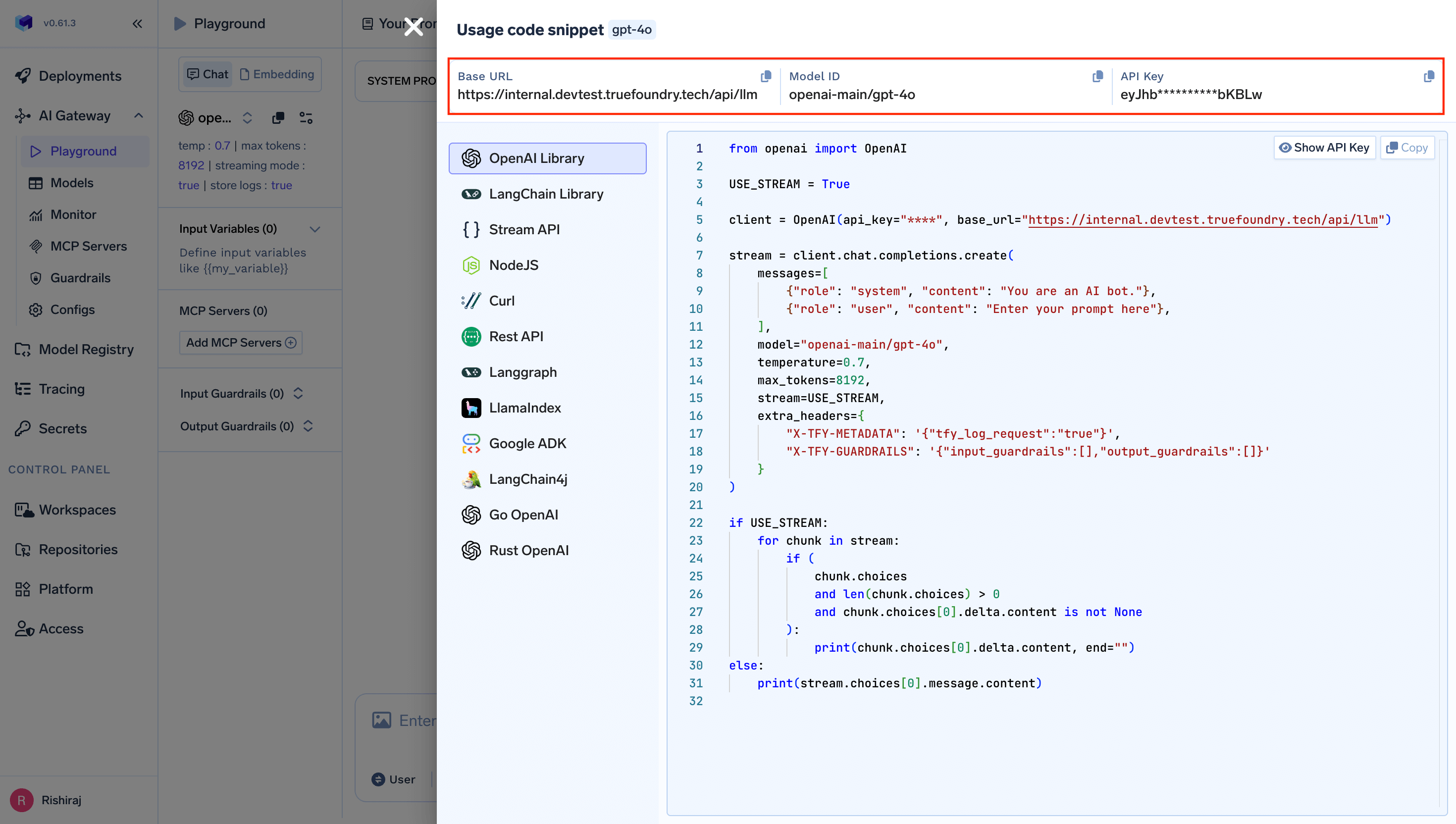
You will get your ‘truefoundry-api-key’, ‘truefoundry-gateway-url’ and model name directly from the unified code snippet

2. Configure Agno Agents

Create your Agno agents with TrueFoundry Gateway configuration:
from agno.agent import Agent
from agno.models.openai import OpenAIChat

# Configure agent with TrueFoundry Gateway
agent = Agent(
    model=OpenAIChat(
        id="openai-main/gpt-4o",    # Use TrueFoundry model name. Similarly you can call any model from any model provider like anthropic, gemini etc
        api_key="your-truefoundry-api-key",
        base_url="your-truefoundry-gateway-url"
    ),
    description="AI assistant powered by TrueFoundry Gateway",
    instructions=[
        "You are a helpful AI assistant",
        "Provide accurate and concise responses"
    ]
)

Usage Examples

Basic Single Agent

Create a simple agent using the configured TrueFoundry Gateway:
from agno.agent import Agent
from agno.models.openai import OpenAIChat

# Single agent with TrueFoundry Gateway
agent = Agent(
    model=OpenAIChat(
        id="openai-main/gpt-4o",
        api_key="your-truefoundry-api-key",
        base_url="your-truefoundry-gateway-url"
        ),
    name="Assistant",
    description="General purpose AI assistant"
)

# Run the agent
response = agent.run("What is the capital of Brazil?")
print(response.content)

Environment Variables Configuration

For persistent configuration across all Agno agents, set these environment variables:
# Add to your ~/.bashrc, ~/.zshrc, or equivalent
export TRUEFOUNDRY_API_KEY="your-truefoundry-api-key"
export TRUEFOUNDRY_BASE_URL="your-truefoundry-gateway-url"

# Optional: Set default model
export TRUEFOUNDRY_MODEL="openai-main/gpt-4o"

Multi-Agent Team

Create a team of specialized agents for complex tasks:
from agno.agent import Agent
from agno.team import Team
from agno.models.openai import OpenAIChat

TRUEFOUNDRY_API_KEY = os.getenv("TRUEFOUNDRY_API_KEY")      # export TRUEFOuNDRY_API_KEY='your-truefoundry-api-key'
TRUEFOUNDRY_BASE_URL = os.getenv("TRUEFOUNDRY_BASE_URL")

# Research Agent
researcher = Agent(
    model=OpenAIChat(
        id="openai-main/gpt-4o",
        api_key="your-truefoundry-api-key",
        base_url="your-truefoundry-gateway-url"
        ),
    name="Researcher",
    description="Conducts thorough research on topics",
    instructions=[
        "Research the given topic thoroughly",
        "Provide factual and well-sourced information"
    ]
)

# Writer Agent
writer = Agent(
    model=OpenAIChat(
        id="openai-main/gpt-4o",
        api_key="your-truefoundry-api-key",
        base_url="your-truefoundry-gateway-url"
        ),
    name="Writer",
    description="Creates well-structured content",
    instructions=[
        "Write clear and engaging content",
        "Structure information logically"
    ]
)

# Create team
research_team = Team(
    agents=[researcher, writer],
    instructions=[
        "Researcher should investigate the topic first",
        "Writer should create content based on research findings"
    ]
)

# Execute team task
result = research_team.run("Research and write about sustainable energy solutions")

Benefits of Using TrueFoundry Gateway with Agno AI

  1. Cost Tracking: Monitor and track costs across all your Agno AI agents and teams
  2. Security: Enhanced security with centralized API key management
  3. Access Controls: Implement fine-grained access controls for different teams and agents
  4. Rate Limiting: Prevent API quota exhaustion with intelligent rate limiting
  5. Fallback Support: Automatic failover to alternative providers when needed
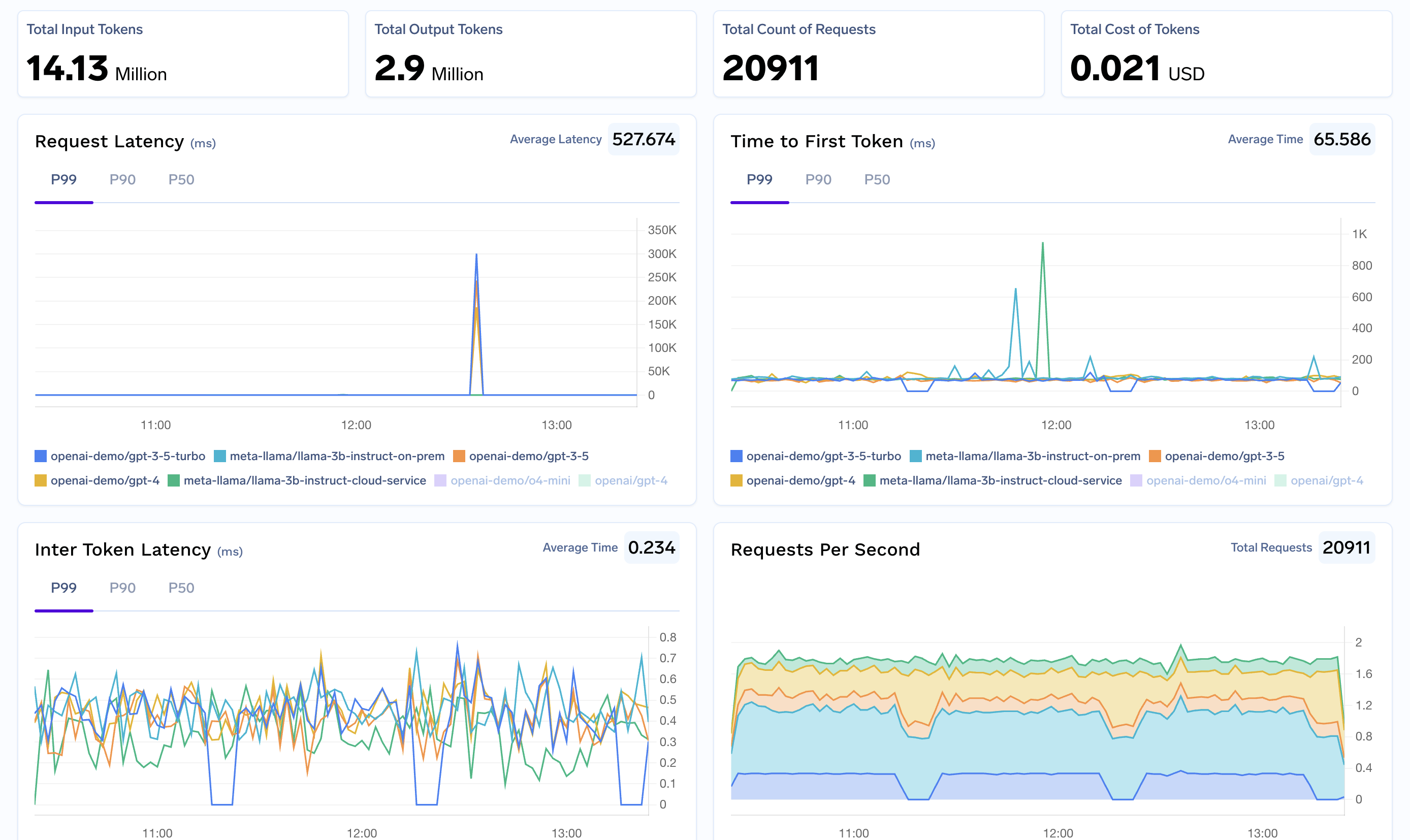
  6. Analytics: Detailed analytics and monitoring for all LLM calls across your agent ecosystem
  7. Multi-Provider Support: Seamlessly switch between different model providers