Documentation Index
Fetch the complete documentation index at: https://www.truefoundry.com/llms.txt
Use this file to discover all available pages before exploring further.
This guide provides instructions for integrating DSPy with the Truefoundry AI Gateway.
What is DSPy?
DSPy is a framework for algorithmically optimizing language model prompts and weights through a programming-first approach. It enables developers to build and optimize LM-based systems by treating prompts as learnable parameters rather than manually crafted text, using a declarative programming model that separates logic from optimization.
Prerequisites
Before integrating DSPy with TrueFoundry, ensure you have:
- TrueFoundry Account: Create a Truefoundry account and follow the instructions in our Gateway Quick Start Guide
- DSPy Installation: Install DSPy using pip:
pip install -U dspy
Setup Process
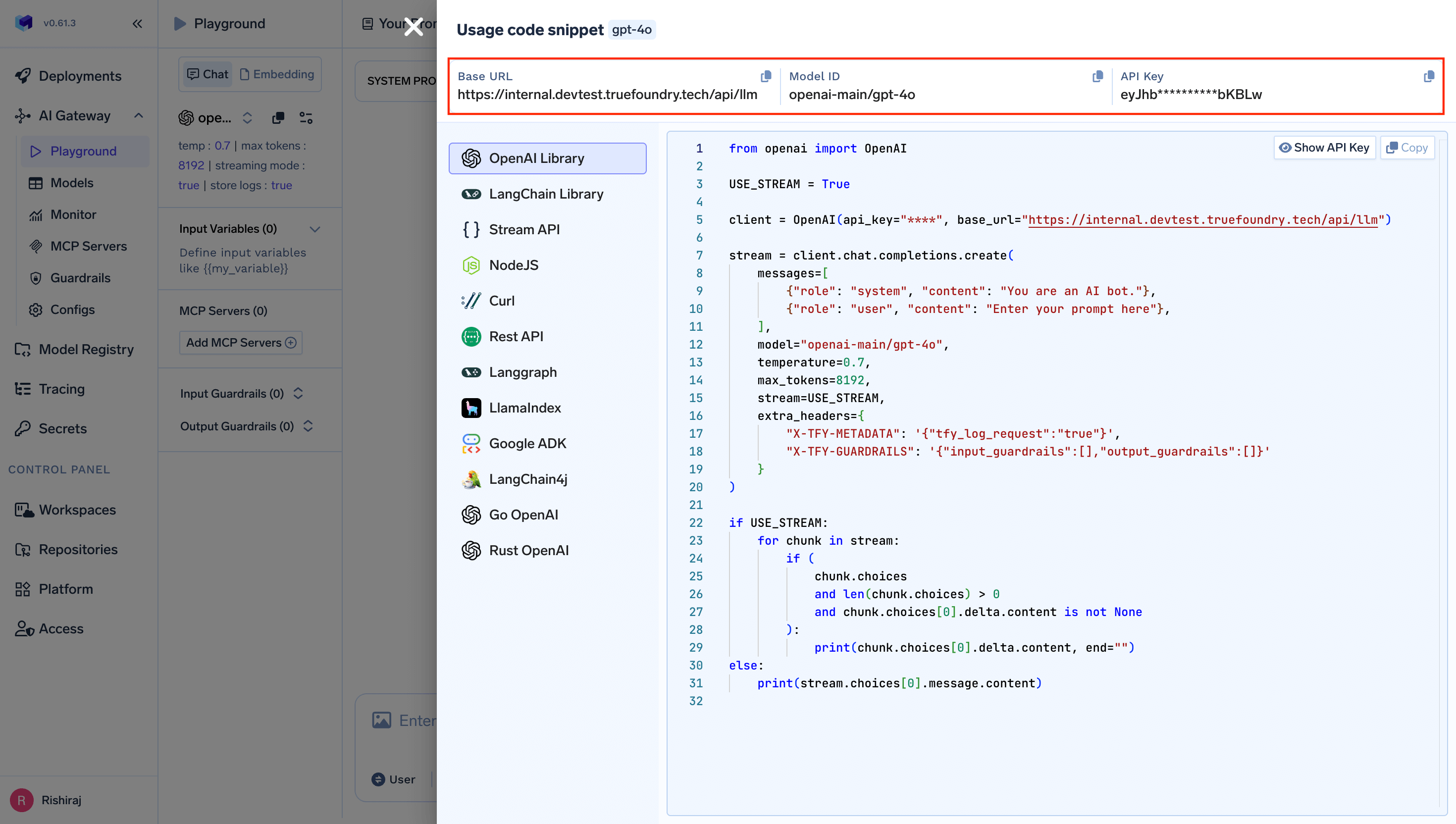
DSPy integrates seamlessly with TrueFoundry’s gateway through the LM interface. Configure the LM with TrueFoundry’s gateway URL and your API key:
import dspy
# Set up your TrueFoundry-enabled LM client
lm = dspy.LM(
model="openai/anthropic-account/claude-4", # Use openai/ prefix with TrueFoundry model name
api_key="your-truefoundry-api-key",
api_base="{GATEWAY_BASE_URL}"
)
# Configure DSPy to use the TrueFoundry-enabled client
dspy.configure(lm=lm)
You will get your base URL and model name directly from the unified code snippet:
Replace:
your-truefoundry-api-key with your actual TrueFoundry API key (if required)
{GATEWAY_BASE_URL} with your TrueFoundry Gateway Base URL
openai/anthropic-account/claude-4 with your desired model using the openai/ prefix
2. Environment Variables Configuration
For persistent configuration across your DSPy applications, set these environment variables:
export OPENAI_API_KEY="your-truefoundry-api-key"
export OPENAI_BASE_URL="{GATEWAY_BASE_URL}"
Usage Examples
Basic DSPy with TrueFoundry Gateway
Here’s a simple example demonstrating DSPy with TrueFoundry integration:
import dspy
# Set up the TrueFoundry-enabled client
lm = dspy.LM(
model="openai/anthropic-account/claude-4",
api_key="your-truefoundry-api-key",
api_base="{GATEWAY_BASE_URL}"
)
dspy.configure(lm=lm)
# Simple completion
response = lm("Say this is a test!", temperature=0.7)
print(response) # => ['This is a test!']
DSPy Signatures and Modules
Create more sophisticated DSPy programs using signatures and modules:
import dspy
# Configure TrueFoundry LM
lm = dspy.LM(
model="openai/anthropic-account/claude-4",
api_key="your-truefoundry-api-key",
api_base="{GATEWAY_BASE_URL}"
)
dspy.configure(lm=lm)
# Define a signature for question answering
class GenerateAnswer(dspy.Signature):
"""Answer questions with short factoid answers."""
question = dspy.InputField()
answer = dspy.OutputField(desc="often between 1 and 5 words")
# Create a module using Chain of Thought
generate_answer = dspy.ChainOfThought(GenerateAnswer)
# Ask a question
question = "What is the capital of Brazil?"
pred = generate_answer(question=question)
print(f"Question: {question}")
print(f"Answer: {pred.answer}")
Advanced RAG System with DSPy
Build a complete RAG (Retrieval-Augmented Generation) system:
import dspy
# Configure TrueFoundry-enabled LM
lm = dspy.LM(
model="openai/anthropic-account/claude-4",
api_key="your-truefoundry-api-key",
api_base="{GATEWAY_BASE_URL}"
)
dspy.configure(lm=lm)
# Define signatures for RAG pipeline
class GenerateSearchQuery(dspy.Signature):
"""Write a simple search query that will help answer a complex question."""
context = dspy.InputField(desc="may contain relevant facts")
question = dspy.InputField()
query = dspy.OutputField()
class GenerateAnswer(dspy.Signature):
"""Answer questions with short factoid answers."""
context = dspy.InputField(desc="may contain relevant facts")
question = dspy.InputField()
answer = dspy.OutputField(desc="often between 1 and 5 words")
# Mock retrieval function (replace with your actual retrieval system)
def retrieve(query: str) -> list[str]:
# This would typically connect to your vector database or search API
return [
"Brazil is a country in South America.",
"The capital of Brazil is Brasília.",
"Brasília was founded in 1960 and became the capital."
]
# Create RAG module
class RAG(dspy.Module):
def __init__(self):
super().__init__()
self.generate_query = dspy.ChainOfThought(GenerateSearchQuery)
self.generate_answer = dspy.ChainOfThought(GenerateAnswer)
def forward(self, question):
# Generate search query
search_query = self.generate_query(context="", question=question).query
# Retrieve relevant documents
passages = retrieve(search_query)
context = "\n".join(passages)
# Generate final answer
pred = self.generate_answer(context=context, question=question)
return dspy.Prediction(context=context, answer=pred.answer)
# Use the RAG system
rag = RAG()
question = "What is the capital of Brazil?"
result = rag(question)
print(f"Question: {question}")
print(f"Context: {result.context}")
print(f"Answer: {result.answer}")
DSPy Optimization with TrueFoundry
Optimize your DSPy programs using the built-in optimizers:
import dspy
from dspy.evaluate import Evaluate
# Configure TrueFoundry LM
lm = dspy.LM(
model="openai/anthropic-account/claude-4",
api_key="your-truefoundry-api-key",
api_base="{GATEWAY_BASE_URL}"
)
dspy.configure(lm=lm)
# Define a simple QA module
class QA(dspy.Module):
def __init__(self):
super().__init__()
self.generate_answer = dspy.ChainOfThought("question -> answer")
def forward(self, question):
prediction = self.generate_answer(question=question)
return dspy.Prediction(answer=prediction.answer)
# Create training examples
trainset = [
dspy.Example(question="What is the capital of France?", answer="Paris"),
dspy.Example(question="What is the capital of Japan?", answer="Tokyo"),
dspy.Example(question="What is the capital of Brazil?", answer="Brasília"),
]
# Define evaluation metric
def validate_answer(example, pred, trace=None):
return example.answer.lower() in pred.answer.lower()
# Initialize module and optimizer
qa_module = QA()
optimizer = dspy.BootstrapFewShot(metric=validate_answer)
# Optimize the module
optimized_qa = optimizer.compile(qa_module, trainset=trainset)
# Test the optimized module
question = "What is the capital of Brazil?"
result = optimized_qa(question)
print(f"Optimized Answer: {result.answer}")
Benefits of Using TrueFoundry Gateway with DSPy
- Cost Tracking: Monitor and track costs across all your DSPy operations with detailed metrics
- Security: Enhanced security with centralized API key management
- Access Controls: Implement fine-grained access controls for different teams
- Rate Limiting: Prevent API quota exhaustion with intelligent rate limiting
- Fallback Support: Automatic failover to alternative providers when needed
- Analytics: Detailed analytics and monitoring for all LLM calls in your DSPy pipelines
- Multi-Provider Support: Seamlessly switch between different model providers (OpenAI, Anthropic, Google, etc.)
- Performance Optimization: Track and optimize the performance of your DSPy modules