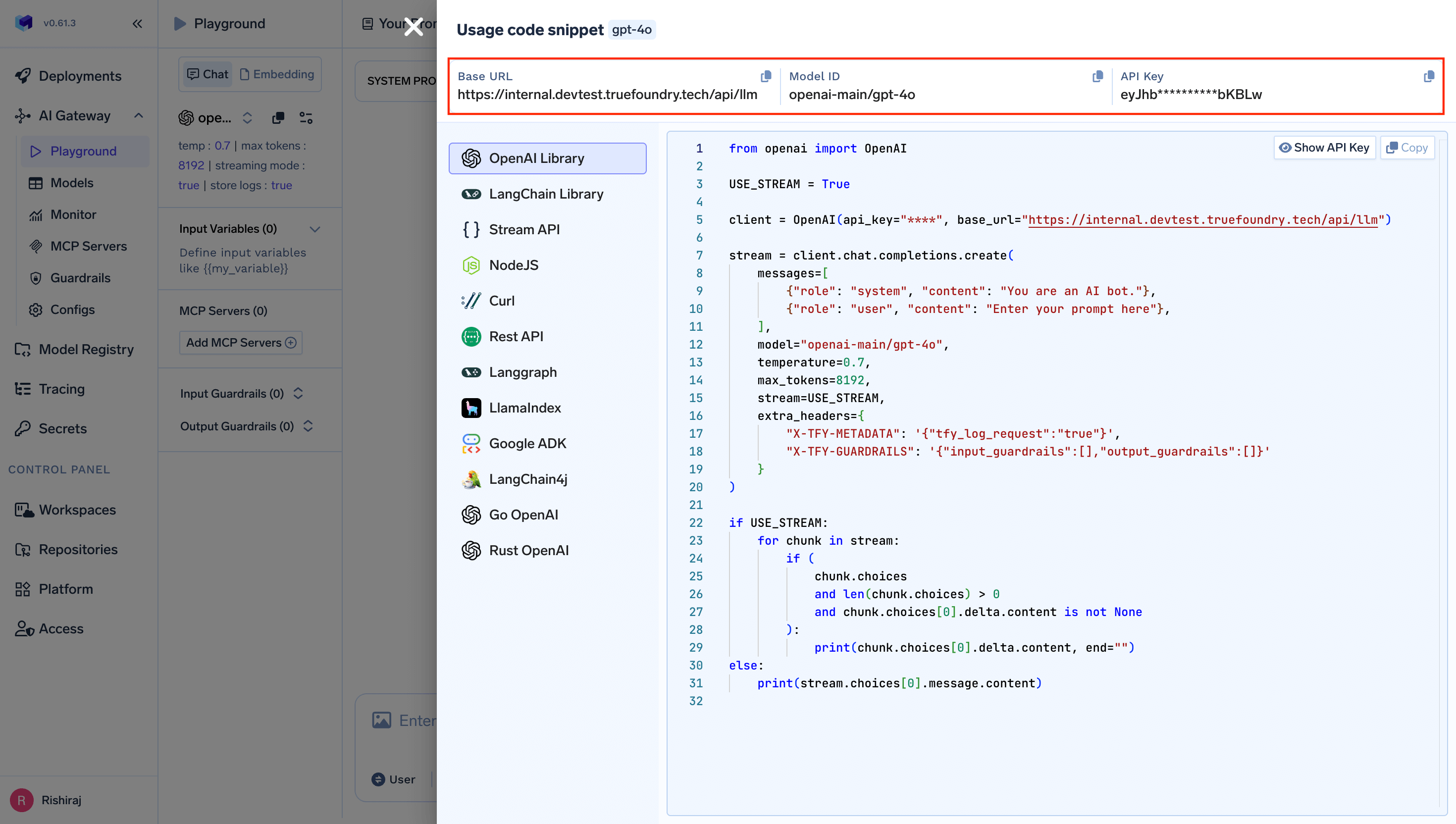
OpenAI Agents SDK is a lightweight yet powerful framework for building multi-agent workflows. It is provider-agnostic, supporting the OpenAI Responses and Chat Completions APIs, as well as 100+ other LLMs. The SDK provides automatic tracing, session management, and support for complex agent patterns including handoffs, function calling, and human-in-the-loop workflows.
Why Zod? The OpenAI Agents SDK uses Zod for schema validation and type-safe parameter definitions in function tools. This provides automatic runtime validation and better TypeScript type inference.
from agents import Agent, OpenAIChatCompletionsModel, Runnerfrom openai import AsyncOpenAIimport asyncio# Configure AsyncOpenAI client with TrueFoundryclient = AsyncOpenAI( base_url="{GATEWAY_BASE_URL}", api_key="your_truefoundry_api_key")async def main(): # Create agent with TrueFoundry client agent = Agent( name="Assistant", instructions="You are a helpful assistant", model=OpenAIChatCompletionsModel( model="openai-main/gpt-4o", openai_client=client ) ) # Run the agent result = await Runner.run(agent, "Write a haiku about recursion in programming.") print(result.final_output)if __name__ == "__main__": asyncio.run(main())
Why AsyncOpenAI? The OpenAI Agents SDK is built on async/await patterns for non-blocking operations. While you can use the synchronous OpenAI client, AsyncOpenAI is recommended for production as it allows your agents to handle concurrent requests efficiently without blocking.
import { Agent, Runner, setDefaultOpenAIClient } from '@openai/agents';import OpenAI from 'openai';// Configure OpenAI client with TrueFoundryconst client = new OpenAI({ baseURL: "{GATEWAY_BASE_URL}", apiKey: "your-truefoundry-api-key"});// Set as default client for all agents// @ts-ignore - Version conflict between openai packagessetDefaultOpenAIClient(client);// Create agentconst agent = new Agent({ name: "Assistant", instructions: "You are a helpful assistant", model: "openai-main/gpt-4o" // Format: provider-name/model-name});// Run the agentconst runner = new Runner();const result = await runner.run(agent, "Write a haiku about recursion in programming.");console.log(result.finalOutput);
from agents import Agent, OpenAIChatCompletionsModel, Runnerfrom openai import AsyncOpenAIimport asyncio# Configure TrueFoundry clientclient = AsyncOpenAI( base_url="{GATEWAY_BASE_URL}", api_key="your_truefoundry_api_key")# Create model instance to reusemodel = OpenAIChatCompletionsModel( model="openai-main/gpt-4o", openai_client=client)# Create specialized agentsspanish_agent = Agent( name="Spanish agent", instructions="You only speak Spanish.", model=model)english_agent = Agent( name="English agent", instructions="You only speak English", model=model)# Create triage agent with handoffstriage_agent = Agent( name="Triage agent", instructions="Handoff to the appropriate agent based on the language of the request.", model=model, handoffs=[spanish_agent, english_agent])async def main(): result = await Runner.run(triage_agent, input="Hola, ¿cómo estás?") print(result.final_output) # ¡Hola! Estoy bien, gracias por preguntar. ¿Y tú, cómo estás?if __name__ == "__main__": asyncio.run(main())
import { Agent, Runner, setDefaultOpenAIClient } from '@openai/agents';import OpenAI from 'openai';// Configure OpenAI client with TrueFoundryconst client = new OpenAI({ baseURL: "{GATEWAY_BASE_URL}", apiKey: "your-truefoundry-api-key"});// Set as default client for all agents// @ts-ignore - Version conflict between openai packagessetDefaultOpenAIClient(client);// Create specialized agentsconst spanishAgent = new Agent({ name: "Spanish agent", instructions: "You only speak Spanish.", model: "openai-main/gpt-4o"});const englishAgent = new Agent({ name: "English agent", instructions: "You only speak English", model: "openai-main/gpt-4o"});// Create triage agent with handoffsconst triageAgent = new Agent({ name: "Triage agent", instructions: "Handoff to the appropriate agent based on the language of the request.", model: "openai-main/gpt-4o", handoffs: [spanishAgent, englishAgent]});const runner = new Runner();const result = await runner.run(triageAgent, "Hola, ¿cómo estás?");console.log(result.finalOutput);// ¡Hola! Estoy bien, gracias por preguntar. ¿Y tú, cómo estás?
from agents import Agent, OpenAIChatCompletionsModel, Runner, function_toolfrom openai import AsyncOpenAIimport asyncio# Configure TrueFoundry clientclient = AsyncOpenAI( base_url="{GATEWAY_BASE_URL}", api_key="your_truefoundry_api_key")@function_tooldef get_weather(city: str) -> str: """Get the weather for a city""" print(f"[debug] getting weather for {city}") return f"The weather in {city} is sunny."async def main(): agent = Agent( name="Weather Assistant", instructions="You are a helpful weather assistant.", model=OpenAIChatCompletionsModel( model="openai-main/gpt-4o", openai_client=client ), tools=[get_weather] ) result = await Runner.run(agent, "What's the weather in Tokyo?") print(result.final_output) # The weather in Tokyo is sunny.if __name__ == "__main__": asyncio.run(main())
import { Agent, Runner, setDefaultOpenAIClient, tool } from '@openai/agents';import OpenAI from 'openai';import { z } from 'zod';// Configure OpenAI client with TrueFoundryconst client = new OpenAI({ baseURL: "{GATEWAY_BASE_URL}", apiKey: "your-truefoundry-api-key"});// @ts-ignore - Version conflict between openai packagessetDefaultOpenAIClient(client);// Define weather toolconst getWeatherTool = tool({ name: 'get_weather', description: 'Get the current weather for a given city', parameters: z.object({ city: z.string().describe('The name of the city'), }), async execute({ city }) { console.log(`[debug] getting weather for ${city}`); return `The weather in ${city} is sunny and 22°C`; },});// Create agent with the toolconst agent = new Agent({ name: "Weather Assistant", instructions: "You are a helpful weather assistant. Use the get_weather tool to provide accurate weather information.", model: "openai-main/gpt-4o", tools: [getWeatherTool]});// Run the agentconst runner = new Runner();const result = await runner.run(agent, "What's the weather in Tokyo?");console.log(result.finalOutput);// Based on the current information, the weather in Tokyo is sunny and 22°C.
Monitor your OpenAI Agents through TrueFoundry’s metrics tab:With Truefoundry’s AI gateway, you can monitor and analyze:
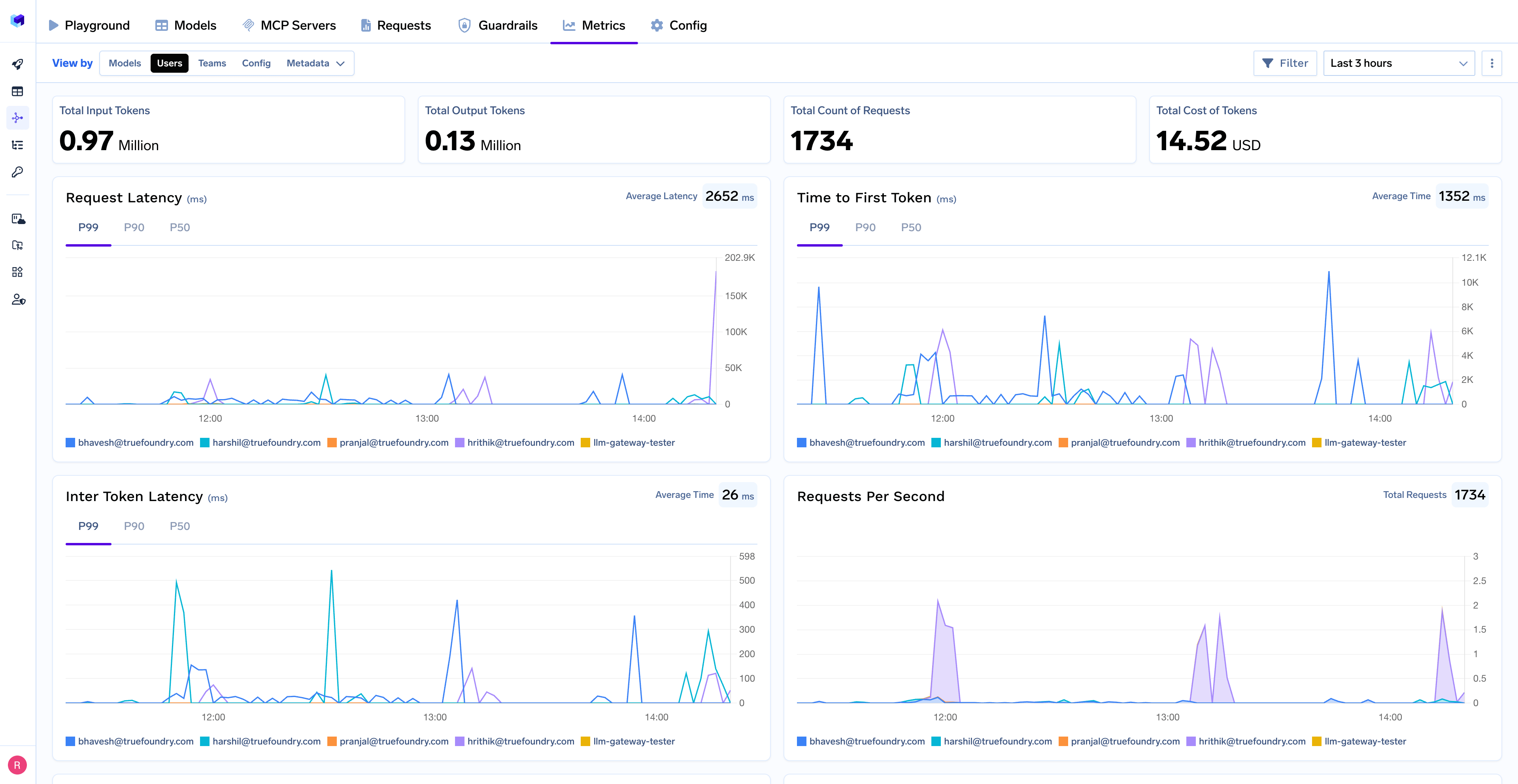
Performance Metrics: Track key latency metrics like Request Latency, Time to First Token (TTFS), and Inter-Token Latency (ITL) with P99, P90, and P50 percentiles
Cost and Token Usage: Gain visibility into your application’s costs with detailed breakdowns of input/output tokens and the associated expenses for each model
Usage Patterns: Understand how your application is being used with detailed analytics on user activity, model distribution, and team-based usage
Agent Execution Traces: Monitor individual agent runs with complete visibility into tool usage, handoffs, and state transitions
Rate Limiting and Virtual Models: Set up rate limiting and configure Virtual Models for intelligent routing and fallback across your models