

settings.json, which is what lets you point it at the TrueFoundry AI Gateway: every model call then passes through the gateway for cost tracking, rate and budget limits, access control, guardrails, and logging.
This page covers the CLI and the VS Code extension. For the desktop app see Claude Desktop; for claude.ai see Claude Web. If you just want to see it work on one machine, start with the quick start.
Prerequisites
- TrueFoundry account, sign up and follow the Gateway quick start to get your gateway base URL and an API key.
- Claude models on the gateway, add an Anthropic, Bedrock, or Vertex model account via Anthropic model integration. Include Opus, Sonnet, and Haiku so all of Claude Code’s aliases resolve.
- Claude Code, install following the official documentation.
Integrate TrueFoundry with Claude Code
Get the base URL and a model name from the TrueFoundry playground’s unified code snippet:
- Global:
~/.claude/settings.json - Project-specific:
.claude/settings.jsonin your project directory
Authentication and who pays
Every request Claude Code sends through the gateway carries two things: a TrueFoundry credential that tells the gateway who you are, and, on the way out, an Anthropic credential that tells Anthropic who pays. The gateway always gets the first one from you. Where the second one comes from is the only real configuration choice, and it has nothing to do with which Claude plan you’re on:
If your users have seats, passthrough is the only way those seats pay for Claude Code traffic that goes through the gateway; API-key mode leaves them unused and bills your key on top. If they don’t, API-key mode is the only option. Enterprise orgs commonly run both: passthrough for developers on seats, API-key mode for pipelines and for Bedrock-routed workloads.
API-key mode
Create the Anthropic model account with your API key (see Anthropic model integration), then put your TrueFoundry key inANTHROPIC_AUTH_TOKEN:
{GATEWAY_BASE_URL} with your gateway base URL (how to find it), your-truefoundry-api-key with your key, and the model names with your configured models in provider-account/model-name format. No Claude login is involved: the gateway consumes the Authorization header, authenticates you, and calls the provider with the key stored on the model account. The user’s Claude plan, if they have one, is never touched.
CLAUDE_CODE_DISABLE_EXPERIMENTAL_BETAS disables experimental features in Claude Code for stable behavior with the AI Gateway.Subscription passthrough
Create the Anthropic model account with the API key left empty (leave Anthropic API Key Auth disabled). An empty key is an instruction to the gateway: forward whateverAuthorization header the client sent instead of supplying one. Claude Code puts the user’s Claude login token there, so Anthropic charges that user’s seat or subscription and attributes the usage to them.
Because Authorization is now carrying the Claude token, the TrueFoundry key moves to x-tfy-api-key. Leave ANTHROPIC_AUTH_TOKEN unset:
/login, choosing the account type that matches your plan (Claude Enterprise, Team, or your personal Pro/Max account). The token Claude Code receives is short-lived and refreshed by Claude Code itself; a 401 later usually means it expired, and /login fixes it.
The
Authorization header is forwarded to Anthropic only when the model account has no API key. If a key is present the gateway uses it and ignores the client’s header, so the request is billed to the key, not the subscription. This is also why passthrough can’t be used for Claude Desktop: in third-party mode Desktop has no Claude login, so its Authorization header holds the TrueFoundry key, and forwarding that to Anthropic returns 401 Invalid bearer token.Fall back from the subscription to the Anthropic API
A subscription covers most day-to-day Claude Code work, but when its limit is hit requests start failing mid-task. Route through a virtual model that uses the subscription first and falls back to a pay-per-token Anthropic account when the subscription is rate-limited. Work continues, and only the overflow is billed per token. The setup uses two Anthropic accounts and one virtual model per Claude model:- A subscription account (for example
claude-pro-traffic) with no API key, the user’sAuthorizationheader is forwarded to Anthropic. - A standard account (for example
anthropic-primary) with an Anthropic API key. - A virtual model that targets the subscription account at priority
0and the standard account as the lower-priority fallback.
1
Add the subscription account
Create an Anthropic account with Anthropic API Key Auth disabled and add the Claude models you want to route through the subscription.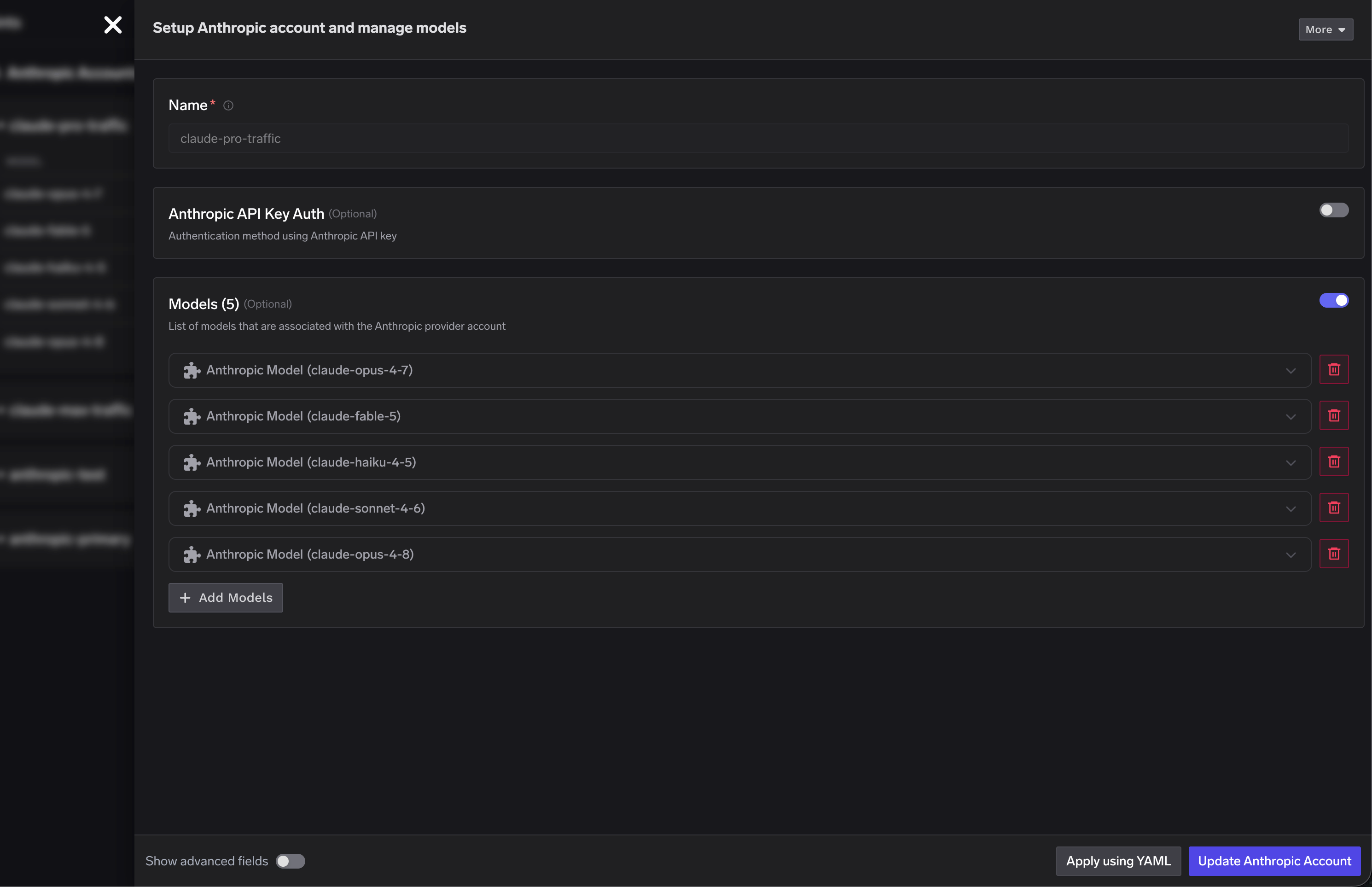
2
Add the standard Anthropic account
Create a second Anthropic account (for example
anthropic-primary) with Anthropic API Key Auth enabled and a valid API key. This is billed per token and serves as the fallback.3
Create virtual models with priority-based fallback
For each Claude model, create a virtual model with the subscription target at priority 
0 and the standard target as the fallback. The gateway routes to the fallback only when the subscription target is rate-limited or unavailable.claude-opus virtual model routes to claude-pro-traffic/claude-opus-4-8 first and falls back to anthropic-primary/claude-opus-4-8; the same pattern applies to Sonnet and Haiku.4
Point Claude Code at the virtual models
Set
ANTHROPIC_DEFAULT_OPUS_MODEL, ANTHROPIC_DEFAULT_SONNET_MODEL, and ANTHROPIC_DEFAULT_HAIKU_MODEL to the virtual model names. Claude Code talks to one endpoint while the gateway handles the subscription-to-API fallback.Controlling fast mode on subscriptions
Users on a subscription can turn on fast mode per request with/fast or globally in their config. Fast mode uses significantly more of the subscription allowance, so you may want to control it centrally. Create two virtual models, one that strips fast mode and one that allows it, and hand out the appropriate model name.
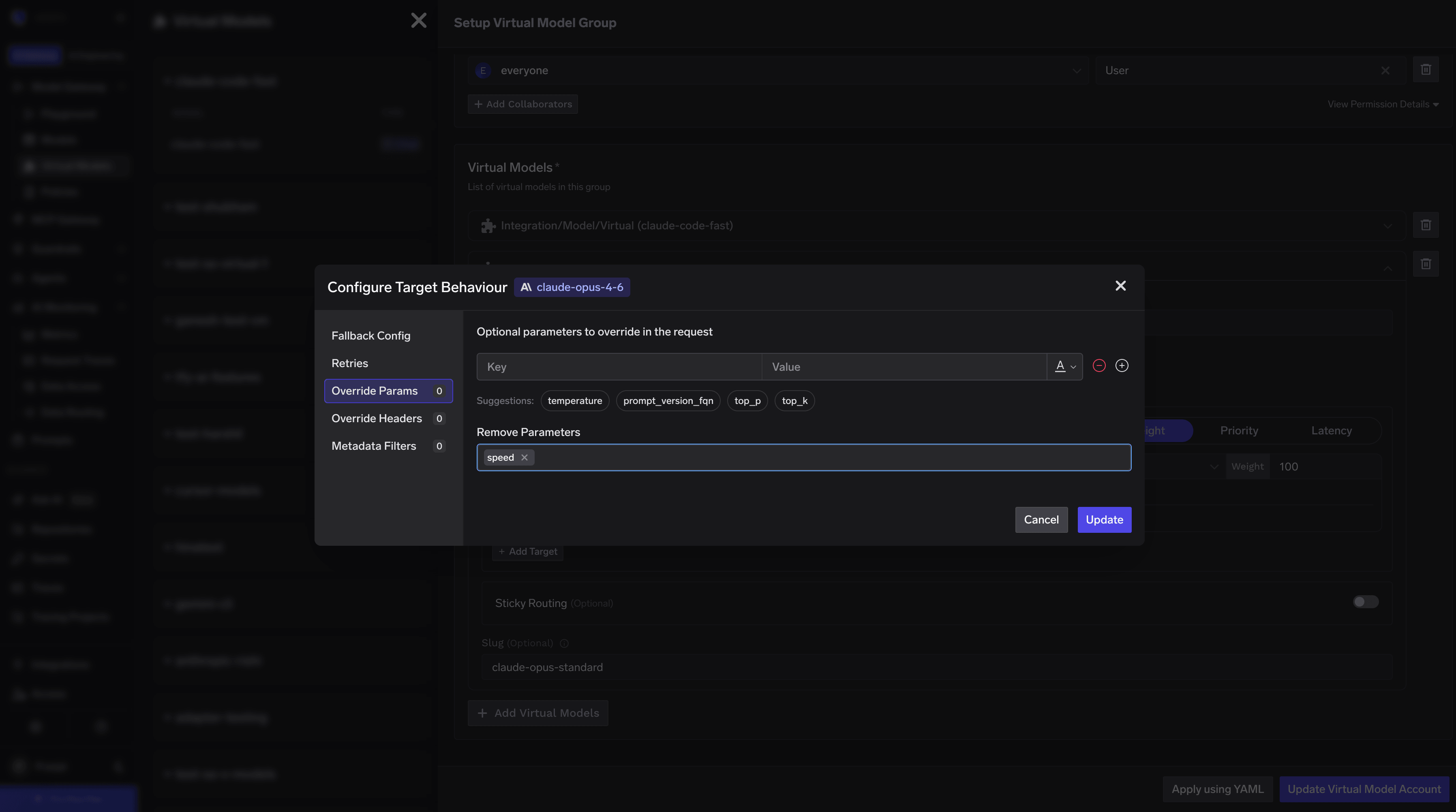
Virtual model 1: fast mode disabled. Route to claude-opus-4-6 and configure the virtual model to delete the speed field from the request body, so requests always go through as standard requests even if the user enabled fast mode.
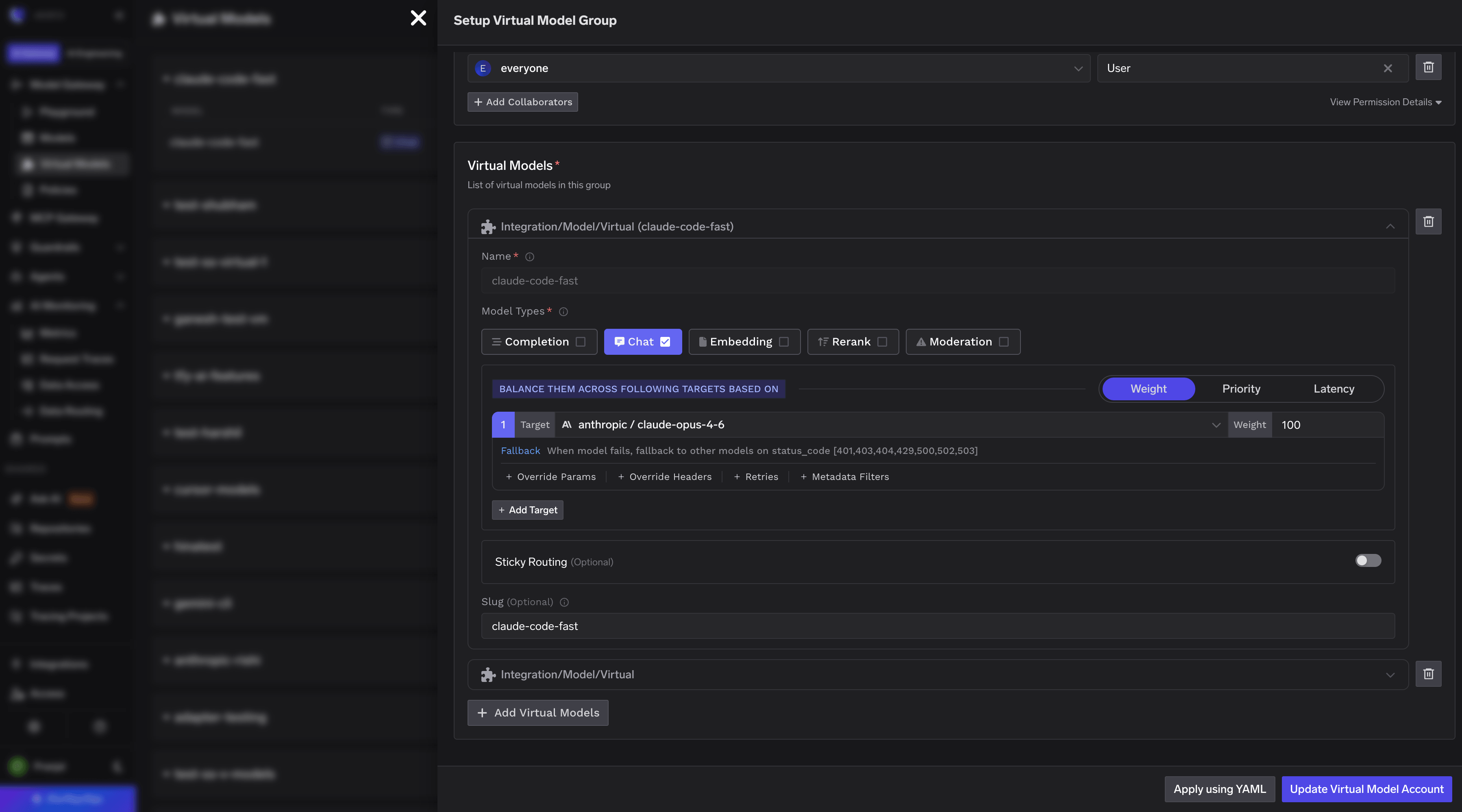
claude-opus-4-6 with no additional parameters or headers, so a user’s fast-mode setting reaches Anthropic.
ANTHROPIC_MODEL and ANTHROPIC_DEFAULT_OPUS_MODEL.
For a fleet, tfy-local-ai-setup writes either configuration into a locked managed-settings.json with a per-user TrueFoundry token, see Enforce with MDM. For how the same choice plays out on Claude Desktop (API-key mode only) and claude.ai (seat only), see the overview.
Verify the integration
Start Claude Code and send a prompt. Run/model to confirm the picker shows your gateway models, then open AI Gateway → Analytics in TrueFoundry: the request appears under your user with its model, token counts, and cost, and Request Logs shows the prompt and response. See Analytics overview and Request logging. On subscription passthrough the cost figure is an estimate at API list price; the seat is what actually pays.
Model configuration
Claude Code has built-in model aliases (opus, sonnet, haiku, opusplan) that users switch between with /model opus, --model sonnet, and so on. The ANTHROPIC_DEFAULT_*_MODEL variables map each alias to a model on your gateway:
ANTHROPIC_DEFAULT_OPUS_MODEL, theopusaliasANTHROPIC_DEFAULT_SONNET_MODEL, thesonnetaliasANTHROPIC_DEFAULT_HAIKU_MODEL, thehaikualias
Claude Code detects model capabilities (e.g. extended thinking
effort, ToolSearch, beta tool blocks) by string-matching the model id. Make sure the value of ANTHROPIC_DEFAULT_OPUS_MODEL, ANTHROPIC_DEFAULT_SONNET_MODEL, and ANTHROPIC_DEFAULT_HAIKU_MODEL contains a recognizable Anthropic model id like claude-opus-4-7, claude-sonnet-4-6, or claude-haiku-4-5 or claude-haiku-4-5-20251001. If you’re using a TrueFoundry virtual model, ensure that the virtual model’s display name is the same as the underlying Anthropic model id (e.g. claude-haiku-4-5), so the full value your-account/claude-haiku-4-5 contains a recognizable id for Claude Code; otherwise Claude Code may attach parameters the underlying model doesn’t support and Anthropic will return 400: This model does not support the effort parameter.Forwarding Anthropic beta features
Anthropic releases beta features (e.g. context management) that require theanthropic-beta header on API requests. To forward a beta flag through the AI Gateway, set the x-tfy-anthropic-beta header via ANTHROPIC_CUSTOM_HEADERS as shown in the baseline config. To enable multiple beta features, pass them as a comma-separated list (no spaces):
Beta support depends on the routed provider. For direct Anthropic requests, Anthropic validates the beta identifier. For AWS Bedrock, Bedrock Mantle, and Google Vertex AI, the Gateway translates supported identifiers and omits identifiers that the provider does not accept.
VS Code extension
The Claude Code VS Code extension reuses the CLI’s configuration, base URL, credentials, and model aliases, so there is no separate setup.- Configure the CLI as described above.
- Install the VS Code extension.
- On macOS and Linux, launch VS Code from the terminal where Claude Code is configured (
code .), since GUI applications don’t inherit shell environment variables by default. Settings in~/.claude/settings.jsonare picked up regardless.
Guardrails
Three layers can inspect Claude Code traffic, and they stack:- Gateway guardrails run on every model request that passes through the gateway: input and output checks, PII, prompt injection, moderation, and request logs for audit. Configure them once on the gateway; nothing to set in Claude Code. See Guardrails overview.
- Claude Code hooks reach what the model request never shows: prompt submissions, shell commands, file edits, and MCP tool calls. A hook posts each event to the gateway, which can block it or rewrite the tool input or output. Configured in
settings.jsonand enforceable throughmanaged-settings.json. - Anthropic Inference Hooks (Enterprise only) are configured in Anthropic’s admin console and cover every Claude surface at once, including Claude Code sessions that don’t go through the gateway. Allow/deny only.
MCP servers and web search
Route the MCP servers Claude Code uses through the TrueFoundry MCP Gateway so tool access is allowlisted, authenticated, and audited centrally. This includes web search: Claude Code’s built-in search is an Anthropic server-side tool that only works when the routed provider executes it, so for search that behaves the same on every model, add a web-search MCP server (Tavily, Exa) behind the gateway instead. Setup for both, includingmanaged-mcp.json for fleet rollout and how to disable the built-in WebSearch tool, is on Govern MCP traffic.
FAQs
How do I use the 1M (1 million) context window variant?
How do I use the 1M (1 million) context window variant?
Some Claude models (e.g. Opus and Sonnet) offer a 1 million token context window variant. To use it in Claude Code, just append You do not need to create a separate model with
[1m] to the end of the model name in your settings.json:[1m] in its name on TrueFoundry. Claude Code handles the suffix internally, it strips [1m] before sending the request and still treats it as the 1M context variant, so the underlying model on the AI Gateway stays the same.How do I use Claude Opus 4.6 Fast Mode with the AI Gateway?
How do I use Claude Opus 4.6 Fast Mode with the AI Gateway?
Claude Opus 4.6 supports a fast mode that provides lower-latency responses. To use it through the TrueFoundry AI Gateway, you need to create a virtual model with the correct additional parameters and headers.Step 1: Create a Virtual ModelCreate a virtual model in TrueFoundry that routes all traffic to 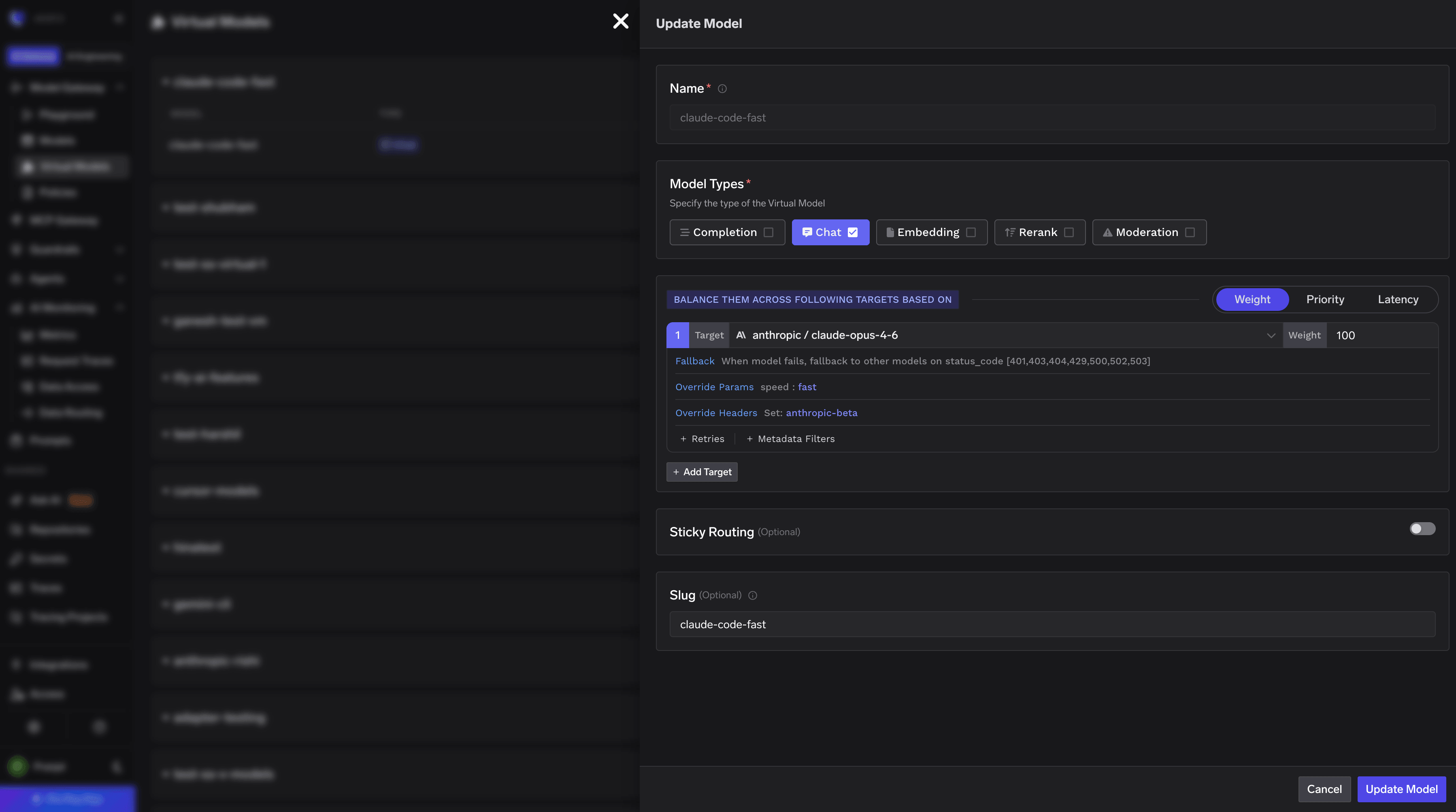
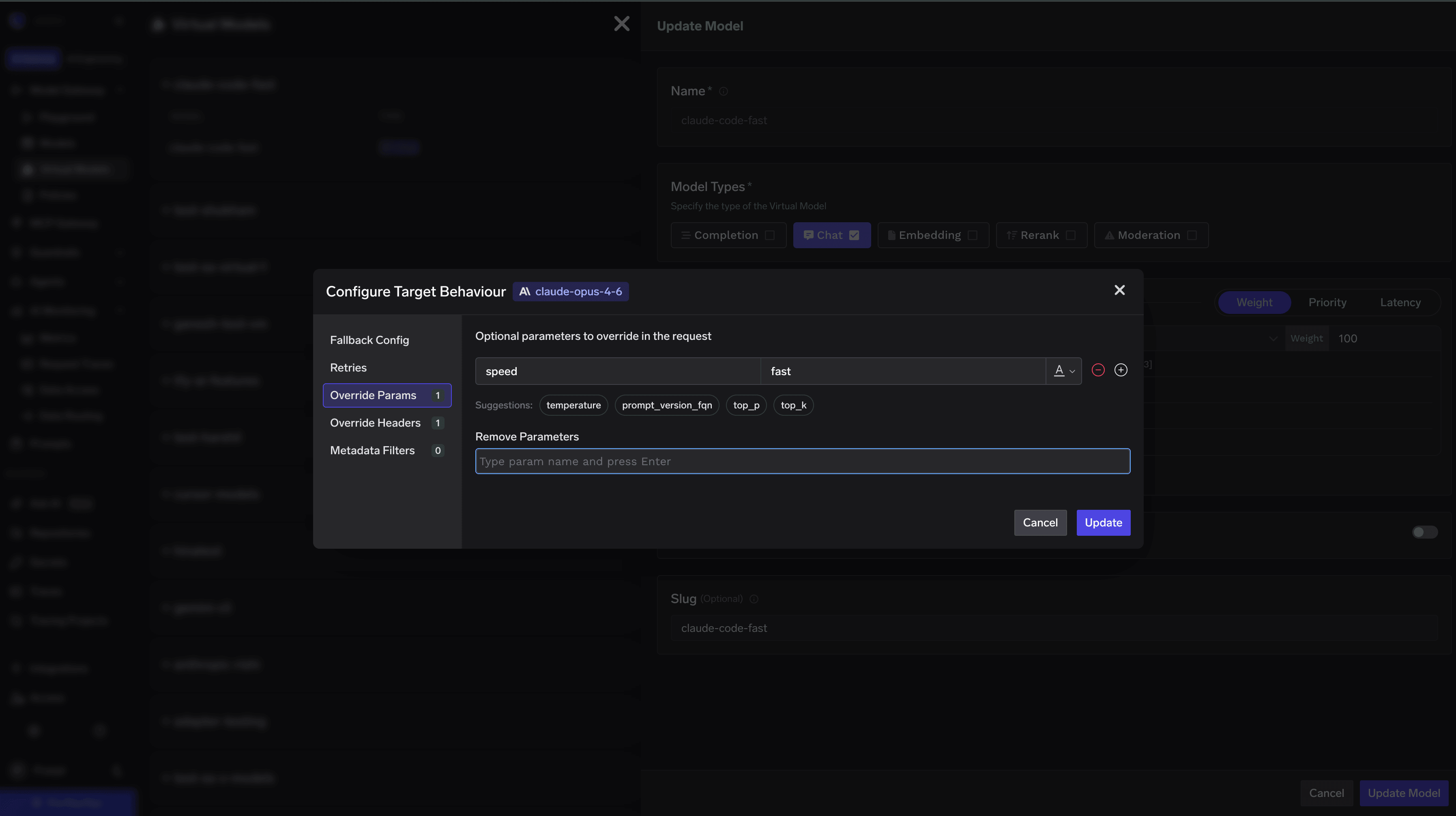
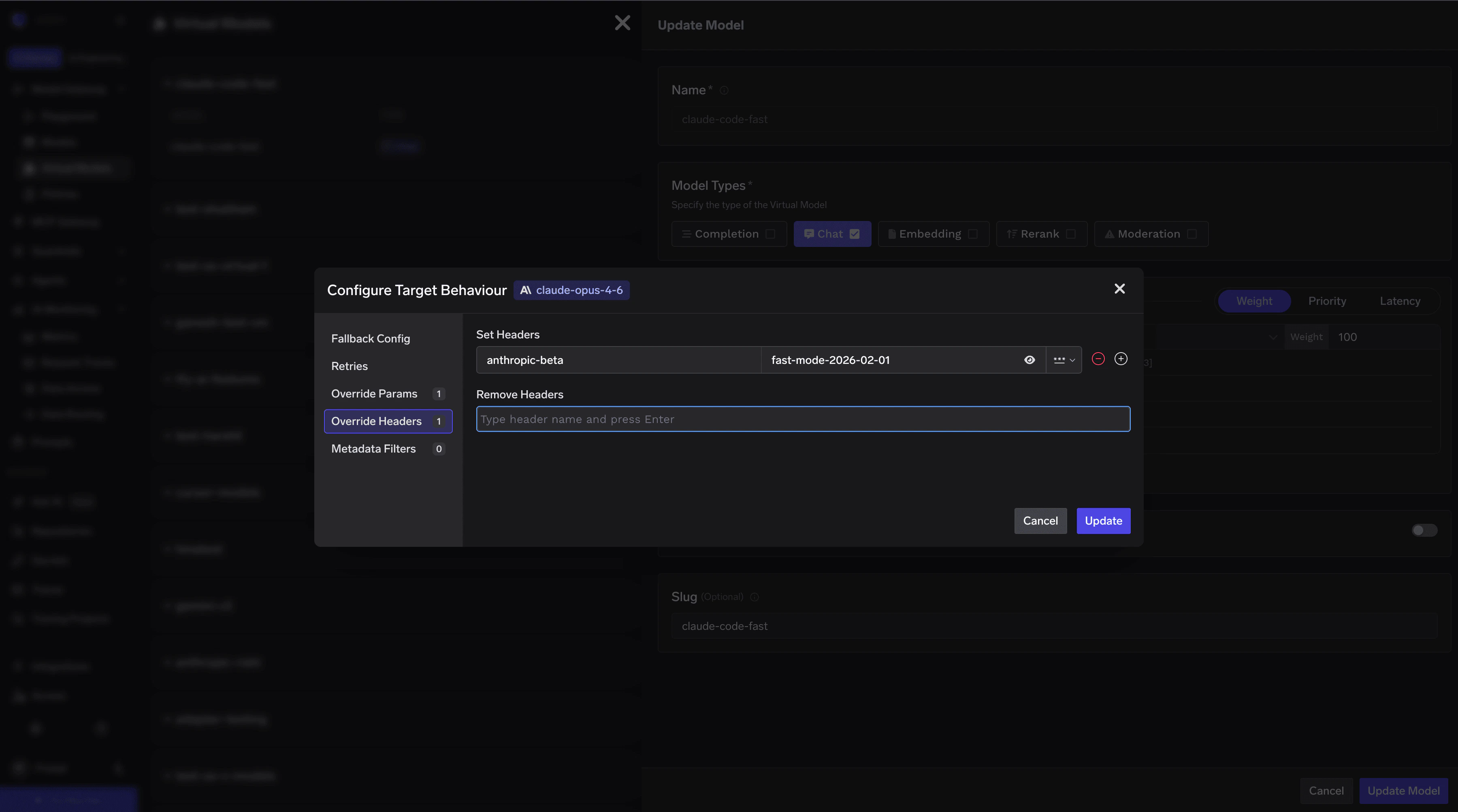
claude-opus-4-6. In the virtual model configuration, set it to forward requests to your underlying claude-opus-4-6 model.speed parameterIn the virtual model’s additional parameters, add the following field:speed: fast parameter.anthropic-beta header with the value fast-mode-2026-02-01. Add this as an additional header in the virtual model configuration:x-tfy-anthropic-beta (for example via ANTHROPIC_CUSTOM_HEADERS), a virtual-model anthropic-beta override will not replace it. Set x-tfy-anthropic-beta on the virtual model instead, and include every token you want sent (including fast-mode-2026-02-01).settings.json. Replace the ANTHROPIC_MODEL and the relevant alias (e.g. ANTHROPIC_DEFAULT_OPUS_MODEL) with the virtual model name:/model or the --model flag), choose the virtual model name you configured above. All requests will automatically include the fast mode parameter and the required beta header.Does the Claude Agent SDK pick up this configuration?
Does the Claude Agent SDK pick up this configuration?
Yes. The Claude Agent SDK (successor to the deprecated Claude Code SDK) no longer reads filesystem settings automatically, so pass All TrueFoundry configurations (Anthropic direct, AWS Bedrock, Google Vertex AI) work identically with the SDK.
setting_sources=["project"] to load .claude/settings.json:Can I run guardrails on Claude Code's prompts and tool calls?
Can I run guardrails on Claude Code's prompts and tool calls?
Yes. Beyond model requests, you can guardrail Claude Code’s prompt submissions and tool calls using Claude Code hooks that post to the AI Gateway’s
POST /hooks/claude-code endpoint. A violation blocks the prompt or tool call, or rewrites it, directly in the client. See Guardrails using Claude Code Hooks for setup, the validation-vs-mutation capability matrix, and caveats.Do I need CLAUDE_CODE_DISABLE_EXPERIMENTAL_BETAS=1? Which beta headers reach the model?
Do I need CLAUDE_CODE_DISABLE_EXPERIMENTAL_BETAS=1? Which beta headers reach the model?
Not on an Anthropic-direct route; set it to
0 if you want Claude Code’s newer features. Forward specific betas with "ANTHROPIC_CUSTOM_HEADERS": "x-tfy-anthropic-beta: <value>,<value>". x-tfy-anthropic-beta replaces, rather than merges with, a raw anthropic-beta header.On Anthropic /v1/messages there is no allowlist: beta values, safeguards, tool_reference, defer_loading, and thinking blocks pass through. On Bedrock, Vertex, and Foundry the gateway filters betas against a per-provider allowlist and silently drops unsupported ones, so a feature such as tool search may not run there. To see what was forwarded, check the trace attributes tfy.model.anthropic_betas_requested and tfy.model.anthropic_betas_sent. Note that DISABLE_EXPERIMENTAL_BETAS=1 also overrides ENABLE_TOOL_SEARCH=TRUE. See Forwarding Anthropic beta features.Claude Code asks for a model ending in [1m] and the gateway rejects it
Claude Code asks for a model ending in [1m] and the gateway rejects it
Append
[1m] to the model name in settings.json (for example claude-code/claude-sonnet[1m]). Claude Code strips the suffix before sending and treats the model as the 1M-context variant internally, so the gateway sees the normal model name. Don’t create a model with brackets in its name on the gateway; brackets aren’t allowed in integration names. See the Claude Code FAQ.Claude Code's auto mode or classifier behaves differently through the gateway
Claude Code's auto mode or classifier behaves differently through the gateway
First upgrade Claude Code. Several reported differences on the subscription-passthrough route were client bugs fixed in later releases. If a current client still misbehaves, open a ticket with the trace attributes
tfy.model.anthropic_betas_requested and tfy.model.anthropic_betas_sent from a failing request, the virtual model configuration, and the settings.json env block.