

Adding Models
This section explains the steps to add Anthropic models and configure the required access controls.Select Anthropic as the provider
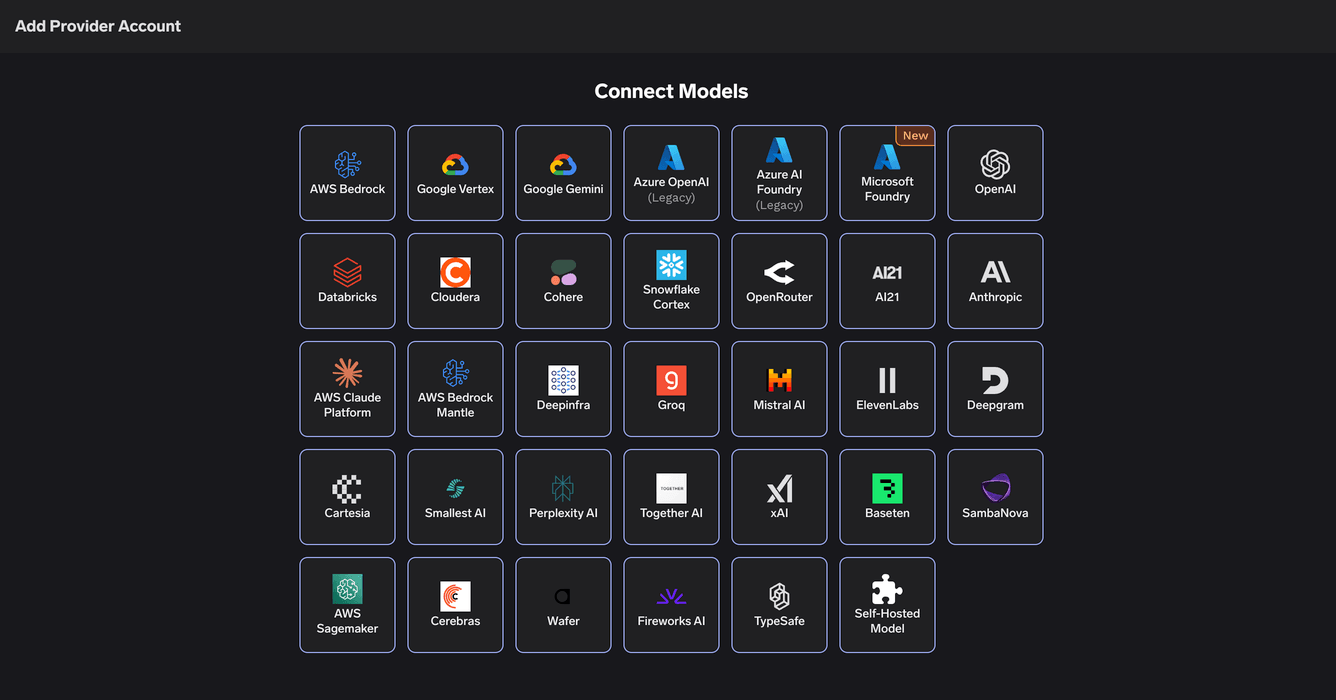
Choose a provider in Add Provider Account
Add Anthropic Account Details
https://my-proxy.example.com/v1. If unset, requests go to https://api.anthropic.com/v1.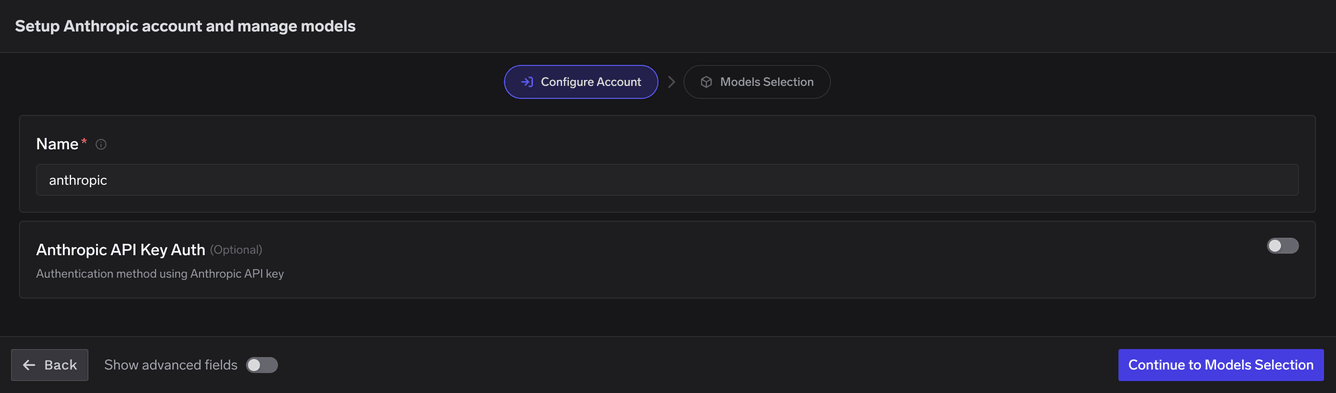
Configure Account for Anthropic
Add Models
Save and grant access
tfy apply.To let other users, teams or virtual accounts use or manage these models, open Manage Accounts, click ⋮ on the account and choose Access Control > Grant Access. See Access control.Authenticate with Workload Identity Federation
gateway.truefoundry.ai). Support for
customer-hosted (hybrid) and self-hosted gateways is planned.wrkspc_…), Service Account ID
(svac_…), and Federation Rule ID (fdrl_…). None of them are secret.
What you’ll do
The examples use a tenant namedacme.
- In TrueFoundry, open a new Anthropic provider account on the Workload Identity Federation tab and copy the Issuer URL, Subject, and Audience.
- In the Claude Console, register that issuer, then create a workspace, service account, and federation rule that use those three values.
- Copy the resulting Organization ID, Workspace ID, Service Account ID, and Federation Rule ID back into TrueFoundry, then test and save.
Copy the values from TrueFoundry
Go to AI Gateway > Models, click Add Model, choose To New Provider Account and select Anthropic. Name the account, turn on Auth Data and select the Workload Identity Federation tab. Copy the Issuer URL, Subject and Audience, and keep the form open — you’ll paste Anthropic’s IDs into the empty fields below them. Every provider account in your tenant shows the same issuer and subject.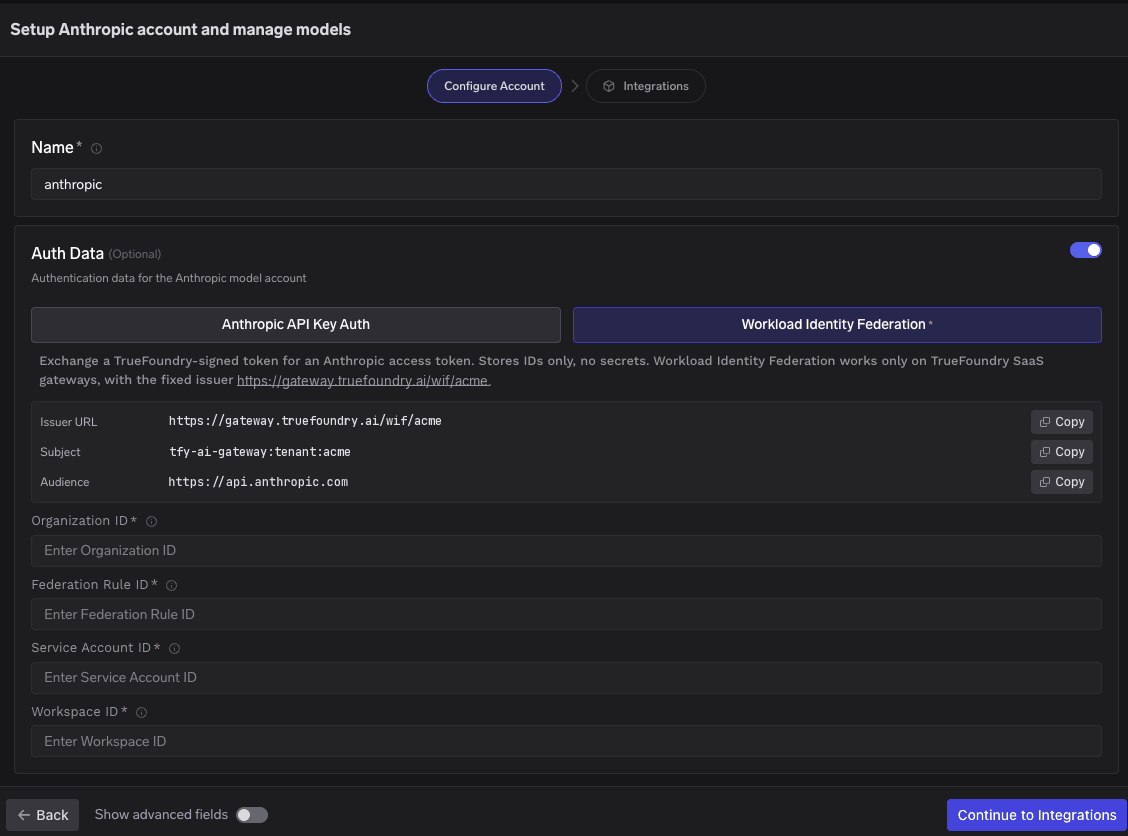
The Workload Identity Federation tab of an Anthropic provider account
Set up Anthropic
Do these steps in the Claude Console. Paste the three values you copied from TrueFoundry into the matching fields below.Register the issuer
- Name: for example
truefoundry-acme. - Issuer URL (iss claim): paste the Issuer URL from TrueFoundry, exactly, with no trailing slash.
- JWKS source: OIDC discovery. Leave the discovery base URL and CA certificate empty.
- Enforce single-use tokens: Off. It’s on by default. The gateway reuses each signed JWT for up to 5 minutes, so with it on, Anthropic rejects the repeats and requests fail.
- Maximum token lifetime (hours):
1or more. The gateway’s JWTs are valid for 1 hour.
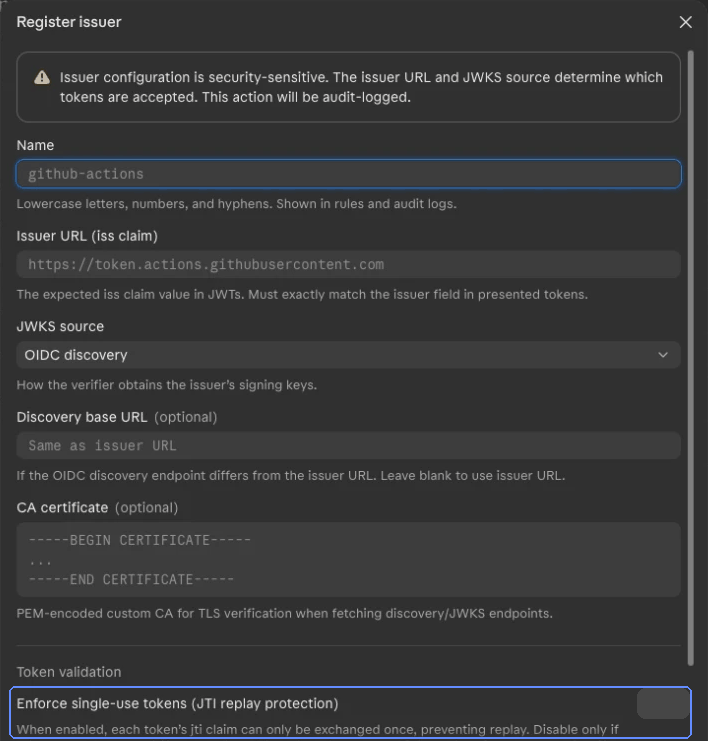
Register issuer. Turn off Enforce single-use tokens (outlined), which is on by default. The maximum token lifetime is below it.
Create a workspace
wrkspc_…) — you’ll paste it into
TrueFoundry later.Create a service account
truefoundry-gateway, give it the
Developer organization role, and add the new workspace under Workspaces. Don’t choose
Admin: an Admin service account lets a federation rule grant organization-admin scopes. Note the
Service Account ID (svac_…) — you’ll paste it into TrueFoundry later.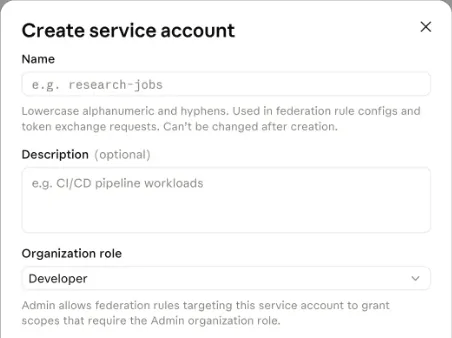
Create service account with the Developer role
Create the federation rule
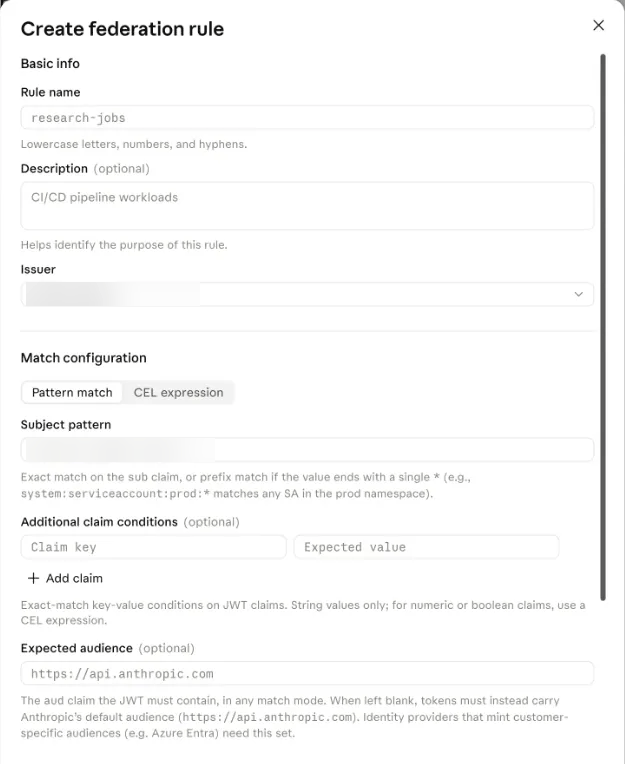
Create federation rule: the issuer and match conditions
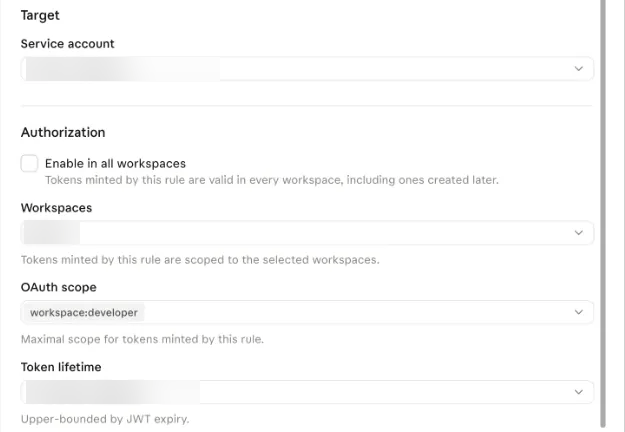
Create federation rule: the target and authorization. Values specific to the capture are hidden.
Copy the IDs from Anthropic
Copy these four IDs — they are what you paste into TrueFoundry. Copy them as text rather than reading them off the screen:O and 0 are easy to confuse.
Add the account in TrueFoundry
Go back to the form from Copy the values from TrueFoundry.Enter the IDs
https://api.anthropic.com/v1 is accepted.Select models
Test and save
tfy apply.The same account as YAML
The same account as YAML
Revoke access
Archive the federation rule in the Claude Console. New exchanges then fail. Access tokens Anthropic has already issued keep working until they expire, within about 1 hour.Troubleshooting
Anthropic returns the same401 (authentication_error) for every rejected JWT. The reason is in
the Claude Console’s
authentication history,
for example match_subject_prefix when the subject doesn’t match the rule. See also Anthropic’s
Troubleshoot a failed exchange.
The issuer's status is Failing
The issuer's status is Failing
jwks_polling_disabled: false (see Anthropic’s
issuers API).403 from the gateway saying Anthropic rejected the token (HTTP 401)
403 from the gateway saying Anthropic rejected the token (HTTP 401)
Some exchanges fail with that 403 while others succeed
Some exchanges fail with that 403 while others succeed
403 from the gateway saying Anthropic refused the exchange, with another HTTP status
403 from the gateway saying Anthropic refused the exchange, with another HTTP status
429 rate limit or 502 from Anthropic's token endpoint
429 rate limit or 502 from Anthropic's token endpoint
Gateway or control plane isn't TrueFoundry SaaS
Gateway or control plane isn't TrueFoundry SaaS
- Requests on a customer-hosted (hybrid) or self-hosted gateway fail with
Workload identity federation for Anthropic and OpenAI is only supported on TrueFoundry SaaS gateways.— send these requests through a TrueFoundry SaaS gateway, or use an API key provider account on that gateway. - Saving the provider account fails with a
400error:Workload identity federation for Anthropic and OpenAI is only supported on TrueFoundry SaaS.— your control plane isn’t TrueFoundry SaaS. Use an API key provider account there.
Check that the issuer is reachable
Use this when Anthropic can’t verify TrueFoundry’s tokens. Anthropic fetches the signing keys from your issuer URL to check each token, so if that URL doesn’t serve them, every exchange fails. Run these checks before you change the issuer or the federation rule. They don’t need any credentials. Fetch your tenant’s discovery document:issuer is your issuer URL and whose jwks_uri is
<issuer URL>/.well-known/jwks.json. Both documents are public. A 404 means the tenant name in the
URL is wrong or the tenant isn’t active. A 503 is temporary, for example while the signing keys
load, so retry after a short wait.
How it works
- The gateway signs a JWT that names your TrueFoundry tenant, valid for 1 hour, and sends it with the account’s IDs to the provider’s token endpoint.
- The provider fetches the public signing keys from your tenant’s issuer URL, verifies the JWT, and checks it against your federation rule (Anthropic) or mapping (OpenAI).
- The provider returns an access token valid for about 1 hour, which the gateway uses for model calls. Once half of the token’s life has passed (30 minutes before expiry for a one-hour token), the next request starts a new exchange in the background, and requests keep using the current token meanwhile.
What the JWT contains
What the JWT contains
exp is 1 hour after iat, and jti is a new random ID for each JWT. The gateway
reuses a signed JWT for up to 5 minutes, so several exchanges can carry the same jti.aud is the account’s Audience, or https://api.openai.com/v1 if it’s empty.Reference links
Inference
After adding the models, you can perform inference using an Anthropic-compatible API via the Playground or by integrating with your own application.overloaded_error before generation begins. The AI Gateway waits for the first non-empty stream chunk; if it receives an overloaded_error before that first chunk, it automatically falls back to the next configured model. Learn more in Anthropic Stream Overload Fallback.x-tfy-anthropic-beta with a comma-separated list of beta tokens. When this header is present, it replaces every other client beta source — including the anthropic-beta header and body anthropic_beta — and is not merged with them. The only override is a virtual model’s headers_override of x-tfy-anthropic-beta itself; setting anthropic-beta in the override does not replace it. See Header overrides.max_tokens. If your request omits it, the AI Gateway sends a default of 2048 tokens so the request does not fail. Responses longer than that are truncated with finish_reason: "length", so set max_tokens explicitly for long-form generations. See max_tokens defaults per provider.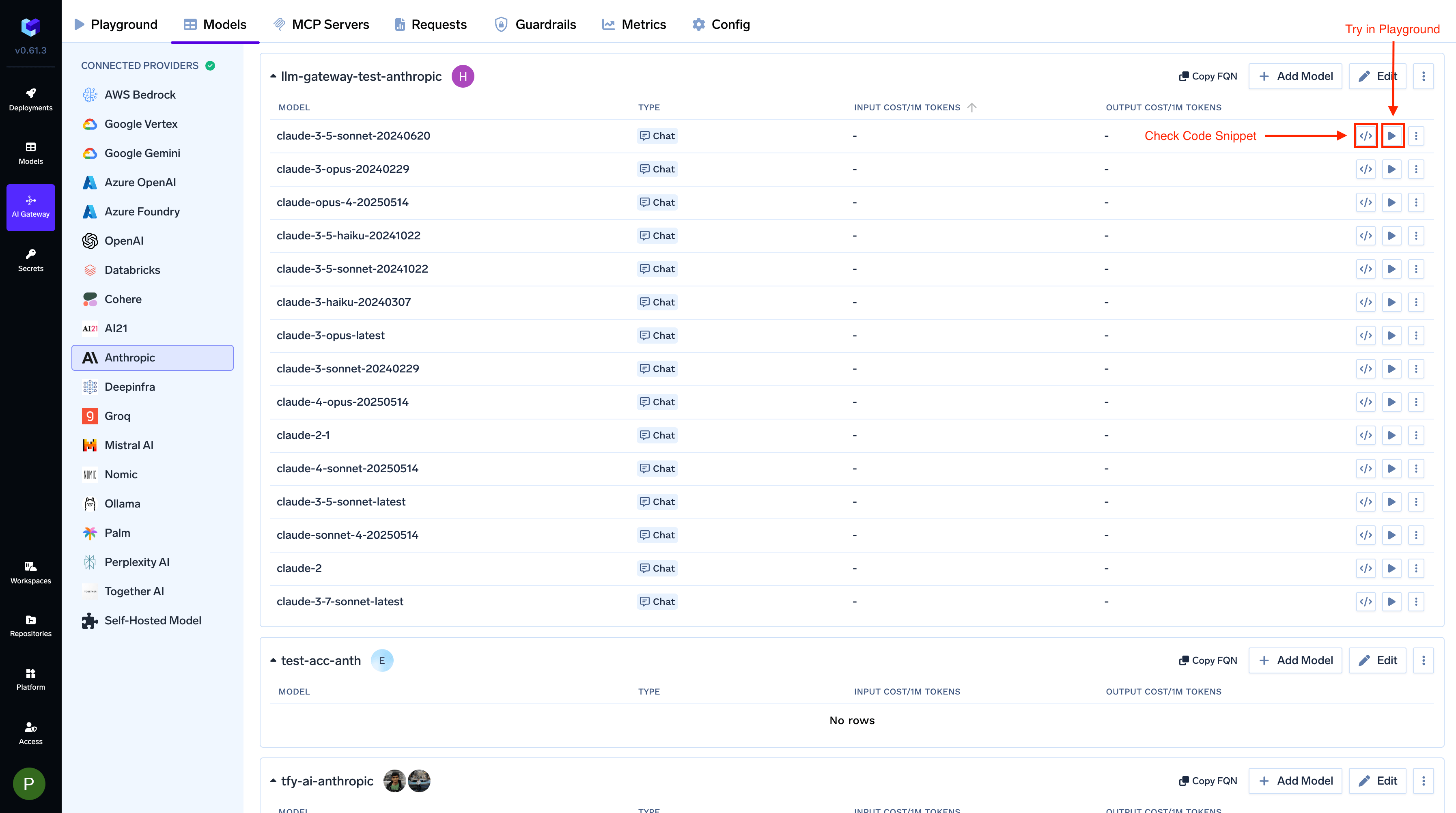
Supported APIs
Once your Anthropic model account is configured, the following API surfaces are available through the AI Gateway. The table below summarizes each endpoint alongside platform feature support (tracing, cost tracking).- ✅ Supported by provider and TrueFoundry
- Supported by Provider, but not by TrueFoundry
- Provider does not support this feature
Chat Completions
Chat Completions
Streaming
Streaming
stream=True to start streaming responses and iterate over delta chunks. You may defensively check that chunk.choices is non-empty and delta.content is not None.Function calling / tools
Function calling / tools
tool_calls back as a tool role message, then request the final response. Use tool_choice to force the model to call a specific tool when you need deterministic behaviour.Vision (multimodal images)
Vision (multimodal images)
image_url content part.The URL can be a public HTTP URL or an inline data:image/...;base64,... URI. For self-contained examples we recommend the inline form.PDF document input
PDF document input
file content type with base64 encoding.Structured outputs (JSON schema)
Structured outputs (JSON schema)
response_format={"type": "json_schema", ...} to force the model to return data matching a JSON schema. Claude 4.5/4.6 models use native JSON schema support; older models use a tool-conversion fallback.Prompt caching
Prompt caching
cache_control on content blocks you want cached (unlike OpenAI’s automatic caching). Cached tokens appear as cache_creation_input_tokens (first call) and cache_read_input_tokens (subsequent calls) in the usage response.Extended thinking (reasoning)
Extended thinking (reasoning)
reasoning_effort parameter — the AI Gateway translates it into Anthropic’s native thinking parameter format.reasoning_effort to a thinking.budget_tokens ratio of the request’s max_tokens: none = 0%, low = 30%, medium = 60%, high = 90%.reasoning_content (plain text) and thinking_blocks (structured blocks with cryptographic signatures required for multi-turn reasoning continuity).Messages API
Messages API
/messages) is also exposed through the AI Gateway, letting you use the official anthropic Python SDK directly.
You get the same gateway features — routing, logging, rate-limiting, budget management — as with the OpenAI-compatible interface.
Full docs: Messages API, Native SDK Supportapi_key=TFY_API_KEY- SDK sends thex-api-keyheaderauth_token=TFY_API_KEY— SDK sends theAuthorization: Bearerheader
api_key is the idiomatic Anthropic SDK pattern - use it unless you have a reason to send a Bearer token.Streaming
Streaming
.messages.stream() and iterate over text_stream for incremental
output.Files API
Files API
files.content) only works for files created by skills or the code execution tool. User-uploaded files cannot be downloaded back — you can only list metadata and delete them.