

Choose an approach
Option 1: Reverse Tunnel Agent
Instead of exposing your model or MCP server publicly, you run acloudflared agent inside your network. The agent opens an outbound-only tunnel to a TrueFoundry-managed domain dedicated to your tenant. The AI Gateway then reaches your private services through that tunnel — no inbound firewall ports need to be opened.
This option is available on enterprise plans. Contact the TrueFoundry team to enable it for your tenant.
How it works
Two components run inside your network:- cloudflared agent — The tunnel client. It initiates outbound-only connections to Cloudflare’s edge and carries encrypted traffic from the AI Gateway back to your private services.
- Caddy internal router — TrueFoundry’s routing component. It receives traffic arriving through the tunnel and forwards each request to the correct upstream service based on the URL.
http://my-mcp-server.internal:8080/sse inside your VPC becomes reachable at:
Request flow
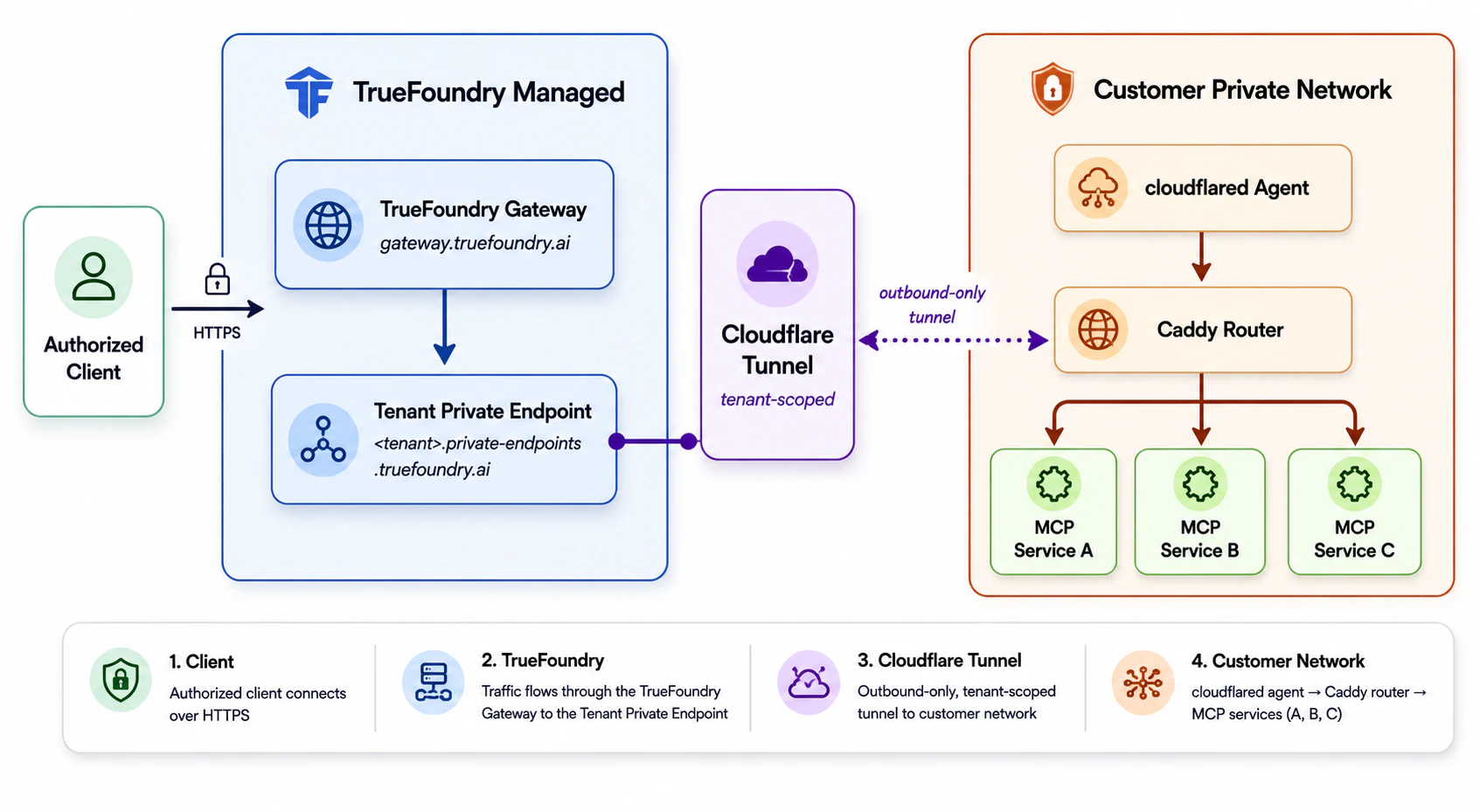
Authorized client requests reach private MCP services through the TrueFoundry gateway and a tenant-scoped Cloudflare tunnel into the customer's network.
Resource specs
The tunnel stack has a small compute footprint. The Helm chart applies these per-replica requests and limits by default:
The chart also deploys 2 replicas of each component by default.
cloudflared can run on any Linux distribution and any instance type. There are no special OS or hardware requirements beyond the resource specs above.Setup
1
Request a tunnel
Contact the TrueFoundry team to provision a new tunnel for your tenant. You will receive:
public_domain— Your tenant’s public domain, e.g.,<tenant-name>.private-endpoints.truefoundry.ai.auth_token— The token used to runcloudflaredin your environment.
2
Deploy the tunnel stack
Run Confirm the pods are running:
cloudflared and the Caddy internal router inside your network using the auth_token.- Kubernetes (Helm)
- VM
3
Register your service in the AI Gateway
Once the tunnel is active, your private services are reachable at:Use this URL as the endpoint when registering the model or MCP server in the AI Gateway. For MCP servers, see Getting started with MCP servers.
Security
- No inbound exposure. All traffic from the AI Gateway to your services travels over the encrypted outbound tunnel. No inbound ports are opened on your network.
- Gateway-only access to the tunnel. Each tenant’s tunnel endpoint is locked down to the TrueFoundry gateway’s IP addresses, so requests from any other source are rejected — even if they know the private endpoint URL.
- Tenant isolation. MCP server URLs can only be registered if they begin with your tenant’s private endpoint domain (
<tenant-name>.private-endpoints.truefoundry.ai), which prevents cross-tenant SSRF. Access is further restricted by a tenant-specific secret token. - Protect the
auth_token. Treat it as a high-value secret — store it in Kubernetes Secrets or a dedicated secrets manager. If an attacker obtains it, they can impersonate your tunnel. Contact the TrueFoundry team immediately if you suspect it has been compromised.
Control what the agent can reach
The tunnel stack is not a cluster agent. The Helm chart creates no Role, ClusterRole, or RoleBinding, so neither component is granted any Kubernetes API permissions — it cannot list pods, read secrets, or enumerate anything in the cluster. Both components are HTTP proxies, so the only meaningful question is which HTTP endpoints they can reach. Three controls scope that, and you own all three.Restrict upstream hosts with caddy.allowedHosts
This is the primary control. caddy.allowedHosts is an explicit allowlist of the upstream hostnames the Caddy router will proxy to. Requests to any other target return 404.
- Entries are hostnames only — do not include a port. The port still comes from the request path.
- Hostnames are matched exactly, so
svc.ns.svc.cluster.localwill not matchevil-svc.ns.svc.cluster.local. - Onboarding a new host is a values change followed by
helm upgrade. The Caddy pods roll automatically to pick up the new allowlist.
Network policies
The chart ships two NetworkPolicies, both enabled by default:Caddy’s own egress is deliberately left open at the network layer so that a cluster-wide default-deny-egress policy does not break it from reaching upstreams or DNS. Upstream targets are scoped at the application layer by
caddy.allowedHosts. If you also want network-layer enforcement, deploy the chart into a dedicated namespace and apply your own egress policy — extraManifests can carry it alongside the release.NetworkPolicies are only enforced on clusters whose CNI supports them. They are inert otherwise.Auditing
Caddy writes a structured JSON access log to stdout for every proxied request, including the upstream host it dialed, so you can audit exactly what the tunnel touched. cloudflared exposes Prometheus metrics on port2000; set serviceMonitor.enabled=true to scrape them.
caddy.allowedHosts requires chart version 0.4.0 or later, and the NetworkPolicies require 0.5.0 (Caddy) and 0.6.0 (cloudflared). Run helm repo update before installing to pick up the latest chart.Option 2: Allowlist TrueFoundry IP addresses
If your model or MCP server can be given an address TrueFoundry can reach — for example a public load balancer or API gateway in front of it — you can keep it closed to everyone else by allowing inbound traffic only from TrueFoundry’s outbound IP addresses. Traffic from TrueFoundry leaves through a fixed set of NAT addresses per control plane and gateway location, so a firewall rule, security group, or WAF allowlist built from those addresses admits TrueFoundry and rejects everything else. The addresses are published in thetruefoundry/ip-ranges repository, in a machine-readable form intended for automation.
Pick the list for your control plane
TrueFoundry runs two independent control planes, each with its own list:
If you are on the US control plane, use only
us.json. The US control plane is being rolled out, so its gateway addresses are added to us.json gradually as they come online — build your allowlist from the file rather than from a one-time copy.
Both URLs always serve the latest list. Replace .json with .txt for one CIDR per line. Each GitHub release also attaches the lists, if you want to pin a specific version.
Choose which entries to allowlist
Each list contains one entry per hostname, andnat_ips on an entry is every address that hostname can send traffic from:
For example, to build the allowlist for a tenant on the global control plane that uses the US multi-regional endpoint:
gw to gateway.truefoundry.ai if you use the global endpoint.
Keep the allowlist up to date
Every change to the addresses is published as a GitHub release of the repository:- New addresses are announced in a release and start carrying traffic 15 days after that release. Add them to your allowlist within those 15 days.
- Removed addresses are announced in a new release. Remove them from your allowlist after that release.