

Reference integrations (deployable wrappers)
Before building from the template below, you can deploy production-ready FastAPI wrappers from theintegrations-custom-guardrails monorepo. Each wrapper implements the custom guardrail response contract; you deploy the service (TrueFoundry, Docker, Render, or any host with a public HTTPS URL), then register Custom Guardrail configs in AI Gateway → Guardrails pointing at the wrapper endpoints.
Arthur AI
Arthur GenAI Engine stateless validation for prompt injection, toxicity, and hallucination checks—validate-only SaaS.
DeepKeep
DeepKeep AI Firewall for PII replace, secret-key blocking, prompt-injection defense, and toxic-language filtering.
Guardrails AI
Hub validators for PII, secrets, toxicity, and profanity—runs locally in the wrapper pod.
Lasso Security
SaaS
classify (validate) and classifix (mutate) via Lasso API v3—policy in the Lasso console.NVIDIA NeMo
LLM-judged
self_check_input / self_check_output rails for jailbreak and output safety.Verra
Managed AI governance for regulated industries—validate and mutate (PII/secrets redaction) with SOC 2 / HIPAA audit trail.
These appear on the Integrations → Guardrails page alongside native provider integrations. They use the same Custom Guardrail dashboard flow as the template repository.
Template Repository Overview
The custom guardrails template repository provides a comprehensive FastAPI application with multiple guardrail implementations. It serves as a starting point for building your own custom guardrail server with best practices and example implementations.Architecture
The template follows a modular architecture:main.py: FastAPI application with route definitionsguardrail/: Directory containing all guardrail implementationsentities.py: Pydantic models for request/response validationrequirements.txt: Dependencies and libraries
Custom guardrail response contract
The AI Gateway treats your guardrail HTTP status and JSON body as follows:- HTTP 2xx — The guardrail ran to completion. Policy outcome and mutations are expressed only in the JSON body (see fields below). Use 2xx for both allow and deny so the AI Gateway can tell policy failure apart from infrastructure failure.
- HTTP non-2xx (4xx/5xx) or network failure — The guardrail did not complete successfully (misconfiguration, auth failure, timeout, crash). Depending on enforcing strategy, the AI Gateway may block or continue the request; this path does not mean “content not allowed.”
Why this matters: With
enforce_but_ignore_on_error, only non-2xx / runtime errors are candidates to ignore. If the signal is “blocked” with HTTP 400, the AI Gateway may treat that as a runtime error and allow the request—use 2xx + verdict: false instead.
Entities and Data Models
The template defines several Pydantic models that structure the data flow between TrueFoundry AI Gateway and your custom guardrail server.RequestContext
RequestContext is a Pydantic model that provides structured contextual information for each request processed by your custom guardrail server. It includes details about the user (as a Subject object) and optional metadata relevant to the request lifecycle. This context is automatically populated by the TrueFoundry AI Gateway and can be leveraged for access control, auditing, or custom logic within your guardrail implementations.
For MCP tool guardrails,
context.metadata also includes a claims object holding the verified claims from the caller’s inbound JWT (e.g. an Okta access token exposes cid and scp). Use these to authorize a tool call by the calling application or its scopes. The keys depend on your identity provider, and claims is absent when the caller uses an opaque / non-JWT token.InputGuardrailRequest
OutputGuardrailRequest
Guardrail response models
Available Guardrails
The template repository includes five pre-implemented guardrails that demonstrate different validation and transformation techniques.1. PII Redaction (Presidio)
1. PII Redaction (Presidio)
Info
Info
Endpoint:
Type: Input Guardrail (Mutate)
Technology: Microsoft PresidioDetects and redacts Personally Identifiable Information (PII) from incoming requests using Microsoft’s Presidio library.
POST /pii-redactionType: Input Guardrail (Mutate)
Technology: Microsoft PresidioDetects and redacts Personally Identifiable Information (PII) from incoming requests using Microsoft’s Presidio library.
Code Snippet
Code Snippet
Response Behavior
Response Behavior
Response Behavior (HTTP 2xx; see Custom guardrail response contract):
transformed:false— No PII redaction applied; gateway keeps the originalrequestBody(you may still return e.g.{ "verdict": true, "transformed": false, "result": <unchanged body> }for clarity).transformed:true— PII was redacted;resultmust be the full OpenAI-shapedrequestBodyto replace the incoming request.- HTTP 4xx/5xx — Processing or dependency failure only; not used for “PII found” policy outcomes.
2. NSFW Filtering (Local Model)
2. NSFW Filtering (Local Model)
Info
Info
Endpoint:
Type: Output Guardrail (Validate)
Technology: Hugging Face Transformers (Unitary toxic classification model)Filters out Not Safe For Work (NSFW) content from model responses using a local toxic classification model.
POST /nsfw-filteringType: Output Guardrail (Validate)
Technology: Hugging Face Transformers (Unitary toxic classification model)Filters out Not Safe For Work (NSFW) content from model responses using a local toxic classification model.
Code Snippet
Code Snippet
Response Behavior
Response Behavior
Response Behavior (HTTP status):
- HTTP 2xx — Outcome in the JSON body (see Custom guardrail response contract).
- Allow: e.g.
{ "verdict": true }. - Deny: e.g.
{ "verdict": false, "message": "…" }— blocked by policy.
- Allow: e.g.
- HTTP 4xx/5xx or timeout — Guardrail or dependency failed to run; not “content denied.”
3. Drug Mention Detection (Guardrails AI)
3. Drug Mention Detection (Guardrails AI)
Info
Info
Endpoint:
Type: Output Guardrail (Validate)
Technology: Guardrails AIDetects and rejects responses that mention drugs using Guardrails AI’s drug detection capabilities.
POST /drug-mentionType: Output Guardrail (Validate)
Technology: Guardrails AIDetects and rejects responses that mention drugs using Guardrails AI’s drug detection capabilities.
Code Snippet
Code Snippet
Response Behavior
Response Behavior
Response Behavior (HTTP status):
- HTTP 2xx — Outcome in the JSON body (see Custom guardrail response contract).
- Allow:
{ "verdict": true }. - Deny:
{ "verdict": false, "message": "…" }— blocked by policy.
- Allow:
- HTTP 4xx/5xx or timeout — Guardrail or dependency failed to run; not “content denied.”
4. Web Sanitization (Guardrails AI)
4. Web Sanitization (Guardrails AI)
Info
Info
Endpoint:
Type: Input Guardrail (Validate)
Technology: Guardrails AIDetects and rejects requests that contain malicious web content using Guardrails AI’s web sanitization capabilities.
POST /web-sanitizationType: Input Guardrail (Validate)
Technology: Guardrails AIDetects and rejects requests that contain malicious web content using Guardrails AI’s web sanitization capabilities.
Code Snippet
Code Snippet
Response Behavior
Response Behavior
Response Behavior (HTTP status):
- HTTP 2xx — Outcome in the JSON body (see Custom guardrail response contract).
- Allow:
{ "verdict": true }. - Deny:
{ "verdict": false, "message": "…" }— blocked by policy.
- Allow:
- HTTP 4xx/5xx or timeout — Guardrail or dependency failed to run; not “content denied.”
5. PII Detection (Guardrails AI)
5. PII Detection (Guardrails AI)
Info
Info
Endpoint:
Type: Input Guardrail (Validate)
Technology: Guardrails AIDetects the presence of Personally Identifiable Information (PII) in incoming requests using Guardrails AI. Unlike the Presidio implementation, this only detects and reports PII without redacting it.
POST /pii-detectionType: Input Guardrail (Validate)
Technology: Guardrails AIDetects the presence of Personally Identifiable Information (PII) in incoming requests using Guardrails AI. Unlike the Presidio implementation, this only detects and reports PII without redacting it.
Code Snippet
Code Snippet
Response Behavior
Response Behavior
Response Behavior (HTTP status):
- HTTP 2xx — Outcome in the JSON body (see Custom guardrail response contract).
- Allow:
{ "verdict": true }. - Deny:
{ "verdict": false, "message": "…" }— blocked by policy.
- Allow:
- HTTP 4xx/5xx or timeout — Guardrail or dependency failed to run; not “content denied.”
Request Examples
Input Guardrail Request
Input Guardrail Request
context.metadata.claims carries the verified JWT claims (as shown above), so your server can authorize by the calling application (claims.cid) or its scopes (claims.scp). The exact keys depend on your identity provider.Output Guardrail Request
Output Guardrail Request
Running Locally
Adding Custom Guardrail Integration
To add Custom Guardrail to your TrueFoundry setup, follow these steps:-
Navigate to AI Gateway
- Go to AI Gateway in your TrueFoundry dashboard.
-
Access Guardrails
- Click on Guardrails.
-
Add New Guardrails Group
- Click on Add New Guardrails Group.
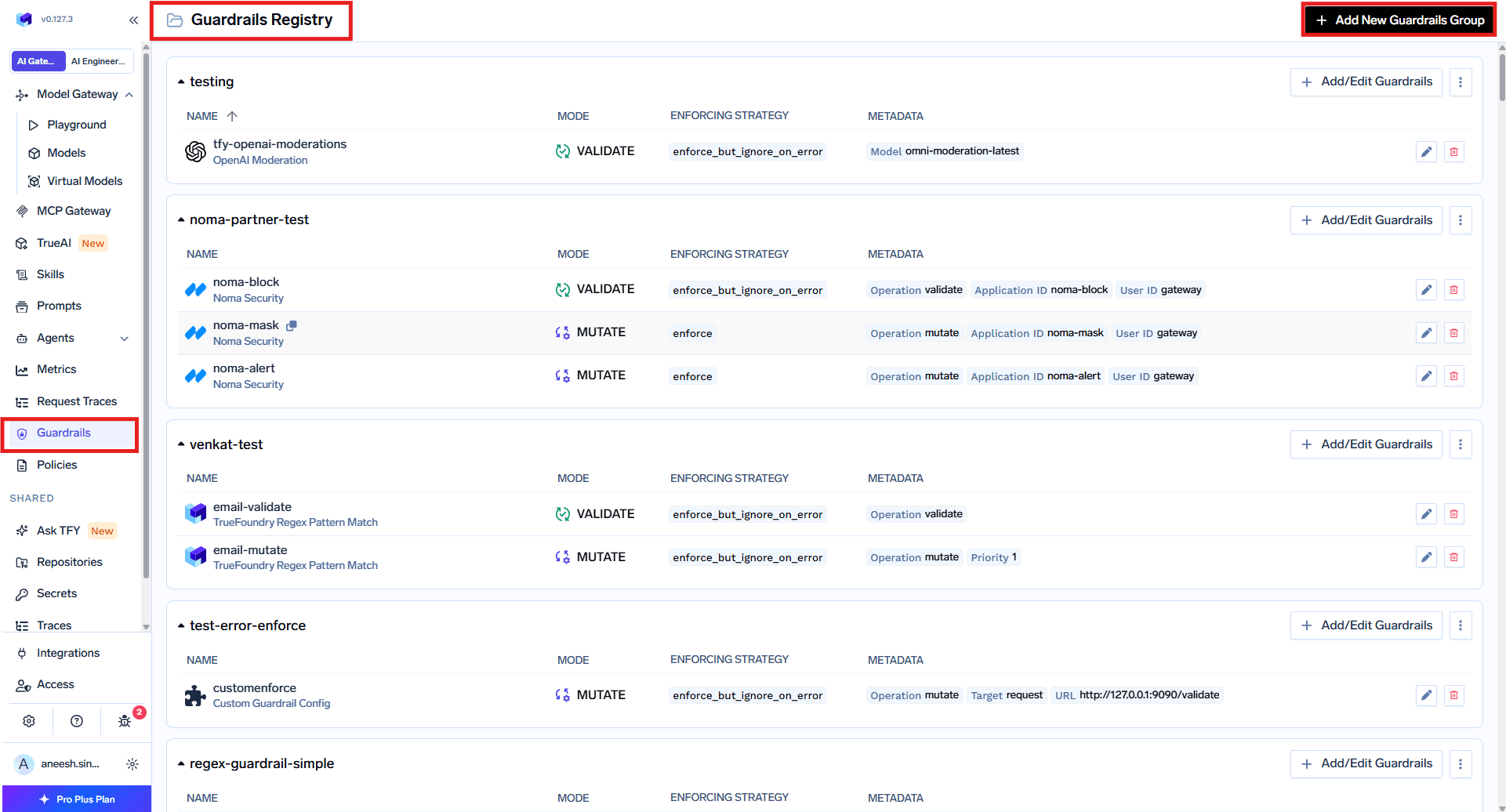
Navigate to Guardrails
- Fill in the Guardrails Group Form
- Name: Enter a name for your guardrails group.
- Collaborators: Add collaborators who will have access to this group.
- Custom Guardrail Config:
- Name: Enter a name for the Custom Guardrail configuration.
- Operation: The operation type to use for the guardrail.
- Validate: Guardrails that inspect and can block without mutating content. On LLM input validation, the AI Gateway may run these alongside the in-flight model request when applicable; on LLM output and MCP hooks, validation runs synchronously before the response or tool result is released. See Guardrails Overview — Operation Mode.
- Mutate: Guardrails with this operation can both validate and mutate requests. Mutate guardrails are run sequentially.
- URL: Enter the URL for the Guardrail Server.
- Auth Data: Provide authentication data for the Guardrail Server. This data will be sent to the Guardrail Server for authorization.
- Choose between Custom Basic Auth or Custom Bearer Auth.
- Headers (Optional): Add any headers required for the Guardrail Server. These will be forwarded as is.
- Config: Enter the configuration for the Guardrail Server. This is a JSON object that will be sent along with the request.
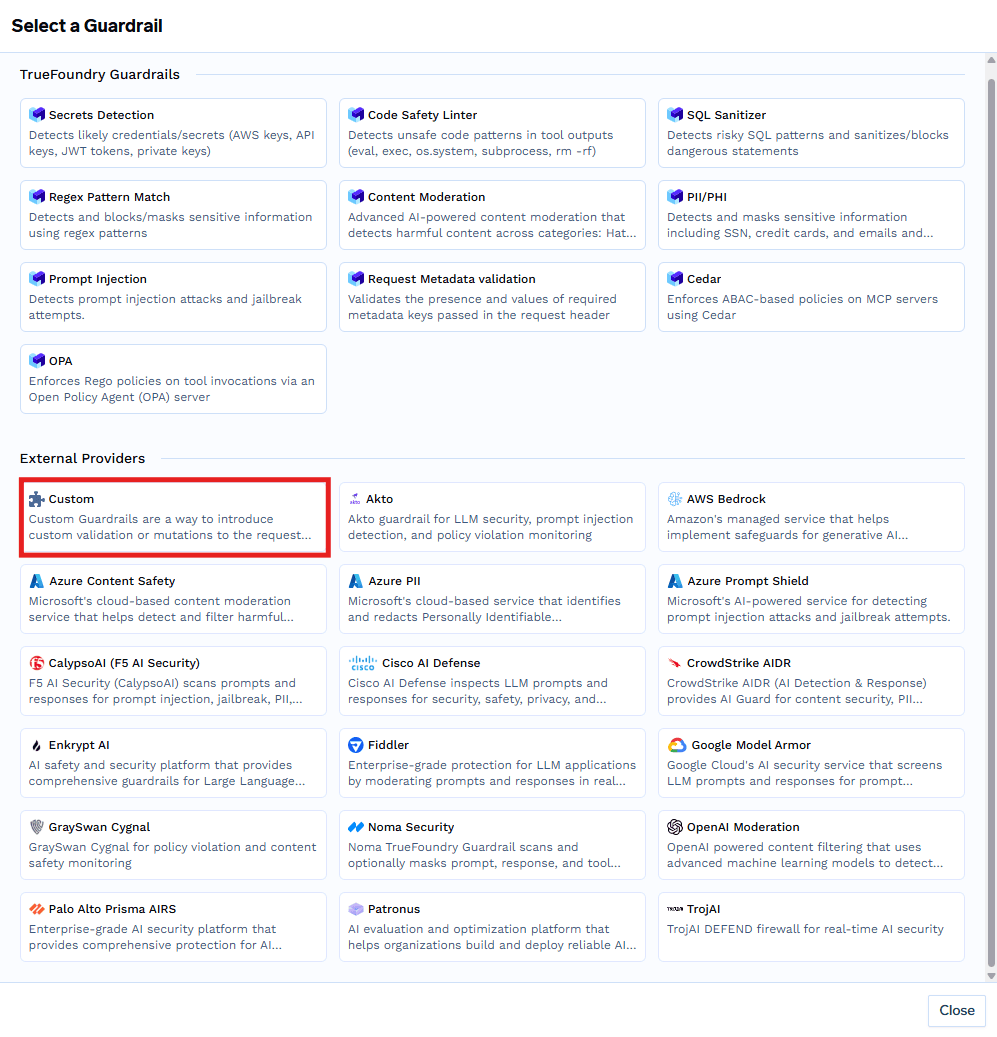
Select Custom Guardrail
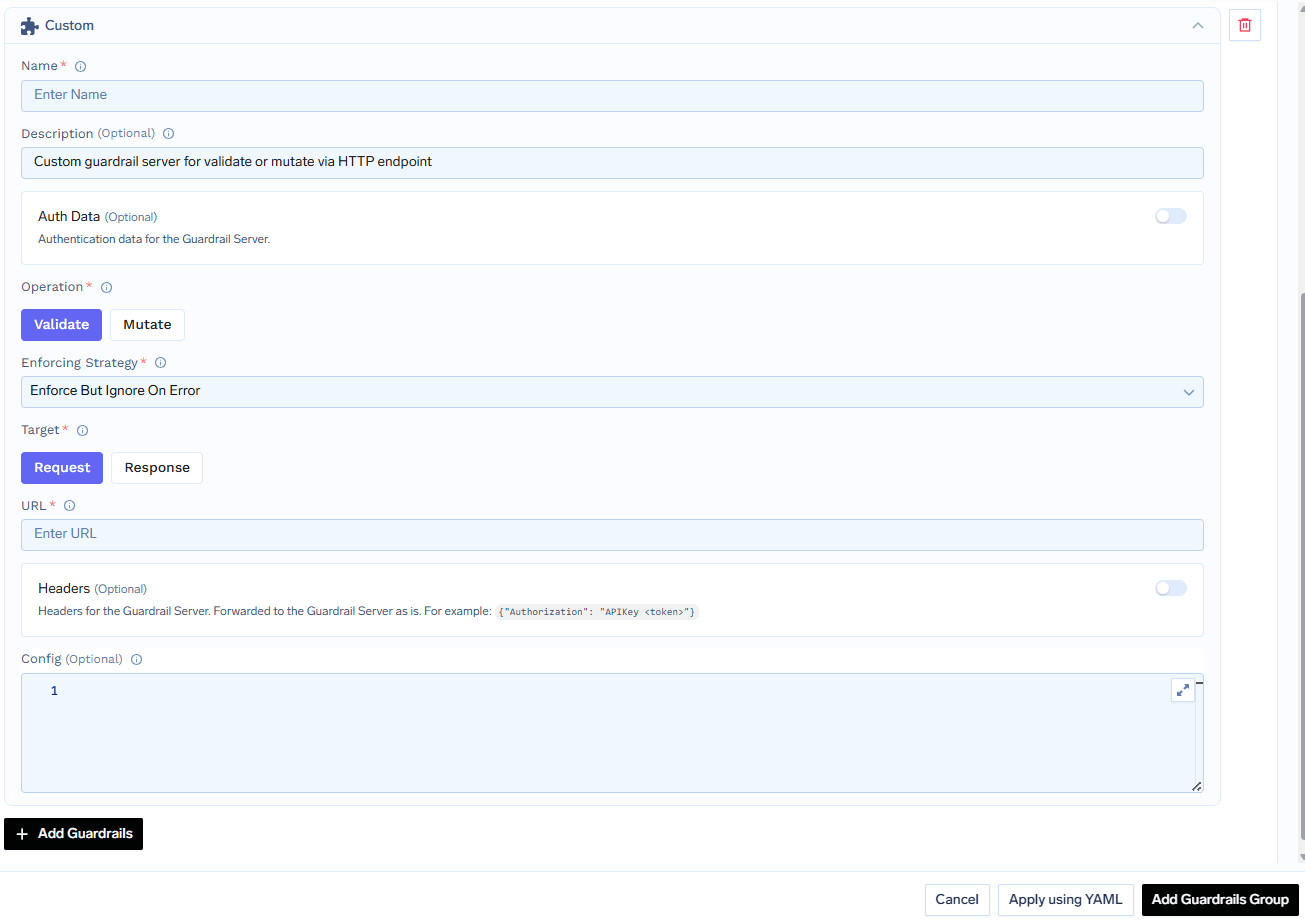
Fill in the Custom Guardrail Form
How Custom Guardrail Config Relates to Guardrail Requests
When you configure a Custom Guardrail in the TrueFoundry guardrails integration creation form (as described above), the settings you provide—such as the operation type, URL, authentication data, headers, and config—directly influence how the AI Gateway interacts with your guardrail server at runtime. How it works:-
Config Propagation:
TheConfigfield you specify in the integration creation form is sent as theconfigattribute in every guardrail request payload. This allows you to parameterize your guardrail logic (e.g., set thresholds, enable/disable features, or pass secrets) without changing your server code. -
Request Structure:
When a request is routed through a guardrail, the AI Gateway constructs a request object (such asInputGuardrailRequestorOutputGuardrailRequest) and sends it to your server. This object includes:- The original model input (
requestBody) - (For output guardrails) The model’s response (
responseBody) - The
configobject (from your integration creation form) - The
context(user, metadata, etc.)
- The original model input (
-
Example Payload:
-
Dynamic Behavior:
By updating the Custom Guardrail Config in the integration creation form, you can change the behavior of your guardrail server in real time—no code redeploy required. For example, you might adjust PII detection sensitivity, toggle logging, or update allowed user lists.
This tight integration ensures that your guardrail logic remains flexible, maintainable, and easy to update as your requirements evolve.
Example: Sending a Request to Your Guardrail Server
Sample Input Guardrail Request Payload & cURL Example
Integration Form Example Values
Integration Form Example Values
| Field | Example Value |
|---|---|
| Operation | mutate (guardrail operation); URL path is /pii-redaction |
| URL | https://my-guardrail-server.example.com/pii-redaction |
| Auth Data | Bearer <token> |
| Headers | |
| Config |
Sample Output Guardrail Request Payload & cURL Example
Integration Form Example Values
Integration Form Example Values
| Field | Example Value |
|---|---|
| Operation | validate (guardrail operation); URL path is /nsfw-filtering |
| URL | https://my-guardrail-server.example.com/nsfw-filtering |
| Auth Data | Bearer <token> |
| Headers | |
| Config |