This section explains the steps to add Perplexity models and configure the required access controls.
1
Navigate to Perplexity AI Models in AI Gateway
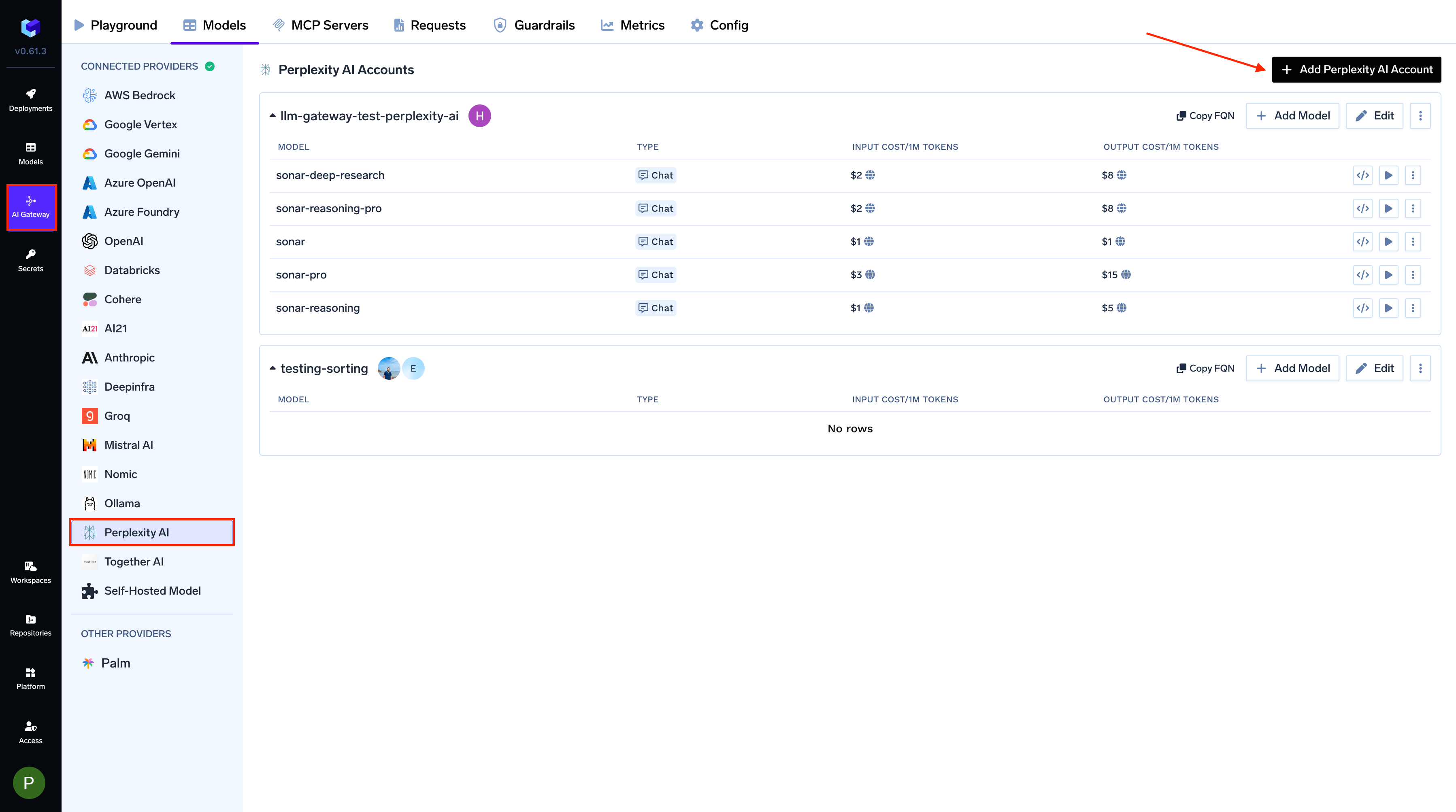
From the TrueFoundry dashboard, navigate to AI Gateway > Models and select Perplexity AI.
Navigate to Perplexity AI Models
2
Add Perplexity AI Account Details
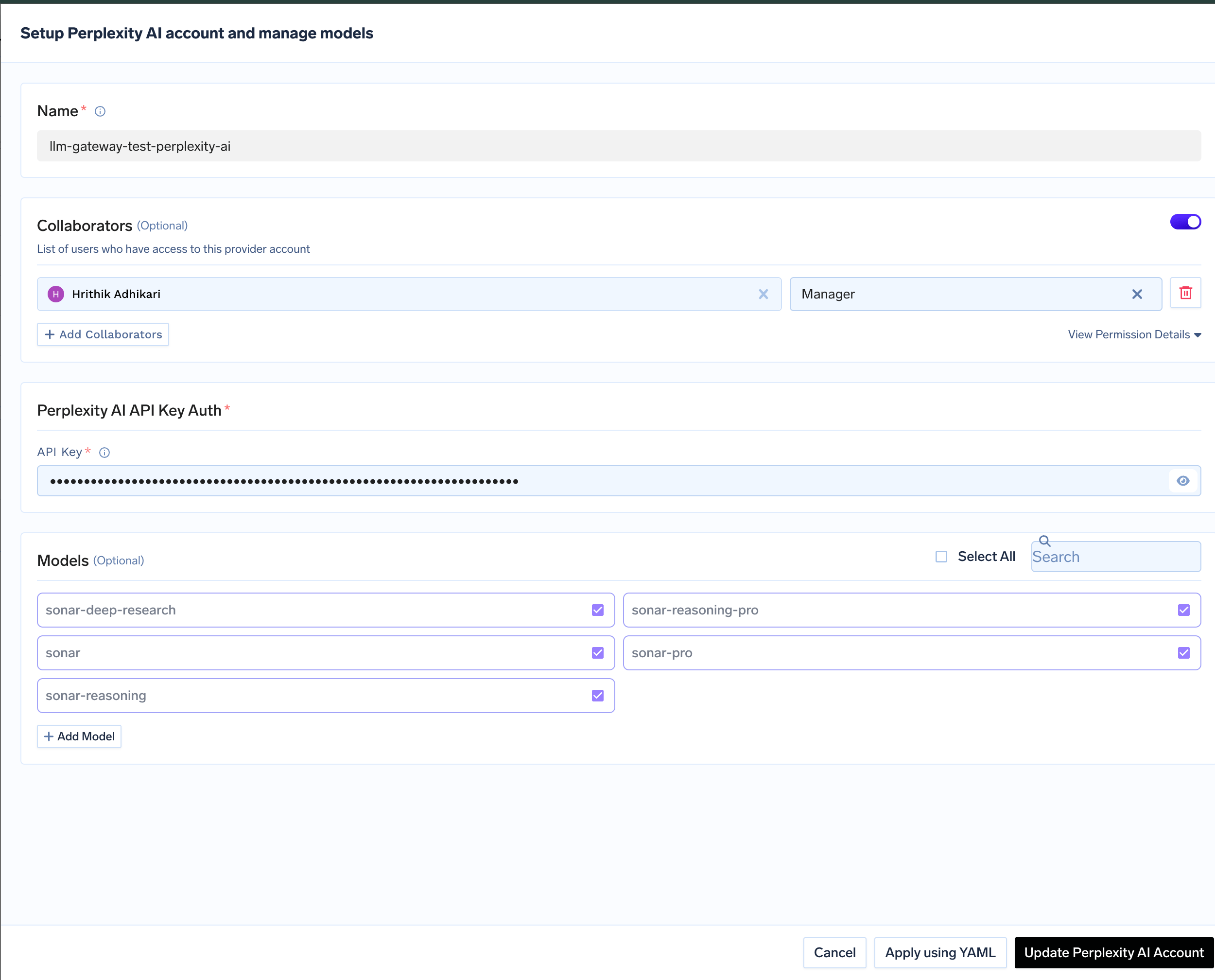
Click Add Perplexity Account. Give a unique name to your Perplexity account and complete the form with your Perplexity authentication details (API Key). Add collaborators to your account, this will give access to the account to other users/teams. Learn more about access control here.
Perplexity AI Model Account Form
3
Add Models
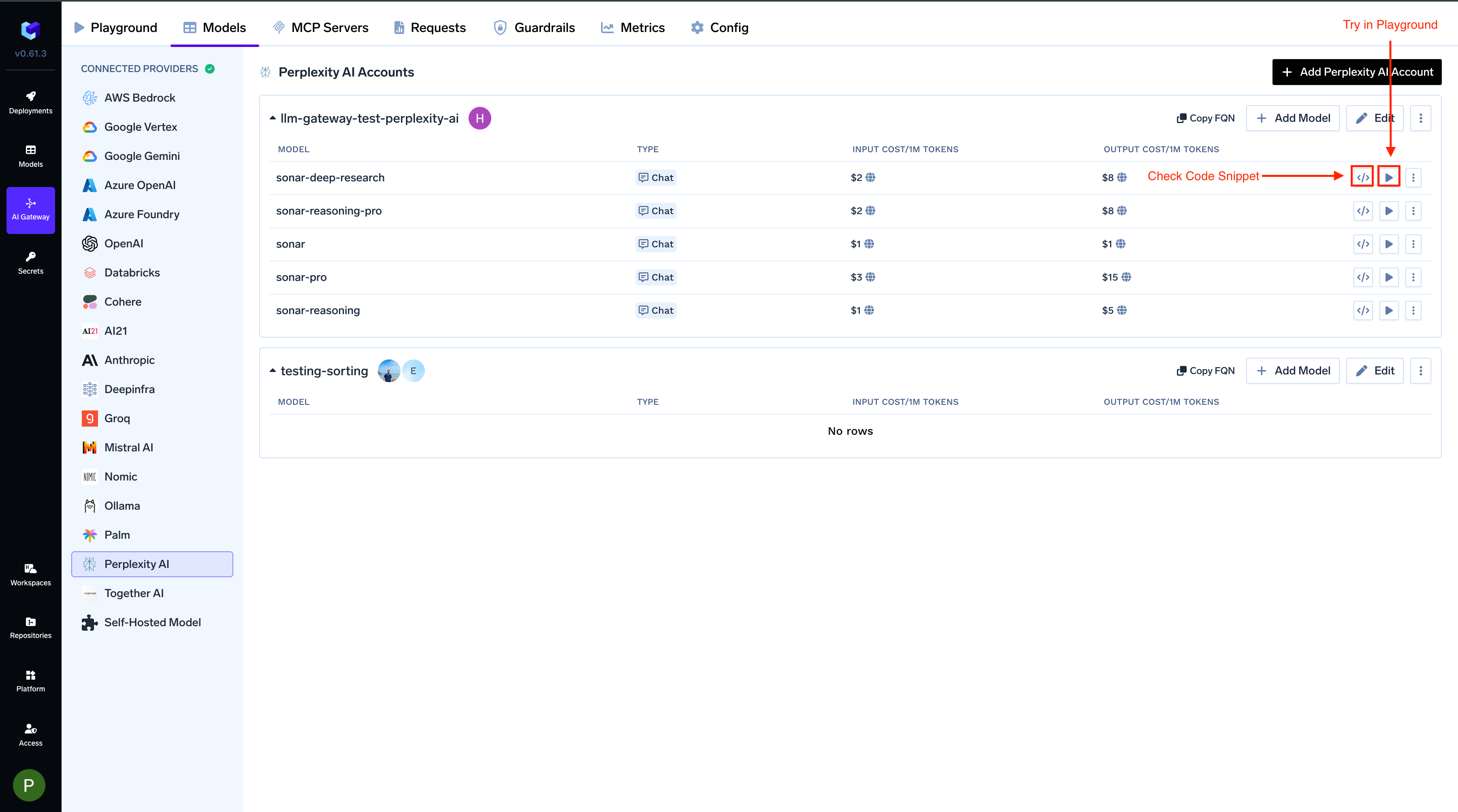
Select the model from the list. If you see the model you want to add in the list of checkboxes, we support public model cost for these models.
(Optional) If the model you are looking for is not present in the options, you can add it using + Add Model at the end of list (scroll down to see the option) by filling the form.
Perplexity has replaced the Sonar chat-completions API with the Agent API, and retires Sonar on 27th September, 2026 (Perplexity: Migrating from Sonar). The AI Gateway already routes every Perplexity request through the Agent API, so the move is handled for you. See the change announcement for the full rollout.The Agent API kept a single Sonar model slug, perplexity/sonar. The quality tiers that used to be separate model names are now expressed as presets: a preset bundles a model, a search configuration, a reasoning budget, a system prompt, and the tools a run may use (Perplexity: Presets).Keep using the model IDs you already have. On Chat Completions, the AI Gateway translates each one into a preset and pins the upstream model:
Model ID you configure
Agent API preset
Upstream model
sonar
fast
perplexity/sonar
sonar-pro
low
perplexity/sonar
sonar-reasoning
low
perplexity/sonar
sonar-reasoning-pro
medium
perplexity/sonar
sonar-deep-research
high
perplexity/sonar
Four of these rows come straight from Perplexity’s published Sonar-to-preset mapping. Perplexity publishes no row for sonar-reasoning. TrueFoundry places it on low, one tier below sonar-reasoning-pro, as the closest match to its previous behaviour.
Why the model is pinned. A preset sent on its own is dynamic: it resolves to whichever model Perplexity currently considers best for that tier, and that is not always a Perplexity model. A live request carrying only {"preset": "low"} came back served by openai/gpt-5.6-luna. The AI Gateway always sends model: perplexity/sonar alongside the preset, so your inference stays on Perplexity’s own model and your cost and latency stay predictable.
The response echoes back the model ID you asked for (a request for sonar-pro reports "model": "sonar-pro"), so cost attribution, metrics, and any model naming in your application are unchanged.A Perplexity model slug outside this list is forwarded as-is, without a preset, so it does not get the tiering above. Stay on the five Sonar IDs to keep it.On the Responses API the mapping does not apply: that surface is caller-driven, and you choose a preset yourself. See the accordion below.
On Chat Completions, every Agent API preset bundles Perplexity’s web_search tool, so answers are grounded against live web results by default. You do not need to ask for it. (On the Responses API, grounding is whatever you ask for; see the accordion below.)The search filters you already send keep working. The Agent API expects them on the web search tool rather than at the top level of the request, and the gateway places them there for you:
For a Chat Completions turn that should not reach the web (rewriting text you supplied, or reformatting a payload), send the x-tfy-disable-web-search header:
response = client.chat.completions.create( model="perplexity-main/sonar-pro", messages=[{"role": "user", "content": "Rewrite this paragraph in plain English: ..."}], extra_headers={"x-tfy-disable-web-search": "true"},)
Because the preset is what carries web search, disabling search also drops the preset. The request still runs on the pinned perplexity/sonar model, but without the tier’s reasoning budget and system prompt, so reach for this header on generation-only turns rather than as a global setting.
If you are starting a new integration, consider the Responses API. Perplexity’s Agent API is itself a Responses-shaped surface, so /responses reaches it with the least translation in between, gives you direct control over presets and tools, and is where Perplexity builds new agent capabilities. Existing Chat Completions integrations need no change.
Chat Completions
The standard OpenAI-compatible chat surface, unchanged for your client. Full docs: Chat Completions API.
Python
from openai import OpenAIclient = OpenAI( api_key="your-truefoundry-api-key", base_url="{GATEWAY_BASE_URL}",)response = client.chat.completions.create( model="perplexity-main/sonar-pro", messages=[{"role": "user", "content": "Who won the last Formula 1 race?"}],)print(response.choices[0].message.content)
Responses API
Perplexity models now serve /responses natively: the request reaches Perplexity’s Agent API without being translated into a chat completion first. Full docs: Responses API.Use the model ID sonar here. It is the one Perplexity model offered on this surface, and the gateway simply renames it to the Agent API’s perplexity/sonar slug.This surface is caller-driven: unlike Chat Completions, it adds nothing on your behalf (no preset, no web search tool). You get exactly the run you describe, which is the point of using it.
The Responses API requires the x-tfy-provider-name header. Set it on default_headers when you construct the client. The AI Gateway uses it to route the request to the right Perplexity model account.
Python
from openai import OpenAIclient = OpenAI( api_key="your-truefoundry-api-key", base_url="{GATEWAY_BASE_URL}", default_headers={"x-tfy-provider-name": "perplexity-main"},)response = client.responses.create( model="perplexity-main/sonar", input=[{"role": "user", "content": "Summarise this week's AI infrastructure news."}], extra_body={ "preset": "medium", "tools": [{"type": "web_search"}], },)print(response.output_text)
A preset you send is passed through untouched, so you pick the quality tier yourself rather than through the model ID: fast, low, medium, high, and above (Perplexity: Presets). A preset is optional; leave it out for a plain run on perplexity/sonar. The Agent API’s own parameters (max_steps, max_tool_calls, models, and language_preference) are accepted here too.
Streaming
Set stream=True and iterate over the emitted events.
Python
stream = client.responses.create( model="perplexity-main/sonar", input=[{"role": "user", "content": "Summarise this week's AI infrastructure news."}], stream=True,)for event in stream: if event.type == "response.output_text.delta": print(event.delta, end="", flush=True)
Decision (System One)
Perplexity’s decider models (pplx-decider-v1-27b, pplx-decider-v1.1-27b) answer typed questions and return probabilities. Add the model with Model Types set to Decision. Perplexity’s upstream path is named /v1/decisions, but the body is System One (state plus named noul / choice / score questions). The AI Gateway still accepts both /v1/systemone and /v1/decisions and translates. Full docs: Decisions API.
Python
import osimport requestsgateway_base_url = os.environ["GATEWAY_BASE_URL"].rstrip("/")response = requests.post( f"{gateway_base_url}/v1/systemone", headers={"Authorization": f"Bearer {os.environ['TFY_API_KEY']}"}, json={ "model": "perplexity-main/pplx-decider-v1-27b", "state": "I was charged twice for order #4411 and want a refund.", "questions": { "is_refund_request": { "type": "noul", "instructions": "Is the customer asking for a refund?", } }, }, timeout=60,)response.raise_for_status()print(response.json()["answers"]["is_refund_request"])
On the Responses API, the Agent API’s own parameters (preset, max_steps, max_tool_calls, and models) are accepted as well.The Agent API rejects request fields it does not recognise, so the AI Gateway builds the upstream request from a known-good list. Parameters outside that list are dropped rather than rejected. Your requests keep succeeding; they simply do not act on the following:
Parameter
What to use instead
top_k
Shape sampling with temperature and top_p
presence_penalty, frequency_penalty, logit_bias
Steer repetition and vocabulary through the prompt
n, best_of
Send the request more than once and choose between the results
stop
Ask for the stopping condition in the prompt, or trim the text in your application
logprobs, top_logprobs
Not exposed by the Agent API
seed
Lower temperature for more repeatable output
search_mode, disable_search
Grounding comes from the preset; switch it off for a Chat Completions request with x-tfy-disable-web-search
citations and search_results are still returned at the top level of the response, on both streaming and non-streaming requests. The gateway rebuilds them from the Agent API’s search results. search_results carries the URL, title, and publication date of each source.finish_reason now carries a real value: stop, length, or tool_calls. Non-streaming Perplexity responses previously always returned an empty string, so code that branches on finish_reason == "" will no longer take that path; treat stop as the normal completion case.images and related_questions are no longer part of the response, as the Agent API has no equivalent for either. For follow-up suggestions, search_results gives you the source titles to build from, or you can ask the model for follow-up questions in the prompt itself.A run that Perplexity reports as failed or cancelled now surfaces as a gateway error carrying Perplexity’s message, instead of a 200 with an empty body, so your existing error handling picks it up.If you have questions about running Perplexity models on the AI Gateway, reach out to support@truefoundry.com.
Was this page helpful?
Assistant
Responses are generated using AI and may contain mistakes.