

What is Enkrypt AI?
Enkrypt AI is an AI safety and security platform that provides comprehensive guardrails for Large Language Model (LLM) applications.Key Features of Enkrypt AI
- Multi-Layered Content Security: Enkrypt AI provides comprehensive content analysis including toxicity detection, PII identification, prompt injection prevention, and bias detection. The platform uses advanced ML models to analyze content across multiple dimensions, ensuring robust AI safety and preventing harmful or inappropriate outputs.
- Flexible Validation and Mutation Operations: Support for both validation-only and mutation operations allows for different security approaches. Validate mode can overlap with the model on LLM input hooks where the AI Gateway supports it; LLM output and MCP validation remain synchronous in the request path. Mutate operations run sequentially and can redact sensitive content like PII. See Guardrails Overview — Operation Mode.
- Real-Time Threat Protection: Advanced detection capabilities for prompt injection attacks, sponge attacks, and other adversarial inputs that could compromise AI system integrity. Enkrypt AI’s security guardrails continuously monitor and protect against evolving AI-specific threats while maintaining system performance and user experience.
Adding Enkrypt AI Guardrail Integration
To add Enkrypt AI Guardrail to your TrueFoundry setup, follow these steps: Fill in the Guardrails Group Form- Name: Enter a name for your guardrails group.
- Collaborators: Add collaborators who will have access to this group.
- Enkrypt AI Guardrail Config:
- Name: Enter a name for the Enkrypt AI Guardrail configuration.
- Guardrail Name: The unique name of your Enkrypt AI guardrail. You can create a new guardrail in the Enkrypt AI portal and get the name from there.
- Operation: The operation type to use for the Guardrail.
- Validate: Guardrails that inspect and can block without mutating content. On LLM input validation, the AI Gateway may run these alongside the in-flight model request when applicable; on LLM output and MCP hooks, validation runs synchronously before the response or tool result is released. See Guardrails Overview — Operation Mode.
- Mutate: Guardrails with this operation can both validate and mutate requests. Mutate guardrails are run sequentially.
- Enkrypt AI Authentication Data:
- API Key: The API key for the Enkrypt AI.
This key is required to authenticate requests to Enkrypt AI. You can obtain it from the Enkrypt AI portal by navigating to your Enkrypt AI resource, then selecting “Keys and Endpoint” in the resource menu. Ensure you keep this key secure, as it grants access to your Enkrypt AI resource.
- API Key: The API key for the Enkrypt AI.
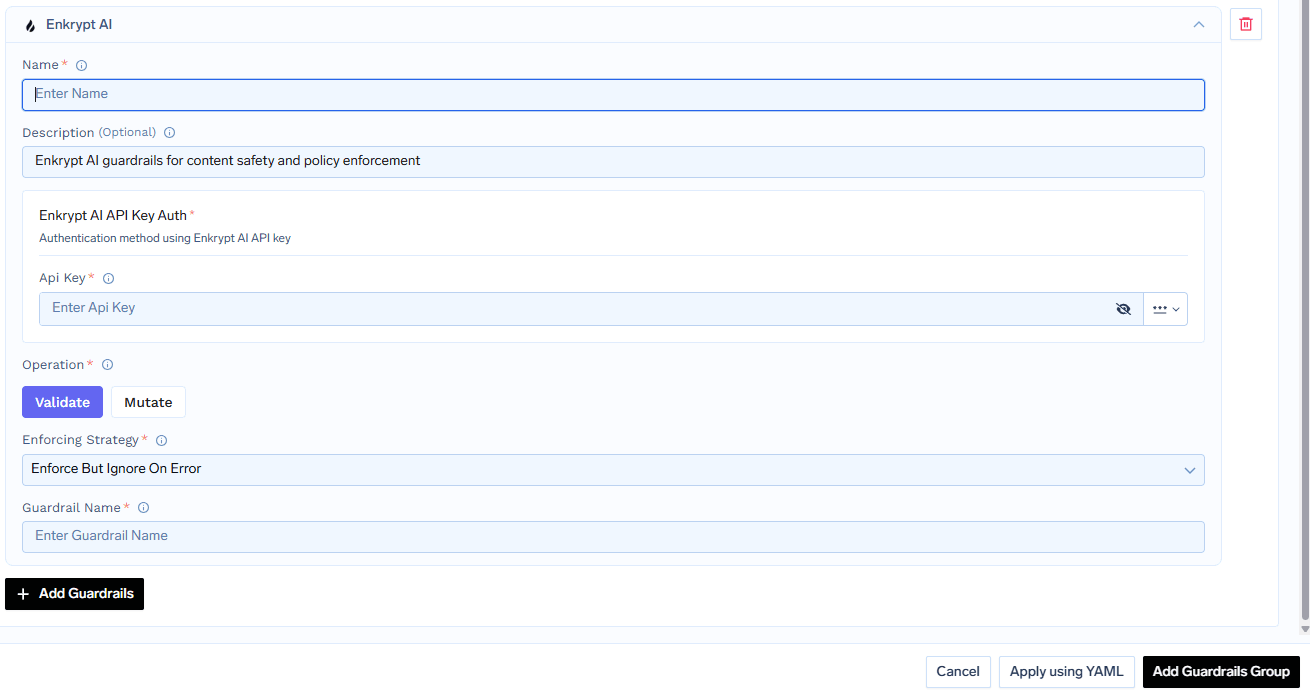
Fill in the Enkrypt AI Guardrail Form
Response Structure
The Enkrypt AI Guardrail API returns a response with the following structure:Example Response: PII Detection
Example Response: PII Detection
This is an example response from Enkrypt AI Guardrail, where PII is detected and anonymized (redacted) in the output. In this example, we have configured topics as “Phone”. The response includes a summary of detected categories, detailed detection results, and the redacted text.
Validation Logic
TrueFoundry uses the Enkrypt AI Guardrail response to determine content safety and compliance:- If the operation is set to
Validateand a policy violation is detected, the request will be blocked and a 400 error is returned. - If the operation is set to
Mutateand PII or a configured keyword is detected (and no other violation is detected), the detected information will be redacted and the redacted message will be returned in the response. - For other types of violations under
Mutate, the request will be blocked and a 400 error is returned. - If no violations are detected, the original content is passed through unchanged.